


What if I forgot my iPhone passcode?
"I forgot my iPhone password! Now my iPhone is disabled. How can I reset my iPhone password?"
It's always recommended to set a passcode on your iPhone to protect your personal data from prying eyes. However, if you haven't used your iPhone for a while, you might forget its screen passcode. So, what should you do if you forget your iPhone passcode?
Don't panic. In this article, we will show you 4 methods to unlock your iPhone if you've forgotten the passcode. I hope one of them helps you regain access to your iPhone, and we will explain in detail the best way to unlock your iPhone using Tenorshare 4uKey (Download it now to follow the next steps with us and get rid of the iPhone lock).
At some point, you may have forgotten your iPhone passcode for the lock screen and can't access your iPhone data. Or you might forget your Apple ID password and can't use your iOS device as you wish. Such situations are undoubtedly very frustrating, as you are unable to access your iPhone at all or can only use the device with limited features. With that in mind, I will show you here what to do to unlock your iPhone.
Ways to unlock your iPhone if you forgot the passcode
When using your iPhone, the first step is to unlock the screen using the passcode, Touch ID, or Face ID. Even if you use Touch ID or Face ID most of the time, you are required to enter your iPhone passcode every few days to ensure the device's security.
However, you may need to remove the passcode from your iPhone and iPad for various reasons. For example, you hardly use it. When you forget your iPhone passcode and enter the wrong code on your iDevice multiple times, your iPhone, iPad, or iPod Touch will be disabled, and you won't be allowed to try again until some time has passed. The more mistakes you make, the longer the waiting period.
Methods to unlock your iPhone
- Unlock iPhone via Security Lockout
- Unlock iPhone via iCloud
- Unlock iPhone via Finder / iTunes
- Unlock iPhone using Tenorshare 4uKey
What is Tenorshare 4uKey?
Tenorshare 4uKey is a software tool for unlocking iPhones, iPads, and other iOS devices. It can remove any password. With the latest software that can decrypt Touch ID and Face Recognition sensors, using a smartphone becomes easier. Now, bypassing lock screens is simple, even if you forget your password or buy a used phone.
This program makes it easy for anyone to quickly unlock any locked device, whether it's protected by a 4 or 6-digit password, a custom code, an alphanumeric password, a fingerprint scanner, or facial recognition software like Apple’s Touch ID or Face ID. The entire process doesn't take long and doesn't require using iTunes. To sync your iPhone, iPad, or iPod touch with a computer, you only need a modern Windows or Mac PC and a USB cable.
Tenorshare 4uKey is a mobile device manager that allows Apple users to enter their Apple IDs without a password. If an iOS device owner forgets or loses their password, they will only be able to use their iPhone or iPad for backup purposes.
Is Tenorshare 4uKey the best for unlocking iPhones? How does it work?
In three easy steps, you can use Tenorshare 4uKey to unlock your iOS device. To remove the current iPhone/iPad passcode, the user must first connect one of their iOS devices to a computer via USB, click the "Unlock Lock Screen Passcode" button, download the appropriate firmware package, and then click "Start Unlock." This makes saving, recovering, viewing, and sharing passwords easier.
Step 1: Download and install 4uKey
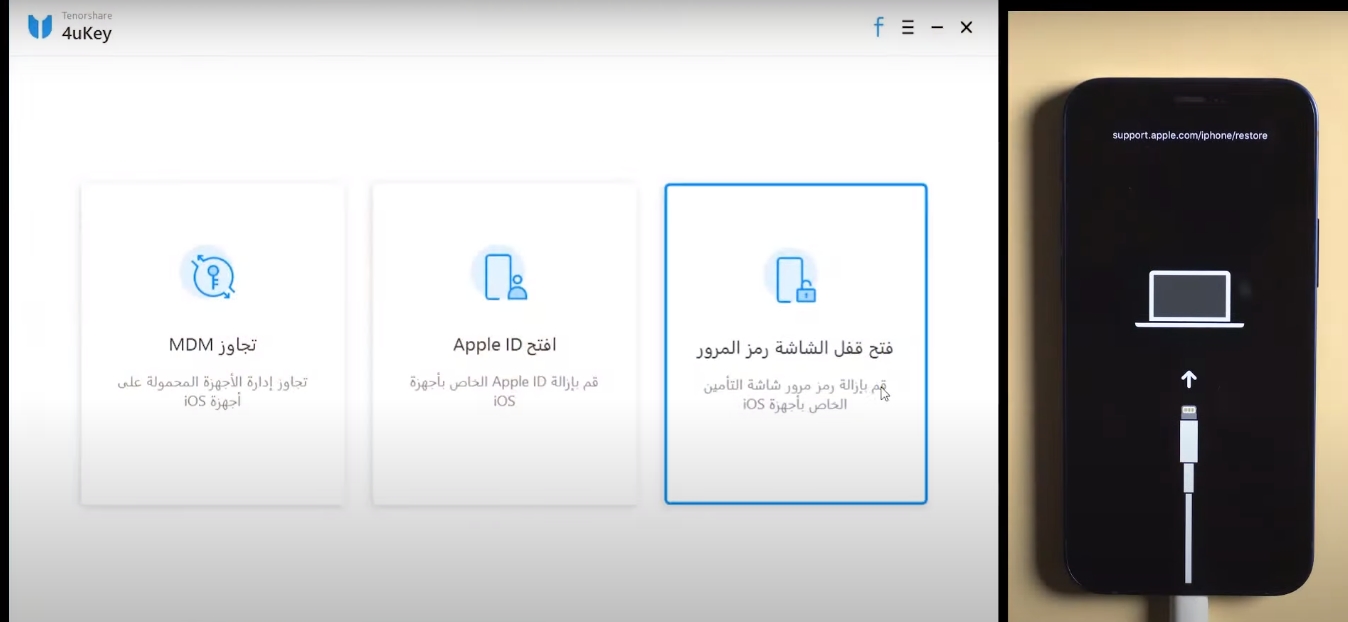
Download Tenorshare 4uKey and install it on your computer or Mac, launch the program, and select the "Unlock Lock Screen Passcode" feature to get started.
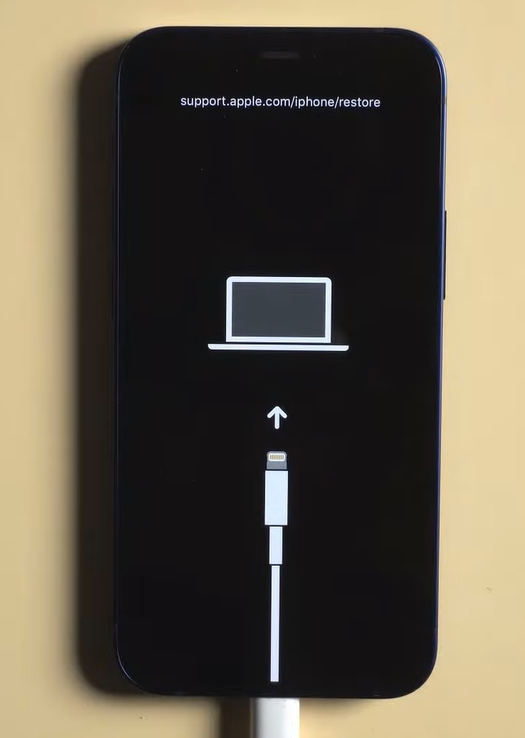
Connect your iPhone to the computer, and the program will automatically detect it. Click "Start" from the main interface.
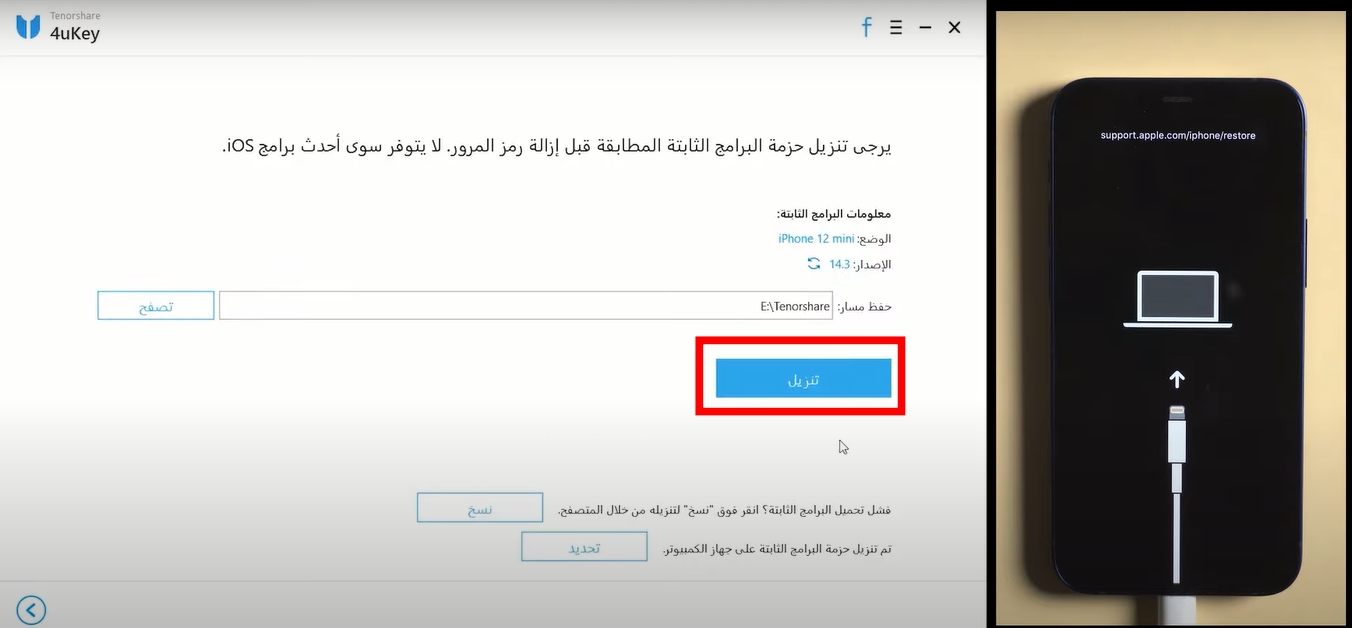
Step 2: Download the firmware package
You will now be prompted to download the latest firmware package. Choose the save path and click "Download" to proceed.
Step 3: Start unlocking the iPhone screen
Once the firmware is downloaded to your computer, the program will begin removing the iPhone passcode.
In the following video, there is a quick explanation of the program's great capabilities. Watch the video to learn how to use the program.
When the iOS device is fully unlocked, the old Apple ID account and the ability to track or block the device using that Apple ID will be completely gone. You need a valid Apple ID to use iCloud, Apple Music, Podcasts, iTunes, purchase and download apps from the App Store, back up, and have full control of the device. If users wish, they can create a new Apple ID.
Key features of Tenorshare 4uKey 2023:
- 4uKey 2023 helps you remove passcodes from Apple devices.
- It can remove 4-digit/6-digit passcodes, Face ID, and Touch ID.
- Thus, the program can remove Android passwords, fingerprint locks, and patterns.
- It helps users bypass MDM screens and remove MDM profiles.
- It also helps you factory reset your device without a passcode.
- It helps you remove Apple ID to enjoy all iCloud services and Apple ID features.
- Users can back up their iPhone/iPad via iTunes.
- It also allows you to fix disabled iPhones without iTunes or iCloud.
- The program offers 3 easy steps to unlock your smartphone.
- This tool can completely remove FRP locks.
- It is fully compatible with the latest iOS devices.
- It automatically sets up the corresponding test profiles for your devices.
Why should you choose Tenorshare 4uKey to unlock your iPhone?
Tenorshare 4uKey 2023 is a fantastic program that can be extremely useful. This software allowed me to remove any type of lock on my iPad as well as my iPhone in just a few simple steps. Some other iPhone screen unlock tools came with one feature or another, but Tenorshare 4uKey was among the few selected that offered all of that in one small yet powerful program.
The user interface didn't take long to get used to, and my favorite part was the ability to find plenty of tutorials and video guides from Tensorshare to get started. However, this tool also has great potential for use in a non-routine, non-boring, and complex way.
Enter discount code PF007B at checkout to get a 30% discount
As for after-sales services, you will receive many features, the most important of which are:
- Customer service available to solve all potential customer issues, and it is free all year round and at all times. In fact, the customer service is excellent and outstanding; I really enjoyed dealing with them.
- Refunds for users dissatisfied with the product within 30 days.
- A well-organized guide explaining the features, benefits, and usage methods of the program provided in Arabic and supported by explanatory videos, available on the official program website. You can check the complete user guide here
- Continuous updates for the program.
Download the 4uKey tool now with the free trial version. Once you are satisfied with the tool, you can purchase the full version of Tenorshare 4uKey
- <a style="text-transform: initial;" href="https://3almalt9nia.com/%d8%a8%d8%b1%d9%86%d8%a7%d9%85%d8%ac-fake-gps-%d8%aa%d8%ba%d9%8a%d9%8a%d8%b1-%d8%a7%d9%84%d9%85%d9%88%d9%82%d8%b9-%d9%84%d9%84%d8%a7%d9%8a%d9%81%d9%88%d9%86-%d8%a8%d8%af%d9%88%d9%86-%d8%ac%d9%


