


The 7 Best Data Visualization Tools for 2025: When it comes to creating visual representations of massive data sets, data visualization software offers designers a simpler way to accomplish this task. Automating the process of creating visualizations, at least partially, makes a designer's job much easier. This is especially true when dealing with data sets that include hundreds of thousands or millions of data points.
These representations can then be used in a variety of applications, including but not limited to dashboards, annual reports, sales and marketing materials, and presentations for investor slides, and virtually any other situation where information needs to be assessed quickly.
Creating visualizations is rarely a complicated process. Of course, it’s easier for designers to take a data set containing thousands of records and create a visualization from scratch. While that is certainly possible, who wants to spend countless hours plotting points on a scatter plot? This is exactly where data visualization software comes into play. Let’s learn more about the best tools.
The 7 Best Data Visualization Tools for 2025
In the upcoming sections of this guide, we will take a look at some of the best data visualization software. Different tools offer various features to meet the needs of all users. Therefore, we recommend reviewing the entire list and then using the product that best fits your expectations and requirements.
1. RAW
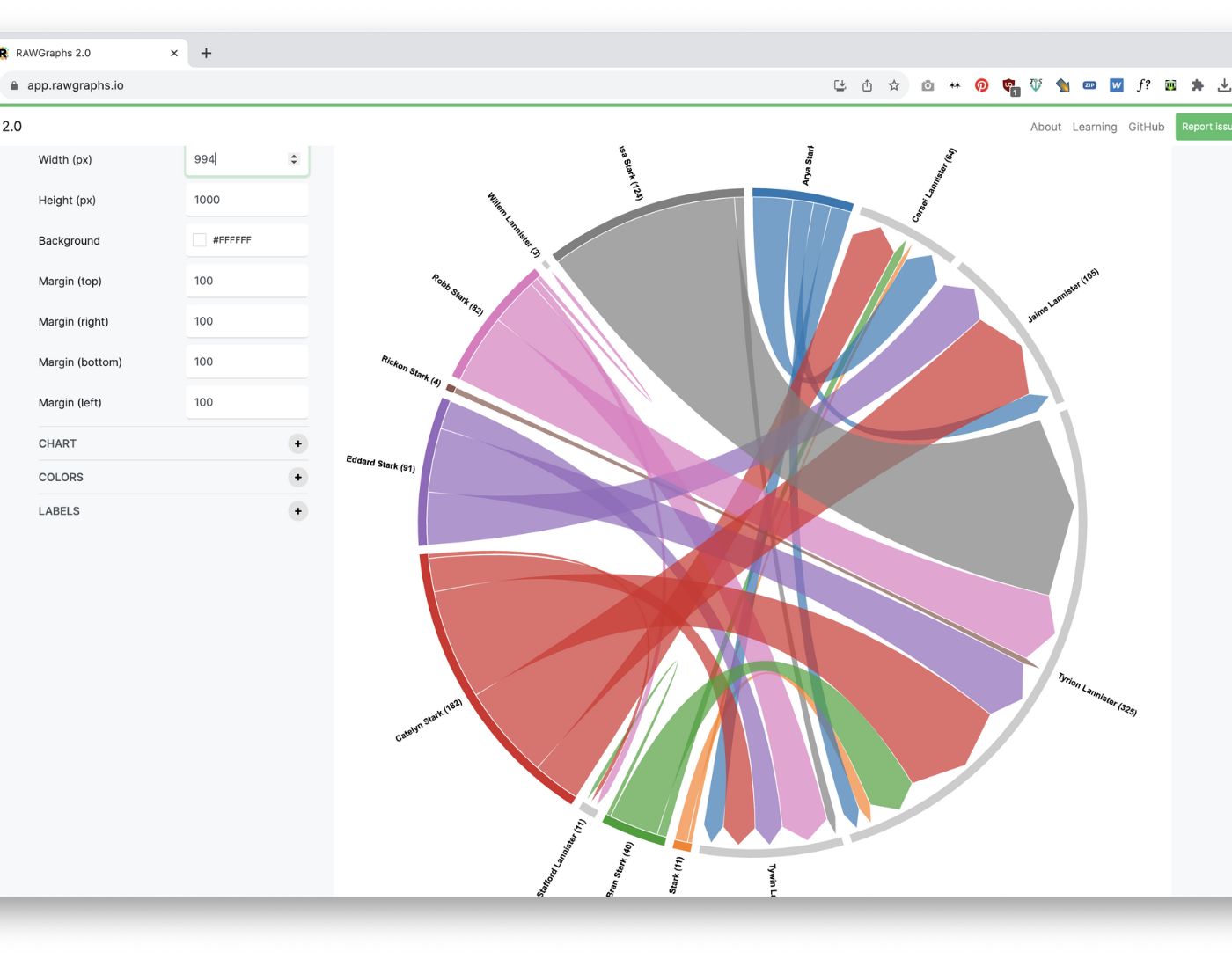
Here’s the first data visualization software on this list of tools. Using data, such as a CSV or TSV file, RAW (often referred to as RawGraphs) creates charts. In other words, it acts as a bridge between spreadsheets and data visualization. Despite being a web-based application, RawGraphs provides the highest possible level of data protection. It offers a variety of layouts, both standard and unconventional, making it one of the best data visualization tools.
2. Visual.ly
When it comes to the best data visualization software, you can’t overlook this tool. One of the best solutions currently available on the market is Visual.ly, which offers a wide range of templates and interactive features that allow users to create visually appealing reports, charts, and infographics. Additionally, it has a team of experts who can assist you in creating custom visualizations if you encounter a creative block or simply want to showcase your skills in using a professional infographic.
3. Google Charts
Google Charts is the next name on this list of top data visualization software. Known for its ability to create graphical and pictorial representations of data, Google Charts is widely regarded as one of the most important tools in the field of data visualization. It is developed using SVG and HTML5.
The zoom feature is included in the charts, providing users with unparalleled compatibility across platforms with mobile platforms like iOS and/or Android, as well as older versions of the IE web browser. You can try this tool if you’re looking for the best data visualization software.
4. Reports from Zoho

If your company is already using the Zoho suite, then Reports from Zoho (also known as Zoho Analytics) is a no-brainer. Zoho Analytics features a powerful drag-and-drop interface, making it easy to create detailed reports without the need for coding. It also boasts AI-powered insights, meaning your data doesn’t just sit there; it provides you with predictions and trend analyses.
Zoho Analytics is a comprehensive tool that integrates business intelligence with online reporting services. This integration allows for the rapid production and distribution of large reports within minutes. Additionally, the high-quality visualization tool allows for the input of big data from databases and major applications, making it one of the best data visualization platforms.
5. Microsoft Power BI
Microsoft Power BI is a smart, user-friendly application. It is considered the best available application. It is compatible with Google Analytics, PostgreSQL, Oracle, Adobe Analytics, Github, SQL Server, Excel, Teradata, Salesforce, and Azure. The application creates stunning visuals and provides real-time information, allowing for quick decision-making compared to other data visualization platforms.
Microsoft Power BI offers a desktop version, a mobile app, and a cloud service, making data accessible wherever you are. The tool’s ability to handle massive data sets effortlessly is what sets it apart, not to mention its sleek and professional design outputs. For businesses needing scalable, robust, feature-rich software, Power BI is the ideal choice.
6. Dundas
Dundas Business Intelligence is an intelligent data visualization software that provides highly customized visualizations including interactive maps, metrics, scorecards, and charts. These features enhance the process of creating custom reports that span multiple pages. The complex process of cleaning, examining, transforming, and modeling large data sets can be simplified using Dundas as it gives users complete control over the visual aspects compared to the other top data visualization tools listed here.
7. Tableau
Tableau is the last name on this list of the best data visualization software. Tableau is a very popular application for providing visual representation of data for two main reasons: it is user-friendly and extremely powerful. You can create a wide range of charts and maps, as well as connect to a large number of data sources. Tableau is owned by Salesforce and is used by a large number of individuals as well as large companies.
Frequently Asked Questions
What is data visualization software?
It is a tool that transforms raw data into visual formats such as charts and dashboards, making complex information easier to understand.
Are open-source data visualization tools reliable?
Yes! Software like RAW and other open-source tools provide strong customization and reliability, especially when supported by active communities.
Can I use these tools for free?
Some software like Google Charts and Tableau Public offer free versions, while others may have limited features without a subscription.
Which industries benefit most from data visualization software?
Almost all of them! Data visualization is used to make data-driven decisions.
Is coding required to use data visualization software?
It depends on the circumstances. Tools like Microsoft Power BI and Reports from Zoho offer drag-and-drop interfaces, while others like Google Charts may require basic knowledge of JavaScript for advanced customization.
What is the best tool for beginners?
Visual.ly and Google Charts are favorites among beginners, as they provide user-friendly interfaces and ready-made templates.
What is the main difference between free and paid data visualization software?
Paid versions often offer advanced features like AI insights, greater data processing capabilities, and enhanced security measures.
Can these tools handle real-time data?
Yes, tools like Dundas and Power BI have the capability to integrate real-time data, making them great for dynamic dashboards.
Do these tools support team collaboration?
Most modern tools, such as Tableau and Microsoft Power BI, offer strong collaboration features, allowing teams to work on reports and dashboards simultaneously.
What is the most customizable data visualization software?
Dundas BI and RAW are among the best options for users looking for customization and control over every detail of their visual representation.
Conclusion
In this article, we discussed the 7 best data visualization tools for 2025. First, there are times when choosing the strongest data visualization software available is not a good idea: there’s a chance that a simpler tool could produce what is needed accurately in a fraction of the time.
Secondly, keep in mind that the tool is just one element of the equation when it comes to creating data visualizations; designers must also consider other factors that contribute to creating excellent data representations.
Finally, what makes any of the best data visualization tools good for an individual is the range of their offerings. Any data visualization software can be great for you if it meets all your visualization and customization needs accurately.
If you need our assistance in choosing the right data visualization software that meets your needs, feel free to ask your questions in the comments section below. We will help you in every way possible. May you be safe and protected.


