

(Tenorshare 4uKey phone unlock program for Android) Tenorshare 4uKey Android Phone Unlock Program: Are you frustrated with your Android phone? Did you forget your Android lock screen password and now your phone is locked with a pattern? Did you buy a used device from a stranger that is password protected? Is your phone screen broken and you need to unlock it without a password? Can't access your Samsung device even with your fingerprint? Do you want to remove the password but don't know how?!!
If you are looking for a reliable tool to unlock your device without any hassle, then Tenorshare 4uKey for Android is definitely your ideal choice. This powerful program can help you bypass various types of screen locks on your Android device with ease.
Tenorshare 4uKey for Android is compatible with both Windows and macOS operating systems, allowing you to unlock almost all Android devices, although older smartphones are only supported on the Windows version. Stay with us to learn more about this exceptional program.
What is the amazing Tenorshare 4uKey Android Phone Unlock Program?
Tenorshare Android Unlocker is a professional program designed to remove Android lock screens, focusing on quickly and easily bypassing unknown passwords, including patterns, PINs, passwords, and fingerprints, enabling you to regain access to your Android device without any password.
The program is designed to help you unlock different types of screen locks on your Android device and supports various Android versions and many devices, including Samsung, Huawei, LG, Motorola, and more. With Tenorshare 4uKey for Android, you can easily remove the screen lock without any technical skills or data loss.
How does Tenorshare 4uKey for Android work?
Tenorshare 4uKey for Android uses advanced algorithms to detect and remove various types of screen locks on your Android device, such as PINs, patterns, passwords, fingerprints, and facial recognition. The program works by downloading the necessary firmware package for your device to bypass the lock screen. This process takes just a few minutes and requires no technical skills.
Features of Tenorshare 4uKey for Android
- Effortlessly remove various types of screen locks: Tenorshare 4uKey for Android can remove different types of screen locks on your Android device, including PINs, patterns, passwords, fingerprints, and facial recognition, unlocking the device quickly in just a few minutes.
- High success rate: The program boasts a high success rate in unlocking Android devices, even for the latest Android versions and device models.
- User-friendly interface: Tenorshare 4uKey for Android features a simple and intuitive interface that makes it easy to use, even for beginners.
- No data loss: The program does not cause any data loss during the unlocking process, so you don't have to worry about losing your valuable data.
- Safe and secure: Tenorshare 4uKey for Android is a safe and secure program with no viruses or malware.
- Wipe or bypass FRP lock and delete Google account even without a password.
System Requirements for Tenorshare 4uKey for Android
To use Tenorshare 4uKey for Android, you need to meet the following system requirements:
- Operating System: Windows 10/8.1/8/7 (32-bit or 64-bit).
- CPU: 1 GHz (32-bit or 64-bit).
- RAM: 256 MB or more (1 GB recommended).
- Hard Disk Space: 200 MB or more of free space.
Why do we recommend using Tenorshare 4uKey for Android?
Tenorshare 4uKey for Android is a program designed to bypass lock codes on Android devices, regardless of the reason for the lock: forgotten password, buying a used phone, or being unable to enter the password due to a broken screen, etc.
Tenorshare 4uKey can unlock password screens for iPhone, iPad, and iPod Touch devices. It can remove four and six-digit passcodes as well as Face ID and Touch ID from your iOS device. You can also bypass the MDM login screen without a password, and the remote management screen can be removed in one step.
Tenorshare 4uKey can remove Apple ID from devices that have been logged in with your account. Removing Apple ID can be risky with some iOS versions, as you may lose your personal data depending on your iOS number and whether Find My iPhone is enabled. A successful Apple ID removal process allows you to use iCloud, podcasts, etc.
While a regular factory reset requires a password or Apple ID login, Tenorshare 4uKey allows you to reset your iOS products without a password or Apple ID credentials. Since a full reset can be uncertain and risks data recovery loss, you will need to know your Apple ID information to ensure you can recover your personal data.
.
Remove Google FRP Lock for Samsung Phones

Can't access your email for Google verification? Are you stuck on the "Verify Your Account" page? 4uKey for Android resolves these issues with a high success rate.
- Remove FRP lock for Android devices.
- Delete Samsung account without a password.
- Full control of your device without any restrictions.
- Sync your phone with the new account.
- Manage your Android phone remotely using "Android Device Manager."
- Supports 99% of Samsung devices, including Samsung S10+, S10.
How to Bypass Google Verification Using Tenorshare 4uKey for Android
Download TENORSHARE 4UKEY FOR ANDROID and let’s start bypassing Google verification on Samsung devices.
Video explaining how to use Tenorshare 4uKey for Android
Special thanks to the video source
Channel: Mahmoud Azzam on YouTube
Instructions for using the program with images
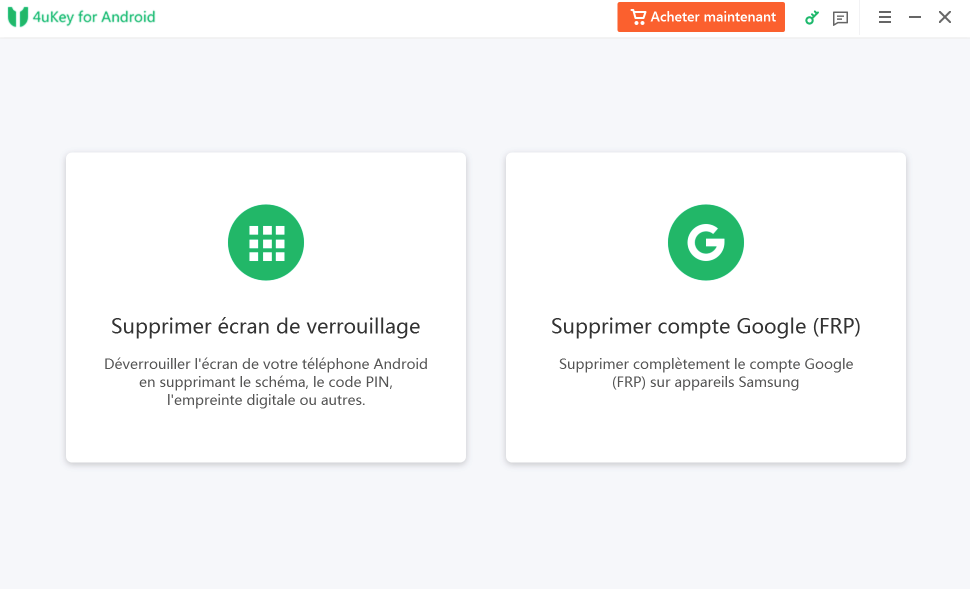
First, connect your device to a Windows computer and select the Remove Google Lock (FRP) option.

4uKey will give you some warnings about what will happen after starting the process. After reading and understanding these, click Start.

Now select the device you have - selecting the wrong one may lead to incorrect results. So, be careful and choose the correct option.

After selecting the device, click next. Then your Samsung device will enter recovery mode. Fill in the required information on your computer, such as the PDA information, and 4uKey will provide instructions on where to find it. Then select the country and carrier.

After filling in this information, click next. Then the tool will start downloading the firmware package. After the firmware package is downloaded, 4uKey will ask you to enter recovery mode on your device, after which it will automatically detect the firmware package for the device and start removing the FRP lock.

Your Samsung device will now start rebooting, and you will see that the Google account has been successfully removed. If you fail to remove the FRP lock, you can repeat the process; this time the lock will definitely be removed.
Is Tenorshare 4uKey Free?
Tenorshare 4uKey does not have a completely free download. Since Tenorshare 4uKey is a trial program, you can use the service for commercial and personal use with a limited-time free trial.
Tenorshare 4uKey is available for Apple Mac and Microsoft Windows PC operating systems (including Windows 11). All plans allow you to use one computer and up to 5 mobile devices. Tenorshare 4uKey has a separate Android unlock tool that works with Samsung devices and Google accounts. You can cancel your subscription at any time, with a money-back guarantee within a certain period.
How to Download and Install TENORSHARE 4UKEY FOR ANDROID
Click the Download button and complete the download of the required files, which may take from a few minutes to a few hours, depending on your download speed.
Extract the downloaded files.
Run "4ukeyforandroid_ts.exe" and install the program.
Run the keygen (Tenorshare_12in1_Keygen_v1.3_By_DFoX.exe) from the keygen folder to generate a key.
You now have the full version of Tenorshare 4uKey for Android installed on your computer without any restrictions.
Conclusion
In this article, we discussed the amazing Tenorshare 4uKey Android Phone Unlock Program. We recommend using this program, as with Tenorshare 4uKey for Android, you can always be confident in providing extra protection for your device's lock screen. Locking your smartphone or tablet will no longer worry you at all because Tenorshare 4uKey for Android can efficiently handle the unlocking task. Unlocking the setup code, password, pattern, and even fingerprint is easy thanks to this powerful program.


