


How to Add a Link to Your Instagram Stories: Many people from various sectors of the web wonder about "how to put a link on an Instagram picture?" or "how to add a clickable link in an Instagram post?" or sometimes even "how can I drive traffic to my website through Instagram content?"
All these questions will be answered here in this article. Join us to learn the steps to add a link to your Instagram stories.
Instagram is no longer just a social media space for interaction and communication; it has become an essential marketing tool for various businesses, brands, and influencers. Everyone is leveraging this social media platform to maximize sales and drive traffic to their websites, and the results are incredibly positive.
We need to clarify a few things first. Instagram Stories have gained more popularity than Instagram posts. The concept of stories and statuses has evolved and gained traction over the past few years; everyone loves the idea of dynamic content that can be viewed and understood in the shortest time possible.
Nearly 500 million users watch and use Instagram Stories daily, so it’s clear that stories are the best thing for marketing.
You can't even add links to your account posts (only one link in the profile), but it’s a completely different story with stories.
Many companies claim that by adding website links to their Instagram Stories, they have seen a remarkable increase in their sales.
But how do you add these links? We’ll show you how.
How to Add a Link to Your Instagram Stories
Note: This feature will only work if you have at least 10,000 followers or a verified account. People without either cannot add links to their IGTV videos (if they have any).
Follow these steps, and you’ll finally learn how to insert the link(s) in an Instagram story:
Step 1: Open the Instagram app and tap the camera icon in the upper left corner or swipe right. You should have a great image/video to post. You can either tap one or upload something from your photo gallery.
Step 2: Before adding a link, you need to include a "call to action." Have you noticed that most of the time when you see a story with links, there’s always something like "swipe up," or "check out more," or even arrows pointing to swipe the link? These are all "calls to action," encouraging viewers and guiding them to see more of your content and check out the websites.
Step 3: After editing and uploading, in the upper right corner, you’ll see an icon that looks like a chain (similar to the Gmail attachment icon). You need to click on it; this is what will help you add links to your Instagram story (and drive more traffic to your content).
Now no one can say there’s no link icon or no link button on an Instagram story; it’s clearly there.
Step 4: After clicking, a new window will open with "more options." You’ll see a category called "Add Link." In this, you can either add a link to your IGTV video or a URL to your website/page. To do either, just click on +IGTV or +URL, respectively.
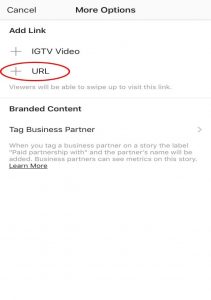
Step 5: Type the URL in the text box. Once you’re done, click "Done" in the upper right corner.

Step 6: Next, you’re ready to post. Click the "+ Story" button in the lower right corner, and now your uploaded story has a "See More" link.
Step 7: You can also keep your stories saved as highlights on your account, which will increase traffic to your business as it allows future followers to engage repeatedly with your brand.
Step 8: If you want to expand your reach to more followers, you can check the insights of your stories and see various aspects that could impact your business.
If Not Links, What Else Can One Do for Business on Instagram?
Although adding links to our Instagram stories is a great way to boost business, not all of us are lucky enough to meet Instagram's criteria to do so. In this case, one must look for other measures to achieve their marketing goals.
Here are some of them:
Try to increase the number of followers on your account and page.
Make your Instagram feed entirely focused on promoting your brand to look professional.
Build a network on Instagram by tagging other businesses in your posts.
Be very active in posting and engaging with your followers.
Frequently Asked Questions
How to use the Instagram link sticker?
In the Instagram app, tap the plus sign.
Select Story (instead of Post, Reel, or Live).
Create your story using all the great media available to you.
Tap the sticker icon in the top row. Type the URL...
Then send it to your story, and you’re done!
How do I add a question in Instagram Stories?
Add a question sticker to your story by selecting it from the sticker tray after taking a photo or video, type your question, then place it anywhere you want and share it in your story. When friends see the sticker, they can click on it to respond - and they can reply as much as they want directly from the sticker.
What is the benefit of a link in stories on Instagram?
When you finish, a small line will appear under this link to indicate that it is a link. Now anyone watching your story can click on this link to get the option to follow the account you tagged: this new feature makes collaboration between brands easier and more effective through Instagram Stories.
How do you select the sticker icon and add the link?
Once you’ve selected the content you want to include in your Instagram story, you can add the external link. Start by selecting the sticker icon, which appears among the row of buttons at the top of the screen. The sticker icon includes a box with a smiling face inside.
Do links work in Instagram Stories?
You can add links to your stories using the new clickable link sticker on Instagram. The new link sticker is more visible and can be added anywhere in the story. It also shows viewers the first part of the destination link (i.e., the domain), providing more transparency.
How to link Reels in an Instagram story?
Here’s how to share Reels in your Instagram Story:
Open the Instagram app and log in.
Go to the profile of the person or locate the Reels.
Click on the Reels you want to share.
Press the "Share" button.
Select "Add to Story."
Conclusion
In this article, we discussed how to add a link to your Instagram Stories. It may take viewers some time to get used to the new link stickers, so encouraging your followers to follow your links can boost clicks and, consequently, your sales.


