


Snapchat has become a popular social media platform where users can instantly share photos and videos with friends. One of its unique features is the ability to show and discover your Snapchat location through SnapMap. However, there are times when users may want to change, hide, or spoof their location on the app due to privacy concerns or to access unique geographically restricted filters.
iAnyGo is a powerful tool for changing Android device locations on Snapchat. This online tool helps you pretend to be in a different location. The bonus of iAnyGo is that you don't need to root your device to change your location.
Do you want to explore new locations and add excitement to your Snapchat experience? The perfect solution for that is Tenorshare iAnyGo - the ultimate solution to easily change your Snapchat location.
With just a few simple steps using Tenorshare iAnyGo, you can instantly teleport anywhere in the world and enjoy the benefits of a new location on Snapchat.
With just 9 clicks, your phone can appear at any point you desire in the world. Follow the next instructions:
How to Change Your Location on Snapchat Map for Android
First: Download iAnyGo to change your location on Snapchat. You can download the program from the following links:
Download iAnyGo for Windows here, and for Mac here
Second: Now, simply connect your Android phone to the computer using a USB cable.
Third: A new window will appear on your Android phone asking for permission to connect to the computer. Click on the allow option.
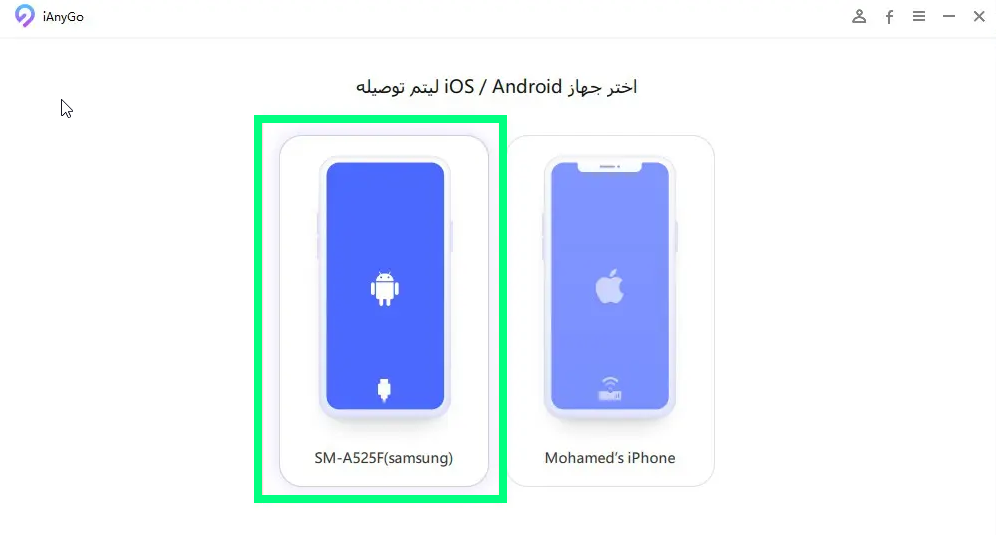
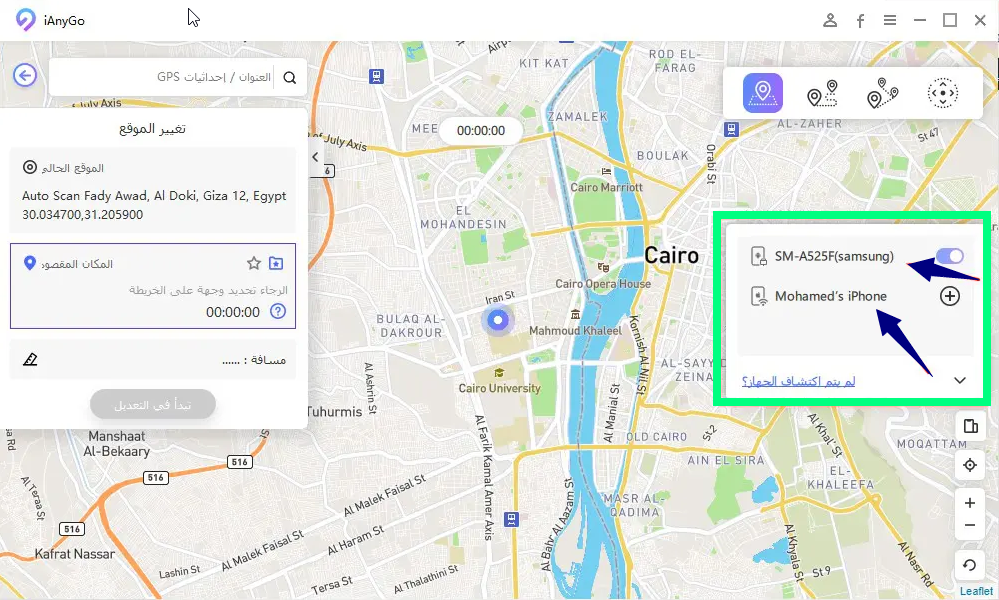
Fourth: Launch the iAnyGo program on your computer, and the program interface will open as shown in the following image. Click on your Android phone and then click (Next).
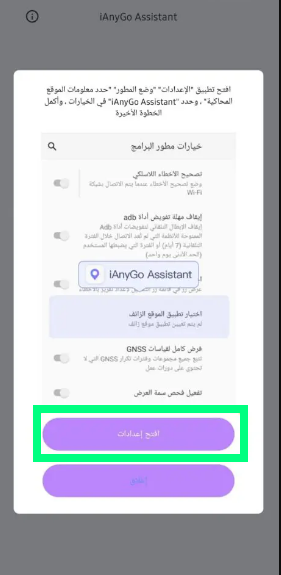
 Fifth: You will be notified that iAnyGo needs your permission to access certain permissions that allow it to function without errors. You will have the option (Open Settings). Click on it to grant the program permissions.
Sixth: Developer options will open. In this step, we want to set (iAnyGo) as the app responsible for determining the phone's location, so we will look for a field named (Select Mock Location App)
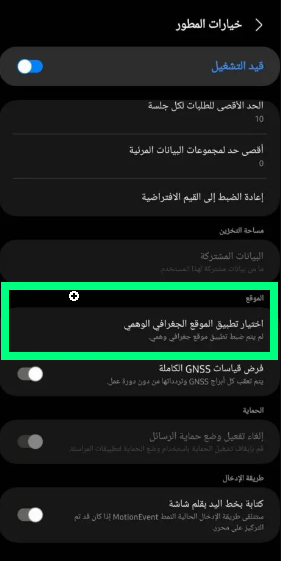
Seventh: Select the (iAnyGo Assistant) app.
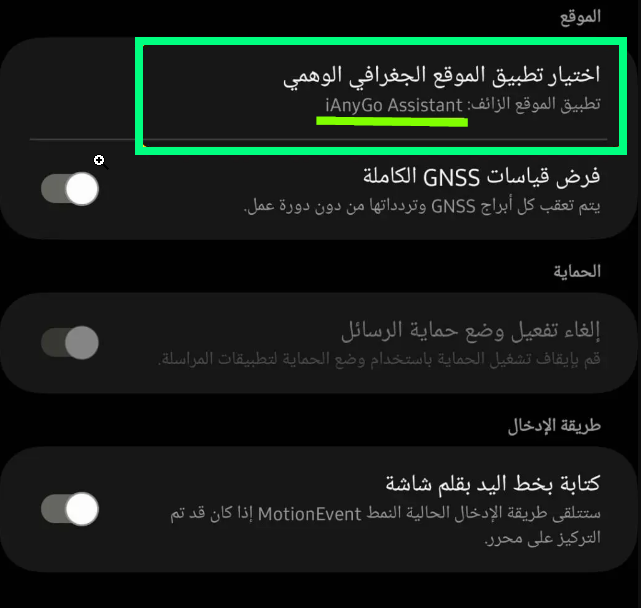
Eighth: This will allow the program to recognize your Android phone. With just a few clicks, you can change your geographic location for Snapchat through the program, and not only that, but also for all applications running on your device.
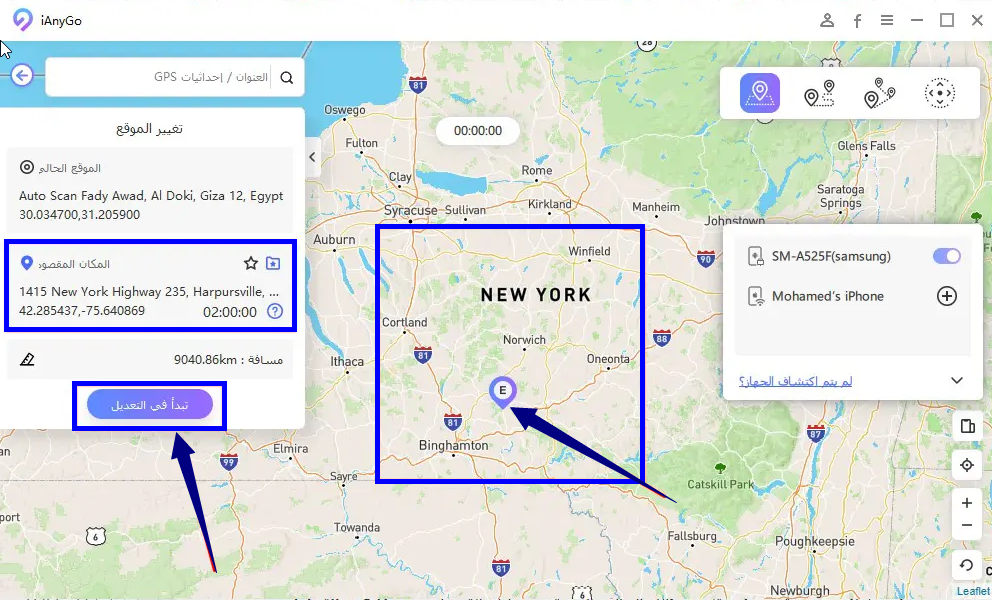
Ninth: Here, we will learn how to change the geographic location for applications. As shown in the following image, you can choose any place on the map to change your location to, and then click the (Start Modifying) button to apply the new geographic location to your phone.
Video Tutorial on How to Change Your Location on Snapchat
Now you have a fake and unreal geographic location, allowing you to switch between all countries in the world whenever you want. You can also use the program on iPhones, and for more details and methods used in this topic, you can refer to this guide on how to use Tenorshare iAnyGo to change the geographic location on iPhone
Why We Recommend iAnyGo Over Other Programs
You might wonder why we provide a guide to change the geographic location on Snapchat using Tenorshare iAnyGo only. Let me simply tell you that it is undoubtedly the best for several reasons, the most important of which are:
- Customer support from the company that developed the tool, Tenorshare, which strives to satisfy all customers by providing free technical support around the clock and throughout the week. You can contact them in multiple ways through their official website or via the company's social media pages.
- If you are not satisfied with the program and want a refund, don't worry; you have a trial period during which you can get your money back if you don't like the program. Just contact support, and your money will be refunded shortly.
- The price of iAnyGo is affordable for everyone, as the price before our 30% discount is $10, and after applying the coupon (PF007B), the monthly price is only $7.
What Are Other Uses for iAnyGo?
We discussed in a previous article titled (Fake GPS Program to Change Location for iPhone Without Jailbreak) that this article also talks about iAnyGo, which controls GPS for both iPhone and Android and changes locations (fake GPS Change). You can go to the previous article to learn about the program's additional features and all its properties.
In conclusion, iAnyGo for Changing Snapchat Location is the most widely used, and we recommend it to our visitors. The program also supports a trial period, is affordable for everyone, and there are many purchasing offers available to you.
Programs You Might Like
- Data Recovery Program for Android | Tenorshare UltData for Android
- Android Screen Unlock Program | Tenorshare 4uKey for Android
- Android Phone Repair Program | Tenorshare ReiBoot for Android
- Fastest and Easiest Ways: Transfer Data from Android to iPhone
- iPhone and iPad Unlock Program | Tenorshare 4uKey
- Fake GPS Program to Change Location for iPhone Without Jailbreak


