

What's new in Canva? New features that will make your designs more professional. Canva is an online design platform that allows users to create a variety of visual content, ranging from social media graphics to presentations, infographics, posters, and even videos. Launched in 2013 with the goal of making design accessible to everyone, regardless of their skill level, Canva's simplicity and extensive library of templates have made it a favorite tool for millions of users, including marketers, educators, small business owners, and professional designers.
One of Canva's main features is its ease of use. Canva offers an intuitive drag-and-drop interface that allows even beginner designers to create professional-looking designs in minutes. The platform is cloud-based, meaning you can access your designs from any internet-connected device, making it a popular choice for remote teams and freelancers.
What's new in Canva? New features that will make your designs more professional
Canva's extensive features have been a significant part of its success. Let's take a closer look at some of the key features that make Canva so popular:
User-friendly interface: Canva's drag-and-drop interface is incredibly easy to use, even for beginners. Whether you're creating a simple social media post or a more complex presentation, the platform is designed to make the process as smooth as possible.
Template library: One of Canva's most appealing features is its vast library of templates. From Instagram posts and stories to business cards, presentations, and flyers, Canva offers thousands of customizable templates across various design categories.
Custom dimensions: While templates are great, Canva also allows users to create designs with custom dimensions. This is particularly useful for designers working on projects with specific size requirements, such as website banners or printed materials.
Graphic elements and images: Canva provides a wide range of free and premium graphic elements, including shapes, icons, illustrations, and stock photos. Users can easily incorporate these elements into their designs, making it a one-stop shop for creating visual content.
Branding tools: Canva's branding tools enable businesses to create consistent designs across all marketing channels. Users can upload their brand's fonts, colors, and logos to ensure that every design they create adheres to their brand guidelines.
Collaboration: Canva makes collaboration easy. Teams can work on the same design in real-time, leave comments, and make adjustments on the go. This feature is especially valuable for teams working remotely or those collaborating on projects with multiple stakeholders.
Animation and video editing: Canva has added features for creating animated graphics and basic video editing, expanding its use cases beyond static images. Users can add animated text, transitions, and audio to create engaging video content without the need for specialized video editing software.
Brand Kit 3.0: For businesses and marketing teams, Canva's new and improved Brand Kit 3.0 ensures brand consistency across all projects. The updated toolkit includes the ability to upload logos, fonts, color palettes, and templates in advance, streamlining brand management for large-scale content creation.
Mobile app: The Canva mobile app provides all the platform's features on your phone or tablet, making it easy to design on the go. Whether you need to tweak a social media post on social media or create an entirely new design, you can do it from anywhere.
Integration with productivity suites: Canva now seamlessly integrates with popular productivity platforms like Microsoft 365, Slack, and Trello. These integrations make it easier for users to import, export, and share files across different platforms without the hassle of manual uploads or downloads.
Enhanced security protocols: For users prioritizing data security, Canva has implemented advanced encryption protocols and multi-factor authentication. These measures are designed to protect personal and business projects from unauthorized access, which is crucial for organizations dealing with sensitive content.
New AI features in Canva
The new version of Canva integrates advanced artificial intelligence that enhances design suggestions and provides real-time tips to elevate your projects. These AI-powered tools offer improvements in layout, color palette recommendations, and style adjustments that align with current design trends.
Let’s discuss the new AI features that you won’t want to miss.
1. Magic Grab
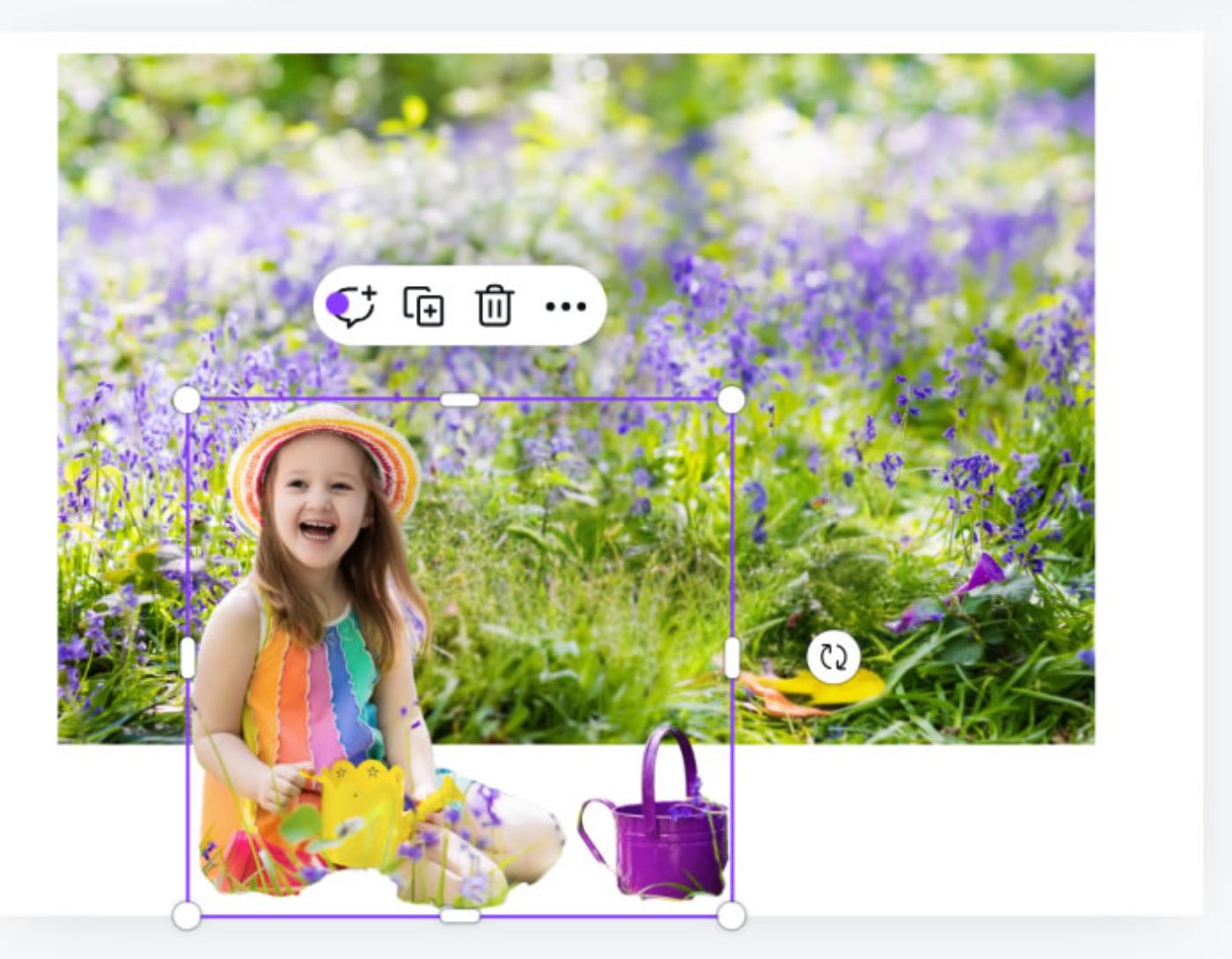
Magic Grab allows you to:
- Isolate an object from an image to move, resize, or use it in another design. - Erase any object in the image.
2. Create and sketch new ideas
- The new drawing tool lets you sketch your ideas with freehand drawing, underlining, or annotations.
- You can now easily turn your quick ideas into cohesive flowcharts, mind maps, and more.
3. Create different shapes for images using Magic Media
- With the AI image generator, you can easily create an image using a text prompt. Not only that, but you can also create different shapes.
- Select the "Create more like this" option to generate multiple variations of the image.
4. Streamline your design workflow
- Start designing directly from the homepage using user-friendly shortcuts, powerful search and filters, and your favorite templates.
- Choose from the multiple available templates, or use AI to create designs for you.
5. Write posts and blog articles
- Magic Write can help you choose titles, detailed outlines, and even create introductory paragraphs.
- Just provide a few keywords or a sentence describing your blog post topic, and Magic Write will give you suggestions to assist you in your work.
6. Magic design for creating presentations and social media posts
- With the magic design feature, you can now easily create
- Social media posts
- Presentations by writing just one prompt.
7. Extract text from images
- Easily update text in your images using Grab Text.
- It can separate words and phrases from any image.
You can check out these features and start experimenting.
Disadvantages of Canva
 Disadvantages of Canva
While Canva is undoubtedly a powerful tool, it is not without its drawbacks. Here are some of the main disadvantages that lead designers to seek alternatives:
Limited design flexibility: Canva's template-based approach can sometimes feel restrictive. While it's great for quick designs, experienced designers often find it limiting in terms of creative freedom. You are confined to Canva's drag-and-drop functionality, which can make it challenging to create truly unique designs.
Basic editing capabilities: For professional designers who need advanced editing tools, Canva's image and graphic editing capabilities may feel lacking. It lacks the precision and detailed control offered by more professional tools like Adobe Photoshop or Figma.
Paid features: While Canva offers a free version, many of its more advanced features, such as premium templates, stock images, and animations, are reserved for paid subscriptions. For designers needing access to a broader range of resources, this can be frustrating.
Over-reliance on templates: While Canva's templates are a great starting point, they can also lead to designs that look generic. Many Canva users heavily rely on templates, which can result in designs that lack originality or appear repetitive.
No advanced vector editing: For designers working with vector graphics, Canva falls short. It does not provide the same level of control and precision that tools like Adobe Illustrator offer, making it a less-than-ideal choice for those needing to work with scalable vector graphics.
Conclusion
What's new in Canva? The developments seen in Canva in 2024 showcase an impressive platform that has become a formidable design force. Whether you are an individual creator or part of a larger team, the updates and expanded features make it a great choice for many designers.


