


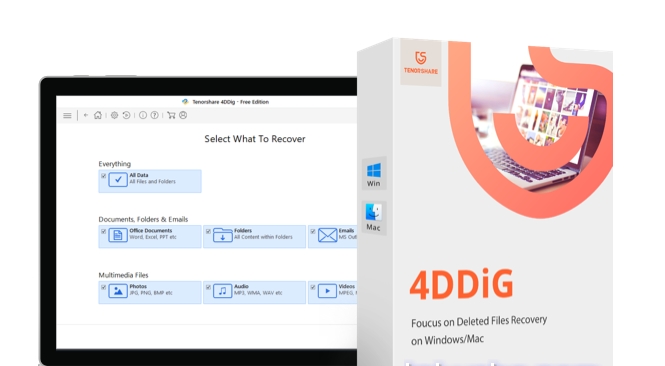
Overview of 4DDiG Windows Data Recovery
There's nothing more terrifying than accidentally deleting a very important file just before sending it to someone. In this digital age, everything is stored in soft formats. These data are kept on personal computers, USB drives, mobile phones, or other external hard drives.
The nightmare becomes real when you accidentally lose data from storage, whether due to accidental deletion or sometimes due to data corruption or hard drive failure. There could be a thousand reasons for data loss, but all you wish for at that moment is to have some magical tools to recover all your lost data. To answer this need, we have 4DDiG Data Recovery for you.
Discover the ultimate solution for easily recovering lost data with Tenorshare 4DDiG Data Recovery. Whether from a laptop, desktop, USB flash drive, or external hard drive, this comprehensive software ensures the recovery of over 1000 types of files, including photos, videos, documents, and audio files. With its user-friendly interface, you can recover data lost due to accidental deletion, formatting, system crashes, virus attacks, and more. Don’t let data loss disrupt your life - download Tenorshare 4DDiG Data Recovery now and regain access to your valuable files with ease.
is a software solution for data recovery that provides users with powerful procedures to protect information. The program rescues files that have been accidentally deleted, corrupted, or lost due to viruses. The product also recovers files from partitions and removable storage devices, such as external drives and USB sticks. It saves time by giving you a preview of recoverable media before committing to a lengthy recovery process. Tenorshare 4DiG is available for installation on Windows and Mac devices.
How to Recover Lost Data from Local Disk Using 4DDiG Windows Data Recovery
In the following video, there’s a quick explanation of the program's great capabilities. Watch the video to learn how to use the program.
Special thanks to the video source
Channel: Mr. Abu Ali on YouTube.
Using the Program with Images
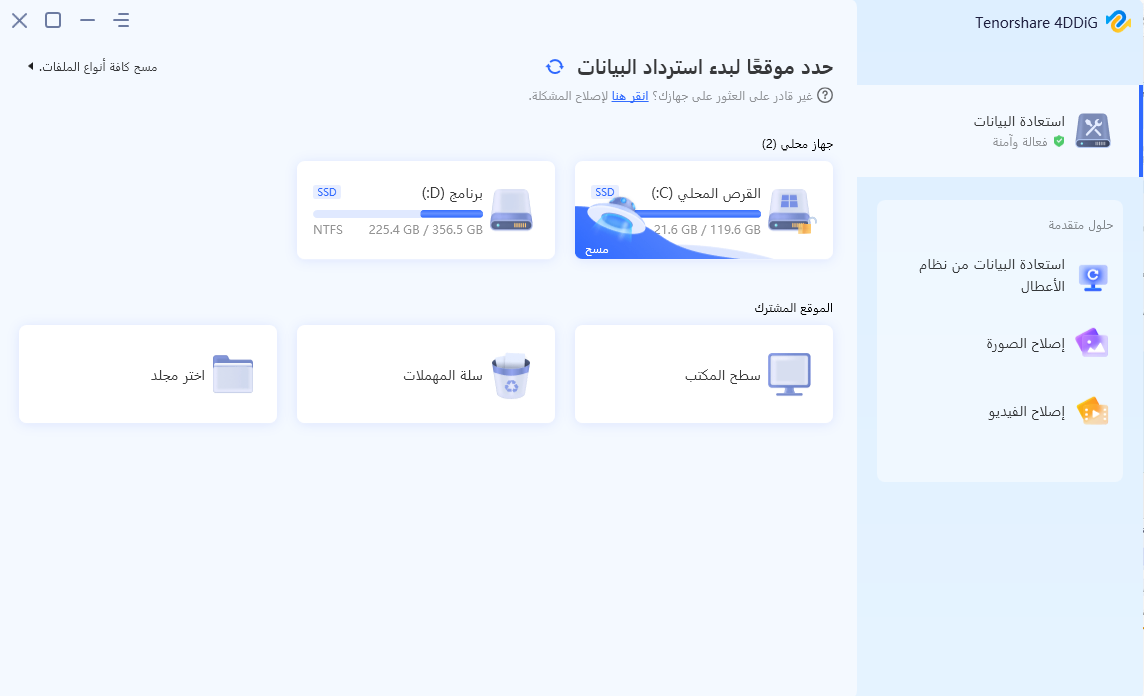
- Step 1: Select the Local Disk After installing 4DDiG Data Recovery for Windows data recovery and launching it, you will reach the main interface below, which displays locations such as devices, drives, and shared locations. In our case, select the local disk where you lost your data from the list of hard drives and then click Start to proceed.
Next, select the types of files you want to scan for, then click Scan Selected File Types to start scanning the drive. Alternatively, you can scan all file types.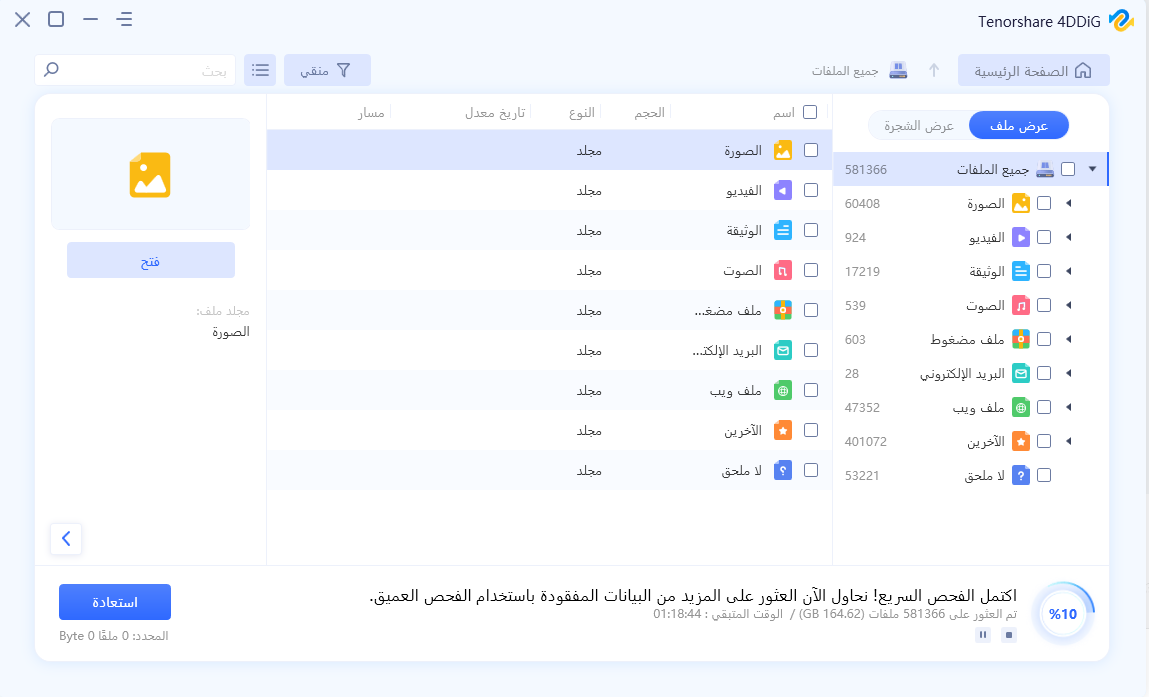
- Step 2: Scan the Hard Drive 4DDiG immediately scans the selected hard drive thoroughly to extract lost data. It lists the scanned items based on tree view and file view as 4DDiG continues to find deleted files on the drive. There’s a progress bar showing how much has been completed. You can also pause or stop the scan at any time as long as you find the files you want to recover.
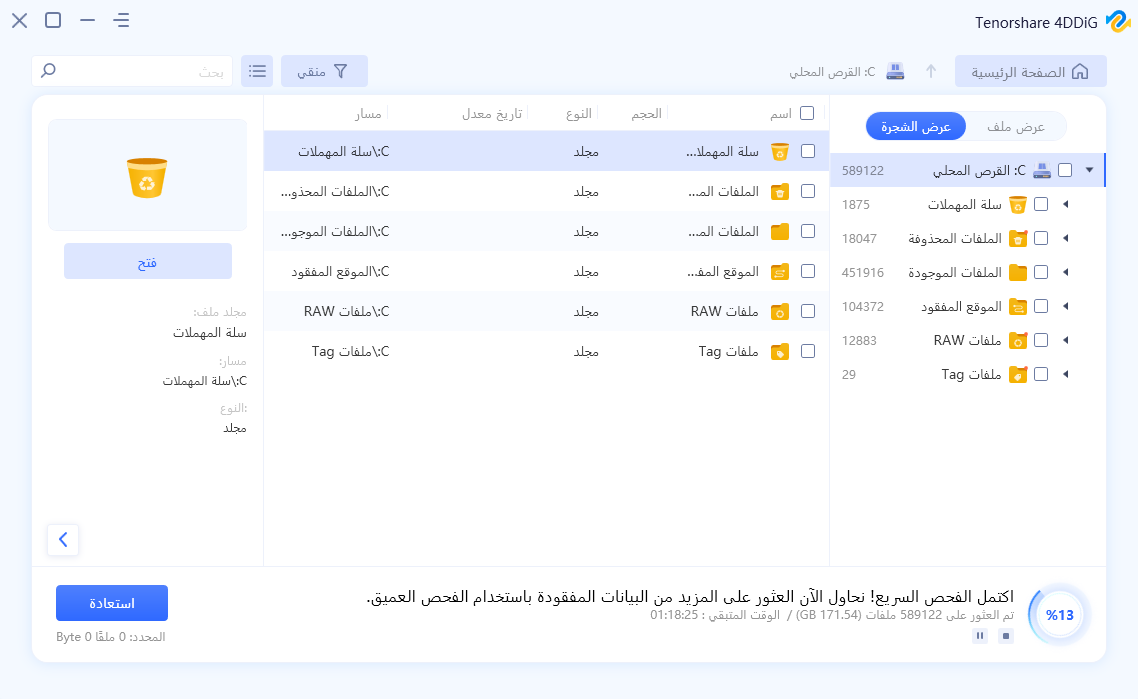
After that, you can see the scan results, which indicate how many files have been successfully found. If you can't find the lost data you want, you can click Deep Scan at the bottom of the interface to recover deleted files, which may take a long time.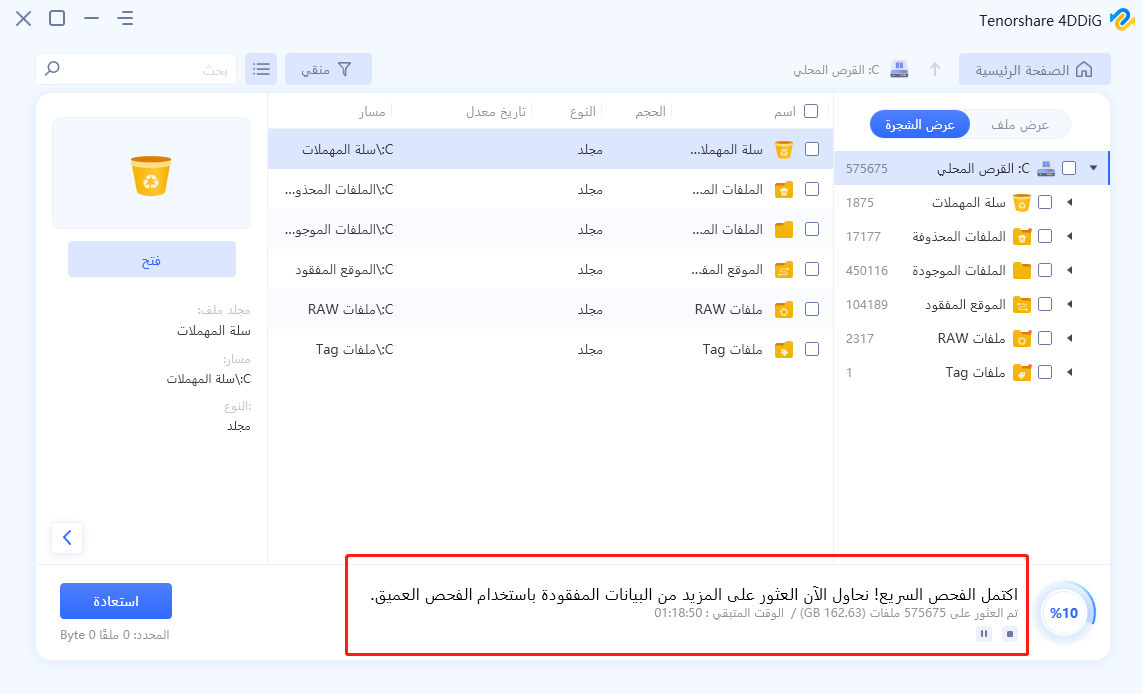
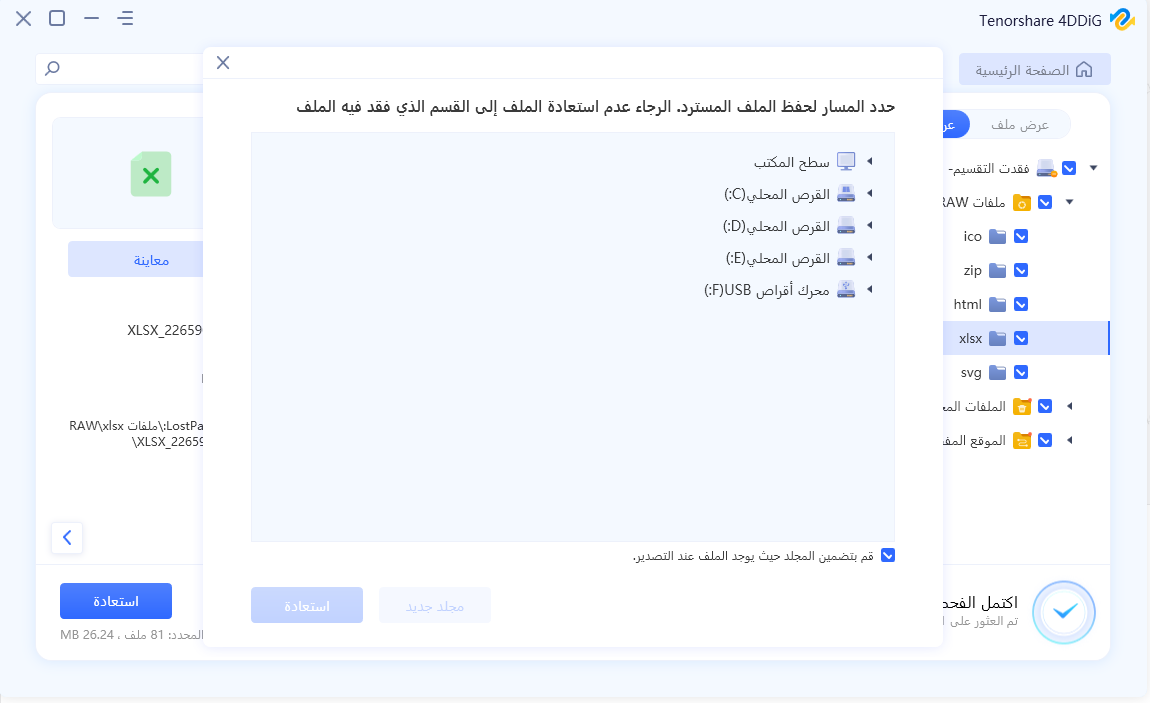
- Step 3: Preview and Recover Files from the Local Disk After the target files are detected, you can preview and recover them to a safe location. In case of overwriting the disk and permanently losing data, please do not save in the same partition where you lost it. After clicking Recover, a dialog box will prompt you for the location where you want to restore the files. Select a different desired location and click OK. Congratulations! The files deleted by mistake from the local disk have been recovered and you can view them now. Please do not save in the same partition where you lost it, as overwriting the disk will result in permanent data loss.
Features of 4DDiG Windows Data Recovery
- Free Scanning and Preview
To save time and recover your data with a 100% guarantee, Tenorshare 4DiG offers two recovery modes: quick scan and deep scan. You can perform data recovery after a free preview. - Flexible Recovery with Pause and Resume Capability
You can pause the scan midway and resume the scanning process whenever you want. You won’t be burdened by the scanning time. - Easy File Recovery
Designed to meet the needs of different user levels. Whether you are a beginner or a pro, you can always recover lost files with just a few clicks. - Recover Deleted Files
Did you accidentally delete important files like photos, videos, and documents? Did you empty the recycle bin without realizing it and then found that the files were very important to you? The application will be there to help. - Recover Formatted Drives
It’s easy to accidentally format a hard drive, SSD, or USB drive, leading to data loss. Just take it easy. With 4DiG Windows Data Recovery, recovering data from a formatted drive is no longer a headache. - Recover Lost Partitions
Access to some locations or files may be denied due to accidental partitioning, deleted partitions, repartitioning, or lost tables. Only a professional data recovery program like this one can get you out of these troubles. - Recover External Devices
External storage devices are great for saving data. But data loss can drive you crazy when the devices are damaged or corrupted. Regardless of the type of device you have, it allows you to recover lost data at the highest recovery rate. - Recover from a Crashed Computer
You may easily face a computer crash with a black or blue screen, leading to data loss. With the application, you can create a bootable drive to run the crashed computer and access the data without any technical knowledge. - Raw File Recovery
RAW means a RAW file system that you cannot access data without the help of a data recovery program. Don’t worry, it will recover files from any RAW drives. - Recover Deleted Files
Did you accidentally delete important files like photos, videos, and documents? Did you empty the recycle bin without realizing it and then found that the files were very important to you? 4DDiG will be there to help.Recover Formatted Drives
It’s easy to format a hard drive, SSD, or USB drive accidentally, leading to data loss. Just take it easy. With 4DDiG Windows Data Recovery, recovering data from a formatted drive is no longer a headache.Recover Lost Partitions
You may be prevented from accessing some locations or files due to accidental partitioning, deleted partitions, repartitioning, or lost tables. Only a professional data recovery program like 4DDiG can get you out of these issues.Recover External Devices
External storage devices are good at preserving data. But data loss can also drive you crazy when the devices are damaged or corrupted. Regardless of the type of your device, 4DDiG makes it possible to recover lost data at the highest recovery rate.Recover from a Crashed Computer
You may easily experience a computer crash with a black or blue screen, leading to data loss. With 4DDiG, you can create a bootable drive to run a crashed computer and access the data without any technical knowledge.Raw File Recovery
RAW means a RAW file system that you cannot access data without the help of a data recovery program. Don’t worry, 4DDiG will recover files from any RAW drives.Over 1000 Types of Data You Can Recover
You can recover various types of data using this powerful Windows data recovery tool. No matter what you’ve lost, 4DDiG is capable of recovering lost files without any hassle, including file types such as photos, videos, music files, emails, office documents, and compressed files.Images
JPG/JPEG, TIFF/TIF, PNG, BMP, GIF, PSD, WEBP, CRW, RGB, CR2, NEF, ORF, SR2, MRW, DCR, WMF, RAW, SWF, SVG, RAF, DNG, ERF, ICO, DSC, etc.Videos
AVI, MOV, MP4, M4V, 3GP, 3G2, WMV, MKV, ASF, FLV, FLA, AMV, F4V, SWF, MPG, RM/RMVB, MPEG, TS, VOB, MTS, DV, etc.Audio
MP3, AIF/AIFF, M4A, WMA, WAW, APE, MID/MIDI, VQF, OGG, AAC, WAV, FLAC, DTS, and other audio formats.Office Documents
DOC/DOCX, XLS/XLSX, PPT/PPTX, CWK, HTML/HTM, INDD, EPS, RTF, EPUB, PDF, CHM, CSV, TXT, DOTM, THMX, etc.Email and Archives
MSG, PST, OST, EML, EMLX, MBOX, etc.
7Z, WAR, ZIP, EXE, 7zip, BZ2, ISO, IMG, TAR, GZ, TAZ, etc.Others
ASPX, CGI, ELM, IGY, IQY,


