

Our top picks for editing software in 2025: If you want to make a strong impression, the first step is to create stunning videos, which means you need great editing software.
The best editing programs depend on several factors: your technical skills and willingness to learn, your budget, and the quality required for the video. There’s no one-size-fits-all tool, but that’s okay – there are plenty of good options available.
Our top picks for editing software in 2025
Here are our top picks for editing software in 2025.
1. CyberLink PowerDirector
Why we chose it
CyberLink has long been a leader in this field, known for its speed and support for new video formats and effects. Despite its extensive feature set, the program’s interface is clear and not as complex as fully professional software. It allows you to do everything from simple clip trimming and merging to virtual reality, multi-camera setups, and keyframe effects. You can get it either through a one-time purchase or a subscription.
Who this program is for
PowerDirector is suitable for video enthusiasts and users of YouTube.
Pros
Quick project preview
Clear and user-friendly interface
Lots of effects and AI tools
Multi-camera support and motion tracking
Screen recording
Cons
The number of options can be overwhelming at times
2. Adobe Premiere Pro
Why we chose it
Premiere Pro is well-known in the industry. It offers all the effects, color tools, collaboration options, and output choices that any professional might need. Recent updates have added a fantastic auto-captioning feature and the ability to edit video based on text, along with a new unified color manager and collaboration features.
The program works on both Mac and Windows systems. Premiere Pro is available only through a subscription.
Who this program is for
As its name suggests, Premiere Pro is designed for professional video editors. However, many serious amateurs also use and enjoy it. It’s particularly powerful for those who need to collaborate with others, as well as teams using the Adobe Creative Cloud suite.
Pros
Excellent stabilization tool
Responsive and fast preview
Unlimited multi-camera angles
Many organization and collaboration tools
Clear and flexible interface
Cons
Some features require additional applications, like After Effects or Media Encoder
No sound effect samples
Interface can be challenging for non-professionals
3. Final Cut Pro
Why we chose it
Final Cut Pro features a modern interface with a “trackless” timeline. Editors who have worked with this interface for a while will appreciate its flexibility and realize it offers a powerful set of tools and capabilities. There’s a new version of the app for iPad that integrates well with the desktop application. Also new is an AI-powered scene removal mask tool that eliminates backgrounds in videos without needing a green screen.
Who this program is for
As evidenced by the number of great Hollywood films and shows made using Final Cut Pro, the program is suitable for professionals, but its ease of use also makes it a good choice for amateurs.
Pros
Outstanding organizational tools, such as libraries, tagging, and automatic face and scene analysis
Support for 360-degree footage and wide color spaces
Plugin support
Multi-camera editing
Fast performance
Cons
No automatic speech-to-text feature
Works only on Apple devices
Fewer collaboration features than Premiere Pro
4. Apple iMovie

Why we chose it
Apple’s editing tools are simple and beginner-friendly. We loved the new Storyboards feature that helps people create compelling digital films. You also get some advanced tools like color keying, picture-in-picture, and audio filters.
Who this program is for
iMovie targets non-professionals, such as those looking to compile a video for a family vacation or special occasion. However, the Storyboard feature makes it a great starting point for those interested in filmmaking. Of course, it’s designed for Apple users only, as is the case with most Apple software.
Pros
Simple and beautiful interface
Great color grading tool
Unique support for iPhone video features
Excellent movie templates
Extremely easy to use
Cons
Does not support media tagging
Lacks multi-camera capabilities and motion tracking
Limited to two video tracks
5. Corel VideoStudio Ultimate
Why we chose it
Corel first caught our attention with its fantastic stop-motion tool, then reinforced that impression by being the first in this group with powerful motion tracking tools. The software continues to add useful new features while providing fast performance and ease of use.
Who this program is for
VideoStudio directly targets amateur videographers and YouTube and TikTok users. VideoStudio is also a feature-rich tool, offered at a reasonable one-time licensing price.
Pros
Lots of stylish effects
Extremely fast preview
Support for 360-degree VR, 4K Ultra HD, and 3D media
Multi-point motion tracking
Color grading
Great stop-motion tool
Cons
Audio editing capabilities are relatively weaker than video
Poor support for high DPI displays
6. DaVinci Resolve
Why we chose it
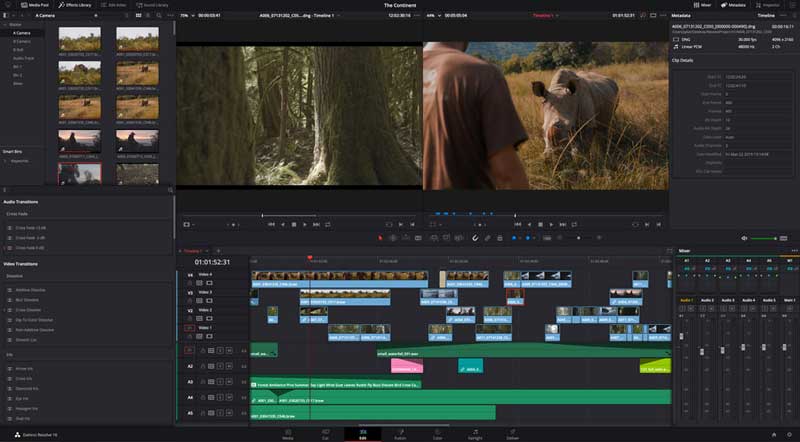
DaVinci Resolve is a professional-grade video editing software, and while it’s not the easiest to use, it offers a fully-featured free version, making it appealing to both amateurs and professionals. It provides a node-based editing workflow for maximum control over effects, and the program is packed with keyframe, color grading, and audio tools. It displays video projects at high speed (as long as you choose GPU encoding for devices), and the company also makes cameras, controllers, and other hardware that integrate seamlessly with the software.
Who this program is for
Resolve targets professional video editors and has been used in many Hollywood productions. However, that doesn’t mean amateurs can’t benefit from its feature-rich free version.
Pros
Many editing tools for precise control
Clear and well-designed interface
Includes motion graphics and audio editing
Fast rendering performance
Cons
Requires a lot of system resources
Complex software that takes time to learn
7. Movavi

Why we chose it
Movavi may not be a household name in video editing software, but it features a really enjoyable interface that includes all the tools amateur video editors and YouTubers might need. It includes good-looking effects and transitions. It’s the fastest for exporting, and you can upload directly to YouTube or Vimeo. Its price is reasonable, with both one-time purchase and subscription options available. Versions are available for both Mac and Windows.
Who this program is for
Those just starting out in video editing will appreciate Movavi’s clear interface and attractive toolset for both video and audio. Everyone will appreciate the fast rendering. It’s also good for those who don’t want to spend a lot of money on video editing software.
Pros
User-friendly interface
Transitions with <a href="https://3almalt9nia.com/%d8%a3%d9%81%d8%b6%d9%84-%d8%a3%d8%af%d9%88%d8%a7%d8%aa-%d8%a7%d9%84%d


