


The best ways to recover deleted Snapchat messages on iPhone: In this article, we discuss the best ways to quickly and easily recover Snapchat messages after they've been deleted.
You might be surprised to learn that Snapchat has over 422 million daily active users worldwide as of the first quarter of 2024, and it seems that the popularity of this leading platform isn't going to decline anytime soon. If you're wondering what makes this app so popular, the automatic and instant disappearance of messages after the sender and receiver leave the chat is the feature that has led to its remarkable success. However, there may be times when you need to revisit Snapchat conversations, prompting you to find ways to recover deleted Snapchat messages on your iPhone.
You may have already searched through the app's settings for a straightforward way to retrieve your messages, but your efforts might not have been successful, as Snapchat does not have a button or option to recover deleted messages. Well, now that you've found this article, you can rest assured.
Through this article, we will guide you through tried and tested methods to recover Snapchat messages. Let's get started right away so you can retrieve your messages to read old conversations with a loved one or get any information you might need from the messages.
The best ways to recover deleted Snapchat messages on iPhone
You can recover your Snapchat messages using the following effective methods.
Method 1: Using "My Data" to recover Snapchat messages on iPhone
Although Snapchat deletes messages from the server 24 hours after they have been read or viewed by the recipient, you can request Snapchat to help you recover some data. Snapchat allows you to obtain your data via email within a day or two of submitting the request. Here’s how to send a message recovery request to Snapchat using a computer or without one.
Recovering Snapchat messages using "My Data" with a computer
If you have a computer, you can follow these steps to recover your messages on Snapchat:
First, log in to Snapchat on your computer.
After logging into Snapchat, select "My Data" from the options available on your screen.
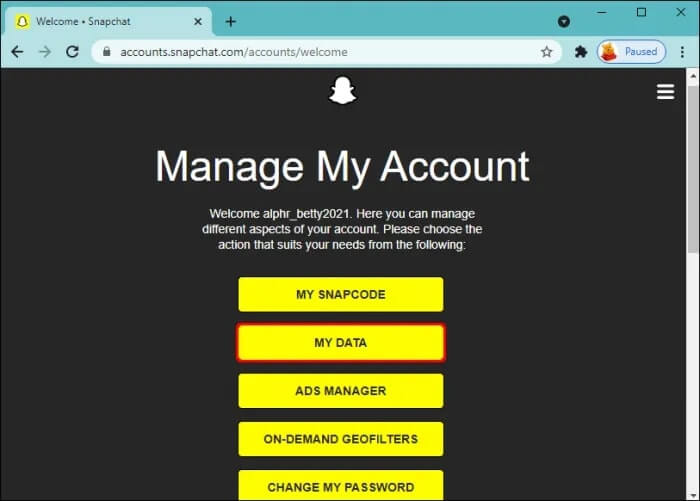
My Data in Snapchat account
Next, make sure to check the chat history box in the available data and click the submit request button.
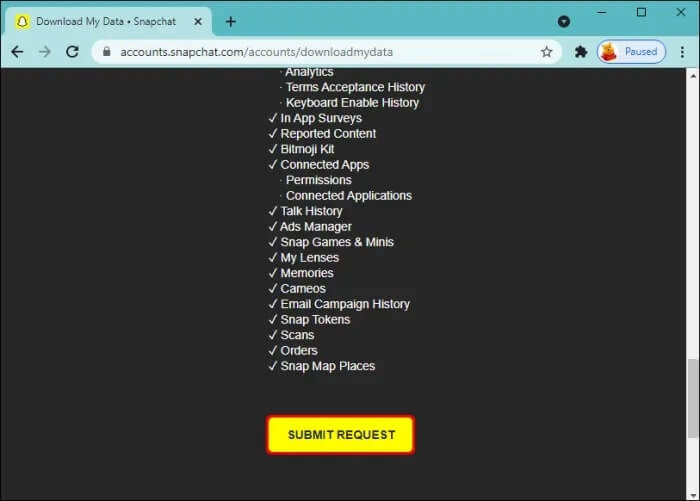
Submit request
Check your email for a link to download your data. Please note that Snapchat may take a few hours or days to prepare and send the requested data.
You can now click on the received link to download the data in a zip file.
After that, double-click the downloaded file to extract it.
Once the file is extracted, go to the html folder.
Finally, look for chat_history.html and open it in the html folder to access your messages.
Recovering Snapchat messages using "My Data" without a computer
Here’s how to recover Snapchat messages on your iPhone without a computer through My Data.
First, open the Snapchat app on your phone.
After opening the app, tap on your profile icon in the top left corner of the screen.
You can now select settings (gear icon) from the available options.
Next, go to the privacy controls in settings and tap on My Data.
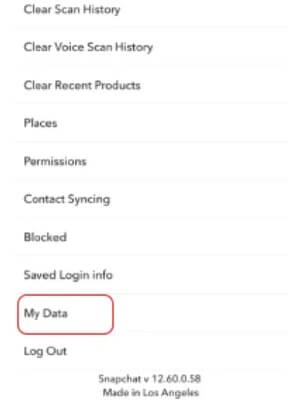
Privacy controls in settings and tap on My Data
You will now be prompted to log in to your Snapchat account.
After logging into Snapchat, tap on submit request and verify your identity.
Now, tap on continue to proceed to the next step.
Finally, check your email for a link to your data; you can download your messages from this link in your email.
Method 2: Recovering Snapchat messages via iPhone backup
You can effortlessly recover lost Snapchat messages if you have iTunes and iCloud backup enabled. If you want to restore data without a computer, you can do it through iCloud. However, if you prefer to use a computer to recover your messages, you can do so via iTunes. The following steps outline how to carry out these procedures.
Restoring messages from iTunes (using a computer)
Here’s how to recover deleted Snapchat messages on iPhone for free via iTunes.
The first step is to connect your phone to your computer (which has a backup of your iPhone files).
Next, open the iTunes application on your computer and choose to restore iPhone.
You can now select the backup file that contains your Snapchat messages.
Click the restore backup button and wait for the process to complete.
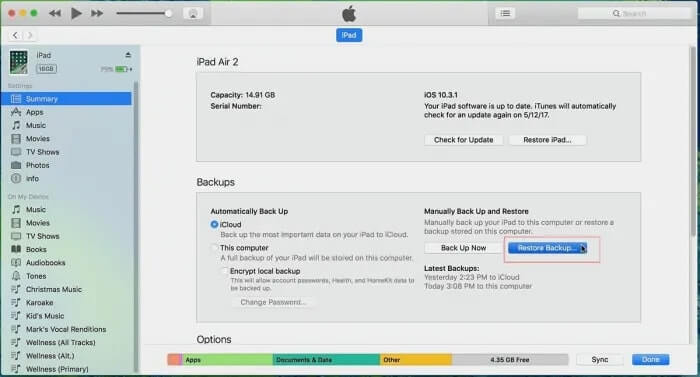
Restore backup button
Recovering Snapchat messages from iCloud (via your phone)
Here are the steps you can take to recover your Snapchat messages from iCloud on your iPhone.
First, open settings on your phone and go to general settings.
Next, tap on reset and erase all content and settings.
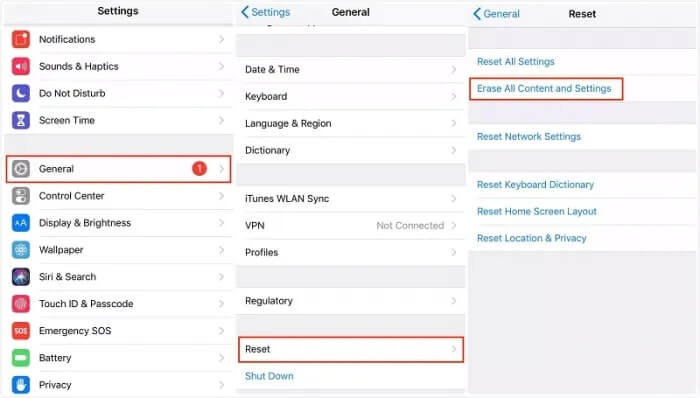
Reset and erase all content and settings
At this step, choose the option to restore from iCloud Backup.
Log in with your iCloud ID and select a backup on iCloud that contains Snapchat data.
Finally, wait for the restoration process to complete.
Method 3: Performing message recovery using a file manager
A file manager contains your Snapchat messages within a .nomedia file. Therefore, you can download any file manager app from the App Store and follow these steps to recover your messages.
First, open the file manager you just downloaded.
Next, locate the files with the .nomedia extension.
Finally, you can now select each of these files and delete the .nomedia extension to view your messages on Snapchat.
Frequently Asked Questions
1. Can you recover deleted Snapchat messages?
Yes, it is possible to recover deleted Snapchat messages, but it depends on several factors such as how long ago they were deleted and whether they have been overwritten by new data.
2. Is there a way to recover Snapchat messages without using third-party apps?
Snapchat itself does not provide a built-in feature to recover deleted messages once they are cleared from the chat. However, if you have a backup of your device or specific Snapchat data, you may be able to recover it from that backup.
3. How long do Snapchat messages remain recoverable after deletion?
Snapchat messages may remain recoverable for a short period after deletion, depending on whether they have been replaced by new data on your device. The sooner you attempt to recover them, the better your chances.
4. Can Snapchat recover deleted messages for me?
The Snapchat support team does not offer a service to recover deleted messages. Once messages are deleted from your account, they are generally considered unrecoverable through official Snapchat channels.
5. Are there any risks in using third-party apps to recover messages?
Yes, using third-party apps carries risks such as data security and privacy concerns. It’s important to research and choose reputable apps and be cautious about any personal information you provide to them.
6. What should I do as soon as I realize I’ve deleted important Snapchat messages?
Stop using your device to minimize data overwriting, then explore recovery options such as third-party apps or device backups as soon as possible.
7. Can I recover messages if I log out of Snapchat?
Logging out of Snapchat generally does not affect your ability to recover deleted messages, as long as they have not been deleted from Snapchat's servers or from your device's storage.
8. What steps can I take to prevent accidentally deleting Snapchat messages in the future?
Regularly back up your device, be cautious when clearing chats, and consider enabling features like "Memories" in Snapchat to save important messages and media.
Conclusion
In this article, we discussed the best ways to recover deleted Snapchat messages on iPhone. This article guided you on how to recover deleted Snapchat messages on iPhone for free through some of the most convenient methods. We hope you found this article helpful. Take care and stay safe.


