

The 7 Best Online Font Identification Tools: Have you ever found yourself admiring a beautiful font in an image and wanted to know its name? If so, you can use the font identification tools or font search tools available in this article.
Imagine this scenario: you’re browsing the internet when you stumble upon a flawless website featuring the most aesthetically pleasing font you’ve ever seen. It’s exactly the type of font that would be perfect for the project you’re currently working on. But how do you find out its name?
Alternatively, picture this: you might have spotted a lovely font in an image you downloaded, and you think it would look fantastic on the brand logo you’re currently designing. You’re making an effort to track it down, but trying to identify it feels like searching for a needle in a haystack given the multitude of fonts available worldwide.
In this case, using a font identification tool is a smart choice. A font identification tool, as you might have guessed, analyzes the font design using advanced algorithms. It then compares the font in question to a database of fonts they already have stored.
There are numerous font identification tools available. Therefore, it can sometimes be challenging to find the perfect search tool. But what if we could help you find the best ones?
The 7 Best Online Font Identification Tools
In the upcoming sections of this guide, we will list and describe the features and working models of the best font identification tools available. All of these tools can be accessed and used online, without the need to download and install standalone software. Additionally, these tools can be accessed using multiple operating systems and devices.
1. Fount
The first font identifier you can try in 2024 is Fount. Fount is an advanced tool that requires you to drag a bookmark known as Fount to your bookmarks sidebar. Once you’ve successfully placed it, you’ll need to click on the bookmark and then point the crosshair at the font you’re interested in.
A pop-up window will appear in the upper right corner of the screen, identifying the font along with its size, weight, and style. Additionally, the font search tool will provide you with a link to a distributor selling the font.
2. WhatFont
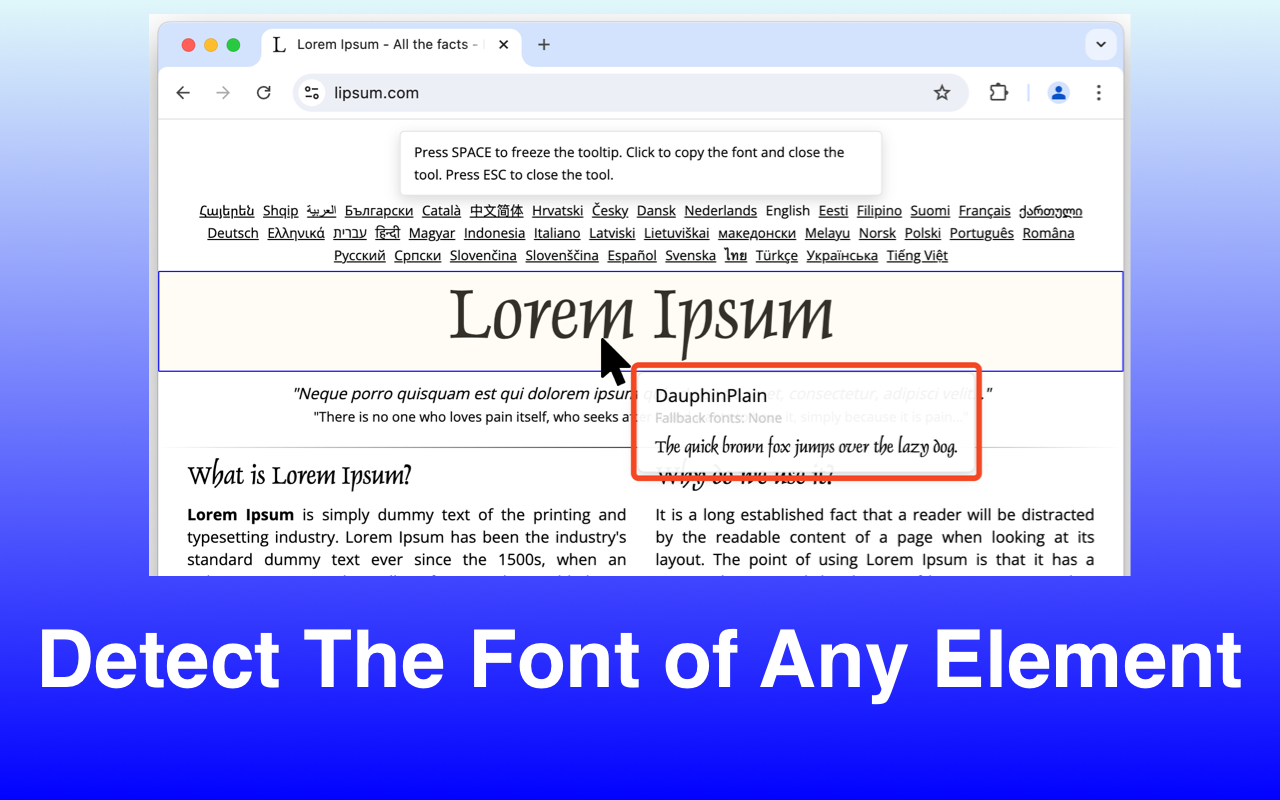
Another font identification tool that can be used to discover the fonts used on websites is called WhatFont. Chrome and Safari users can download it as an extension for their browsers, or you can install it as a bookmark by dragging a small icon to your bookmarks bar, just like Fount.
To activate the extension, you first need to click on a small icon located next to the address bar in your browser. After that, you should point the crosshair at the font you’re interested in. If you’re using the extension, this font detector works in the same way as Fonts Ninja.
3. Identifont
In the realm of font identification tools, Identifont stands out as a unique and standalone option. The tool’s working model is entirely different. You’ll notice that visual recognition of characters is not available, there’s no use of artificial intelligence, and the tool doesn’t perform a site code scan. Identifont operates on a questionnaire model that asks you about the characters and symbols of the font you wish to identify.
It then continues to narrow down alternatives from a database containing various fonts. Thus, the tool may fail to work if you don’t have enough information to provide regarding the font. However, if you’re a developer or a professional creator, this might be the best font search tool you’ll ever use.
4. Fonts Ninja
Let’s take a look at another fantastic font identifier: Fonts Ninja. Initially, this is a program you need to download and install on your browser. You can also download a standalone tool for your macOS as well.
Once you find a font you like while browsing the web, you can activate the font detector extension by clicking on the icon located at the top of the address bar in your browser. After that, you can point the crosshair at the text you want to evaluate. The tool will then provide you with reliable results.
5. Matcherator
Matcherator is another top font identification tool that can help you identify the fonts you choose and assist you in purchasing them easily. This tool is user-friendly; all you need to do is drag an image file over the box on the website, and Matcherator will immediately start analyzing the outlines of the open fonts, symbols, and all other elements.
6. WhatFontIs
WhatFontIs is a fantastic font identifier that has been around since 2009. So far, it has profiles for most different fonts compared to any other tool. On the downside, its performance has been slightly weaker regarding handmade fonts.
Using this font detector is easy; however, the process takes a bit longer. All you need to do is drag and drop the image you choose, and the tool will recognize the fonts. However, it also asks you to type the characters present in the image so it can proceed.
7. WhatTheFont
This tool uses optical recognition technology to provide reliable information about the font with ease.
After dragging the image containing the font you want to identify, cropping it to the words or characters you want to analyze, and pressing the button, the results start appearing on the screen. The tool works well, but even this font detector can sometimes fail.
Frequently Asked Questions
1. How reliable is WhatTheFont in detecting fonts?
WhatTheFont, powered by MyFonts, is one of the most popular tools for font identification. Just upload an image, and the tool will provide a list of matching fonts with purchase links. It also supports handwritten and custom texts.
2. Can these tools detect free and paid fonts?
Yes! Most tools like WhatTheFont and What Font Is provide information about both free and paid fonts. Tools like Fonts Ninja also allow you to explore premium fonts before purchasing.
3. Do font detection tools work on handwritten or text fonts?
Absolutely. Tools like WhatTheFont excel at identifying custom or text fonts. However, the quality and clarity of the image play a significant role in accuracy.
4. What is the best tool for beginners compared to professionals?
Beginners: Fount and WhatFont are great for their simplicity and ease of use.
Professionals: Fonts Ninja and Matcherator offer advanced features like font testing and detailed analytics.
Conclusion
In this article, we discussed the 7 best online font identification tools. As a designer, whether you’re a professional or an amateur, there are moments when you encounter a stunning new font you’ve never seen before that inspires you. Just choose the right font recognition tool for your needs, and within seconds, you’ll be able to identify the font.
There are numerous websites you can use. And you don’t need any prior technical experience to use any of them; it’s incredibly easy.


