


The best program to delete an Apple ID account if you forgot its password: Have you ever thought that using a smartphone could put you in tricky situations sometimes? One of these situations is forgetting your password or losing access to it. What do you do in this case? The usual answer is to take the phone to a service center. However, if you want to solve the problem yourself instead of relying on others, the ideal solution for you is to use a tool like Tenorshare 4uKey.
This tool gives you control over many different issues that smartphone users regularly face.
Let’s take a closer look at the best program to delete an Apple ID account if you forgot its password, "Tenorshare 4uKey".
Tenorshare 4uKey is a manager for smartphones and tablets designed to empower Apple device owners to unlock their Apple ID accounts without a password.
Fortunately, the app allows anyone to quickly unlock their device, regardless of whether the lock mechanism is hidden behind a 4/6 digit passcode, a custom code, an alphanumeric password, or a fingerprint Touch ID. All of this can be done in minutes, without needing iTunes. All you need is a computer with a recent version of Windows, a USB cable, and your Apple mobile device.
Here are some situations where Tenorshare 4uKey can be extremely useful
1. You bought a locked second-hand device
If you find yourself in this situation, I feel sorry for you because it’s never good to suffer from something you spent a lot of money on. However, there is always a solution to problems. If you bought a second-hand iPhone or iPad from someone else and realized it still has the previous owner's Apple ID, you can use Tenorshare 4uKey to bypass the Apple ID and activate it with your own information.
This way, you can start fresh without any trace of the previous owner, and of course, you can also enjoy all the features of the device.
2. You forgot your passcode
I believe most of us have been in this situation many times. In fact, you are in an unenviable position. If you enter the wrong passcode several times, your iOS device will be disabled and will prompt you to restore it via iTunes.
If you don’t want to do that, you can use 4uKey to bypass it and skip the restoration process through iTunes, ending up with a working device again.
The best part? The problem will be solved in just a few minutes.
3. You are a developer
As a developer or someone interested in technology, it’s always important to test things. One area you might want to test is iOS security. We all know how good the security provided by Apple devices is, but there’s no harm in testing it.
With Tenorshare 4uKey, you can identify vulnerabilities in the iOS operating system and areas that can be easily bypassed.
Why do we recommend using the best program to delete an Apple ID account if you forgot its password, "Tenorshare 4uKey"?
Tenorshare 4uKey is compatible with a wide range of iOS firmware versions on iPhone and iPad devices. It can successfully unlock devices even up to the latest iOS/iPadOS version 16, which is why we recommend it for the following reasons:
- It removes the Apple ID on iPhone/iPad without a password.
- Instantly bypasses iPhone/iPad screen passwords.
- Fixes disabled iPhone/iPad without iTunes or iCloud.
- Removes 4-digit/6-digit passcodes, Touch ID, and Face ID from iPhone/iPad.
- Compatible with the latest iOS 15/16/iPadOS 16 models and iPhone 14/13/12!
Features of Tenorshare 4uKey
What makes Tenorshare 4uKey one of the most reliable unlocking tools is its feature set, offering you many amazing capabilities.
Here are the main features in detail:
1. Unlock passcode
If you or someone in your family forgot the passcode for an iOS device, Tenorshare 4uKey can unlock it in just a few simple steps.
Additionally, even if your device is disabled, it can fix that too without any effort.
2. Unlock Apple ID
Forgetting your Apple ID used to be a scary situation, but not anymore with tools like 4uKey. The current Apple ID can be removed, allowing you to create a new one. This is a great feature when you have no other way to access your device.
Not to mention, if you bought a second-hand device and the old Apple ID is still present, this feature will save the day.
And the best part is that you don’t need any technical knowledge because everything is presented to you in the simplest way.
3. Unlock Screen Time passcode
This is a relatively new feature that has been introduced, but it is very useful simply because remembering an additional passcode can be a task that many people do not take seriously.
In my personal opinion, people forget their Screen Time passcode more than their main phone passcode. With Tenorshare 4uKey, you can easily remove the passcode without losing any data.
4. Factory reset without a password
If you want to perform a factory reset on your iPhone but don’t remember your password, 4uKey allows you to do that smoothly.
You won’t need a password or even iTunes.
5. Fix various iOS issues
In addition to the usual features you would expect from an unlocking tool, Tenorshare 4uKey also has many other iOS fixes.
- Some of them include:
- Remove Touch ID
- Remove Face ID
- Bypass MDM screen
- Turn off "Find My iPhone" without a password
- Get rid of activation lock on iPhone and iPad
6. High success rate
It’s very easy to make promises but very hard to deliver on them. Fortunately, Tenorshare 4uKey keeps its promises and achieves high success rates. This fact alone makes it a highly reliable tool to use in emergencies.
The program uses advanced algorithms to perform tasks like unlocking your passcode and Apple ID on your device, and it is almost fail-proof.
7. Flexible compatibility
Tenorshare 4uKey is compatible with all Apple devices and iOS versions, and it can be downloaded on both macOS and Windows operating systems.
This cross-compatibility is great because if you are someone with an iPhone but using a Windows computer, you can still get the job done without errors.
8. User-friendly interface
Unlike many other powerful tools, with Tenorshare 4uKey, you will find a very user-friendly interface. You won’t need any technical skills or prior knowledge to use a tool like this because everything is presented to you in a simple manner.
It’s also important to note that any tasks you perform on this program do not take long to complete, regardless of the severity of the issue.
9. Focus on data privacy
This may be the most important feature of any program. The focus on data privacy and user security should be a top priority, and Tenorshare 4uKey understands that perfectly.
It does not store or sell your personal information, so every little piece of data you enter into this tool is safe and secure.
Pros
- Unlock Apple devices without a password.
- Works with various lock mechanisms.
- Compatible with a wide range of iOS versions and device models.
- Removes Apple ID and allows the use of a new one.
- Provides access to iCloud.
- Simple unlocking process in just a few steps.
- Lightweight and works on older computers.
- Free to use on various Windows operating system versions.
How to download and use Tenorshare 4uKey
Step 1: Download and install 4uKey
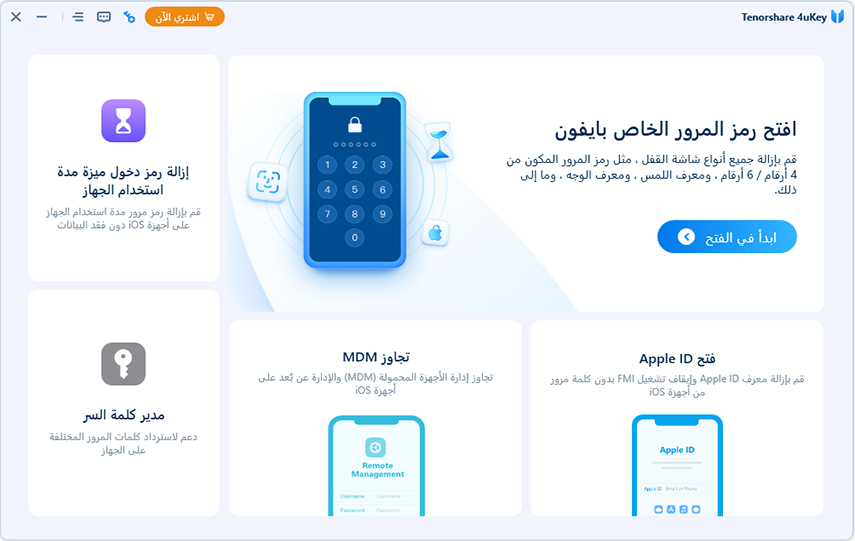
Download 4uKey and install it on your computer or Mac, then launch the program and select the "Unlock Screen Passcode" feature to get started.
Step 2: Connect the iPhone to the computer
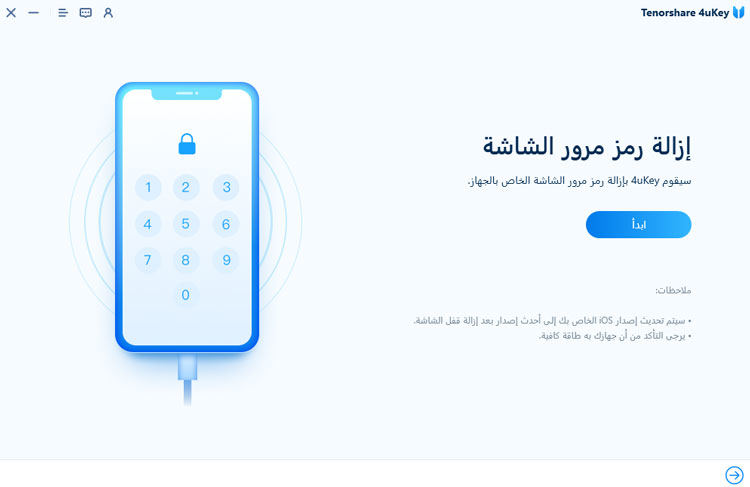
Connect the iPhone to the computer, and the program will automatically detect it. Click "Start" from the main interface.
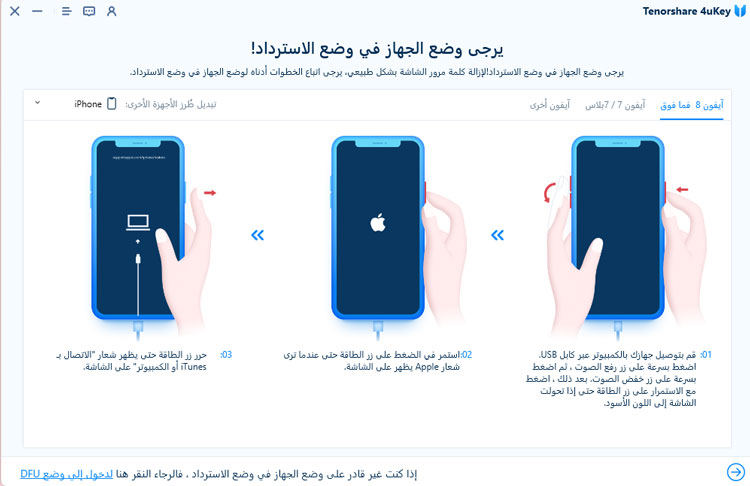
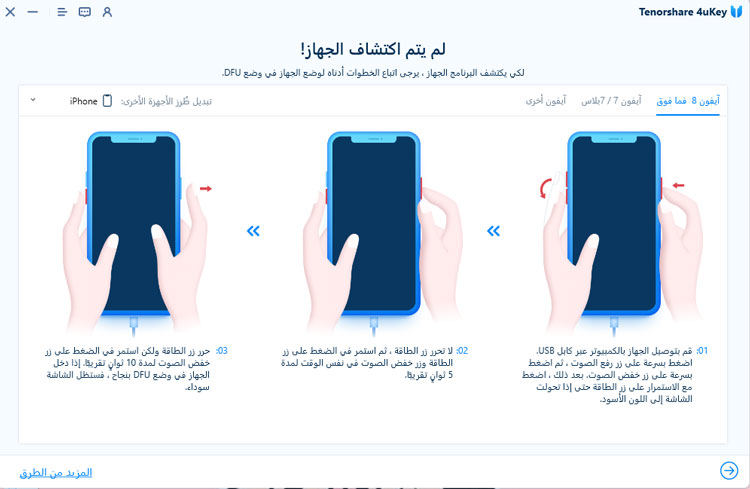
If your device is not detected, you can follow the steps below to put your device into "Recovery Mode" or "DFU Mode" for detection.
Guide on how to enter "Recovery Mode":
Guide on how to enter "DFU Mode":
Step 3: Download the firmware package
You will now be prompted to download the latest firmware package. Choose the save path and click "Download" to proceed.
(Note: Please ensure that your computer has at least 7 GB of space to download the firmware package.)</p


