



Android phones use the same GPS devices as iPhones. However, it's impossible to run and use unregulated apps on iPhones due to iOS restrictions. Is there a way to trick your iPhone into thinking you're somewhere else? Simply changing your Apple ID location or region isn't always enough.
There are techniques to change your iPhone's location without jailbreaking, regardless of why you want to hide your whereabouts. Many people still believe it's a highly technical process, but that's far from the truth. In this article, we'll show you how you can easily change the GPS location on your iOS device using Tenorshare iAnyGo to freely change your GPS location without jailbreaking! It's very special and incredibly simple. Let's take a deeper look at how to change your iPhone's GPS location:
Can I change my iPhone's location without jailbreaking in 2023?
You may find it challenging to change your location because you need to jailbreak the device. In the same vein, jailbreaking means hacking the iPhone so that the user can modify most of the original settings.
But the good news is that you no longer need to jailbreak your iPhone to change its location. That's because we've provided some easy tricks aimed at changing your iPhone's location without jailbreaking using Tenorshare iAnyGo. Just make sure to read the entire article.
Before we begin, the idea of tricking your iPhone's location may seem impossible and strange to some users. One of the main reasons for this is that, generally, GPS location is used for weather updates or directions to a new place. However, here are some common scenarios where you might find the need to change your iPhone's location without jailbreaking.
- Social Media Deception
There are many social media apps like Facebook, Twitter, Snapchat, and others that ask for your current location. However, if you want to avoid sharing, you might consider tricking your iPhone's GPS location. - Gaining Winning Opportunities in Games
If you want to play location-based games, you may need to change your iPhone's location without jailbreaking to gain an advantage. These games require moving from one place to another to collect points. Therefore, faking your location can help you win the game. - Protecting Your Privacy
If you don't want your friends or relatives to know your exact location or want to safeguard your privacy, changing your iPhone's location may become necessary. Moreover, by continuously sharing your location, strangers might misuse your original location.
How can I change my location on iPhone for free?
Now that we've discussed all the potential reasons you might need to change your iPhone's location without jailbreaking, let's take a quick look at the options available to you.
Fake GPS Software to Change iPhone Location Without Jailbreaking
Tricking your iPhone's location without jailbreaking is no longer an impossible task. Thanks to some software like Tenorshare iAnyGo, you can now easily fake your location. Developed by Tenorshare, it is one of the leading programs that allows you to change your location. With the virtual location feature of this tool, you can deceive the GPS data. Here’s a complete guide on fake GPS with Tenorshare iAnyGo:
-
1. What is the use of Tenorshare iAnyGo?
The iAnyGo software, as mentioned above, is used to change your iPhone's GPS location on iOS devices. If you're wondering what that means exactly, it means you can be at home while actually being on the other side of the world.
It's a very useful feature as it protects your privacy by showing you in fake locations and allowing you to use various location-based apps and websites.
Many games, such as Pokémon Go and Minecraft Earth, require location-based simulation. Similarly, there are apps and websites that have their content blocked in specific locations. By faking your location with iAnyGo, you can play location-based simulation games at home and enjoy geo-restricted apps without any hindrance.
-
2. Specifications Required to Run Fake GPS Change Software
If you want to know whether Tenorshare iAnyGo iOS is available for your system, the answer is provided in the table below. Generally, it supports all major versions of Windows and Mac. Here’s a detailed specifications table for your reference:
| Specification | Tenorshare iAnyGo |
| Operating Systems | Windows 7 and later macOS 13 and earlier |
| CPU | 1 GHz (32-bit or 64-bit) or higher |
| RAM | 256 MB minimum (1024 MB recommended) |
| Hard Disk Space | 200 MB or more |
-
3. Is Tenorshare iAnyGo Safe?
When people use some third-party applications to change any default settings on their devices, they first want to know if it's safe or not. Changing location on iPhones using Tenorshare iAnyGo is completely safe. It does not affect any settings on your device, and the changed location can easily be reverted to the original location.
To be on the safe side, you should always download this application from official sources. You should also be cautious when using it to bypass location restrictions on apps, as they may consider it a violation of their terms of service.
-
4. How to Use Tenorshare iAnyGo to Change Location on iPhone Without Jailbreaking
- Step 1: Download the Tenorshare iAnyGo software and install it on your computer.
Then connect your iPhone to the computer via USB cable.
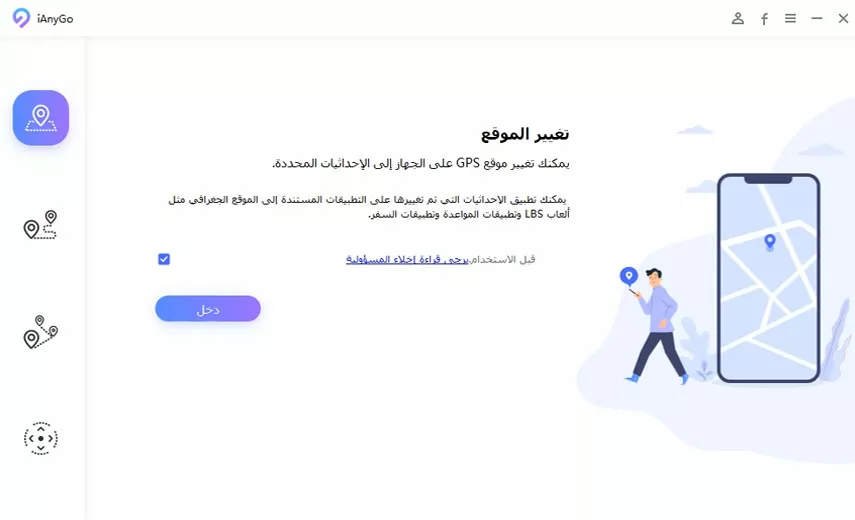
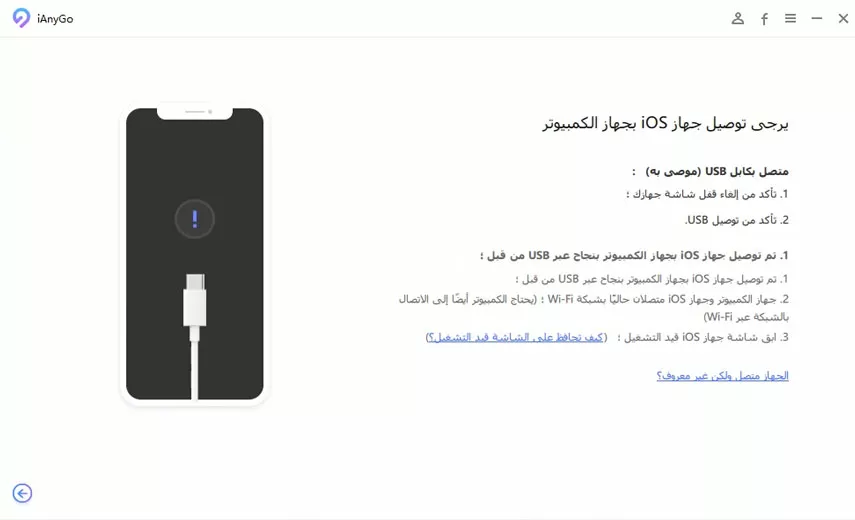
- Step 2: Now, connect your iPhone to your Windows or Mac computer using a USB cable. You will need to select 'Trust' on your iPhone to allow your system to access it.
- Step 3: Select a location on the map
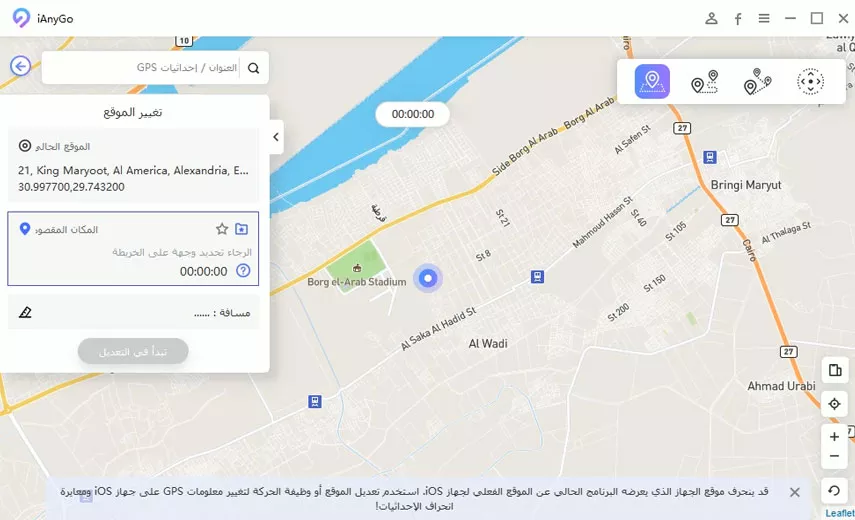
It's very easy and straightforward! Your location will be changed instantly. All location-based apps on your iPhone will also switch to the fake location.
In the following video, there’s a quick explanation of the program's great capabilities. Watch the video to learn how to use the software.
Special thanks to the channel: Mohamed Magdy محمد مجدي
Main Features of Tenorshare iAnyGo
The location-changing software for iPhone Tenorshare iAnyGo provides a comprehensive tool with many features. Some of its main features are mentioned below for a better understanding of its functionalities:
- Cooldown Timer: When using location spoofing to play location-based games, there is a chance that the app or game may detect you. This can lead to being banned from that game. This tool provides a cooldown timer to avoid such situations.
- Joystick Movement: You can use the joystick provided by this tool to simulate actual movement when playing location-based games. The joystick makes it easier to replicate real physical movements.
- Social Media Location: The fake location through this tool also allows you to change default locations on social media apps like Facebook, Twitter, Instagram, etc. It lets you tag yourself from anywhere in the world.
- Dating Apps: If you have a dating profile on apps like Tinder, you can use the location spoofing feature to increase likes and matches for your account.
Pros of Tenorshare iAnyGo
Every software comes with its strengths. Tenorshare iAnyGo iOS is a tool that has proven to be excellent for changing locations. You can see the main pros of this tool below:
Pros
- The location-changing process is quick and easy to follow.
- When using this tool, you can access a wide range of locations.
- No app is needed for iOS when spoofing GPS locations on it.
- During the free trial, you can use each mode three times for free.
Plans and Pricing
You can purchase <a href="https://www.tenorshare.com/ar/products/ianygo-change-gps-location-


