

How to Stop Your Android or iPhone from Vibrating for No Reason: Do you feel your phone vibrating but see no notification? Are you sure it's a problem with your device? Aside from phantom vibration syndrome, there are some bugs that can occur in the Android or iPhone operating systems or within apps that can cause your phone to vibrate randomly. This article discusses the reasons why your phone might vibrate unexpectedly and how to stop it.
When you feel your iPhone vibrating, you might immediately assume you've received a notification, but what if you find no alerts? This actually indicates that something is wrong with your device. Here, we will explain what you can do if your phone vibrates randomly without a clear reason.
Of course, you're not alone in facing this issue, so to prevent your mobile phone from vibrating without a clear cause, here are some things you should know:
- Apps that are outdated or have bugs can cause problems on your phone, so make sure to close and update them.
- Background processes can lead to false vibration notifications, so try restarting your phone.
- Ensure that your phone is not set to vibrate only or in silent mode.
Why is My Phone Vibrating for No Reason?
There are various reasons why your phone might behave strangely, and in some cases, it could be due to a hardware glitch. However, in many instances, a bigger issue is at play.
Many smartphone apps, for example, can send alerts to your phone, with numerous apps sending notifications even when users haven't opened them.
Sometimes, your phone might be in silent mode, but something else in the background could be causing it to vibrate. This usually happens when checking email, Facebook, or browsing the internet.
How to Stop Your Android or iPhone from Vibrating for No Reason
Here are some tried-and-true solutions you can consider to resolve the issue of random phone vibrations.
Method 1: Restart Your Mobile Device
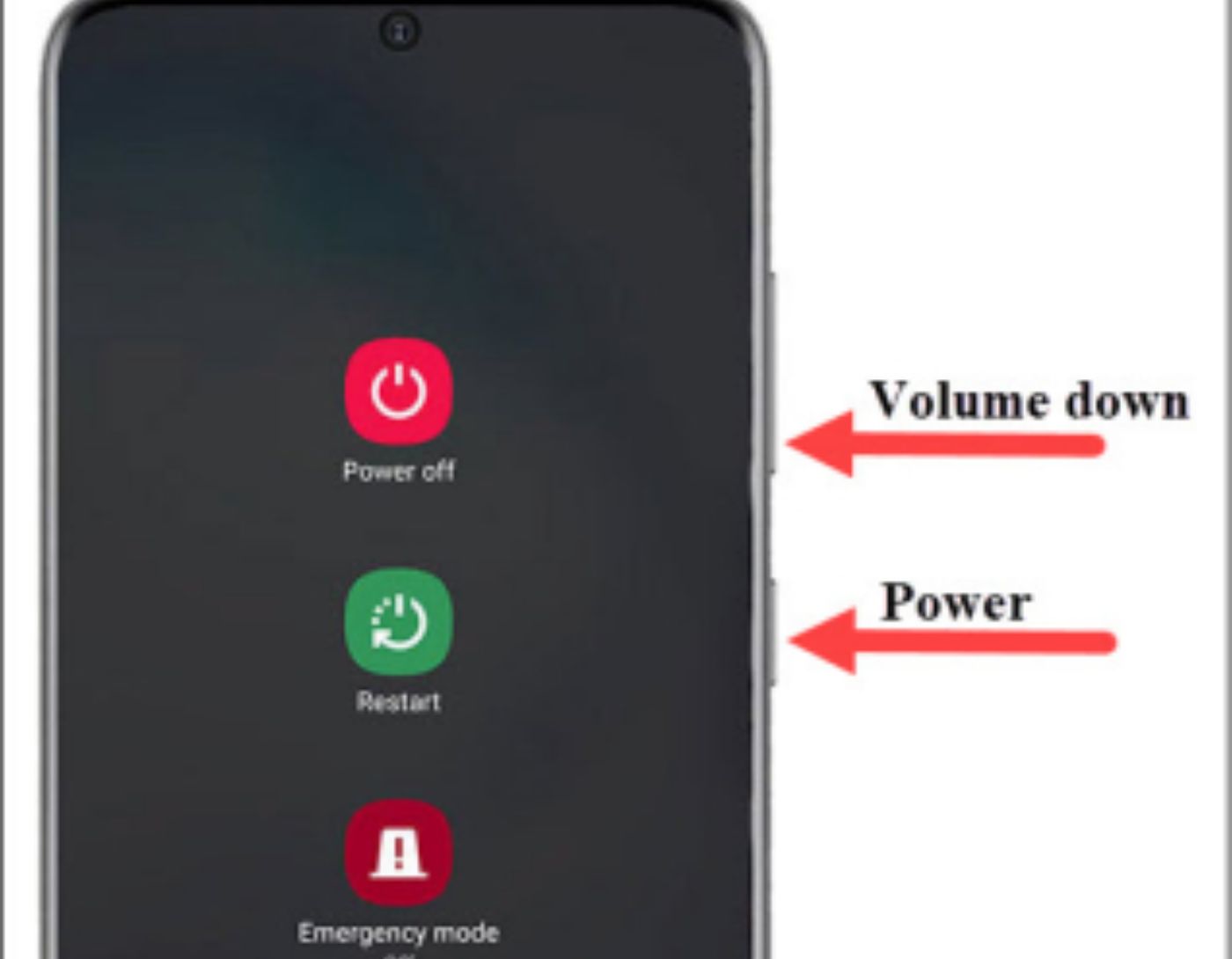
If you're experiencing random vibrations on your iPhone or Android device for no apparent reason, the quickest and most straightforward option is to restart your device. The process for shutting down each device may vary, but the technique is almost the same.
Press and hold the power button until the available power settings menu appears.
When using an Android device, select Restart and then tap the Restart option again.
If you want to restart your iPhone or turn it off, you can do this by pressing and holding the power button for a long time and then sliding the power option that appears on the screen.
Method 2: Disable All Vibrations
Disabling all vibrations is another simple way to stop vibrations for most mobile phones. Here’s a guide on how to disable vibration settings on your iPhone or Android device.
iPhone
Step 1: Open the Settings menu and go to the "General" section.
Step 2: Then navigate to the general menu and select the "Accessibility" option.
Step 3: Next, scroll down until you reach the "Vibration" section, and turn it off.
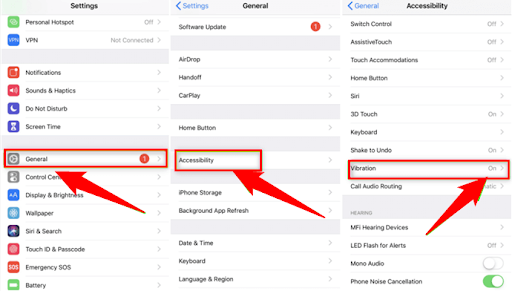
Vibration section.
Android Devices
Step 1: Go to the Settings menu on your Android device and select the "Sound and Vibration" option.
Step 2: Set the sound mode from Sound to mute.
Step 3: Then scroll down until you see the "System Sound/Vibration Control" option and click on it.
In the vibration menu, disable all available settings.
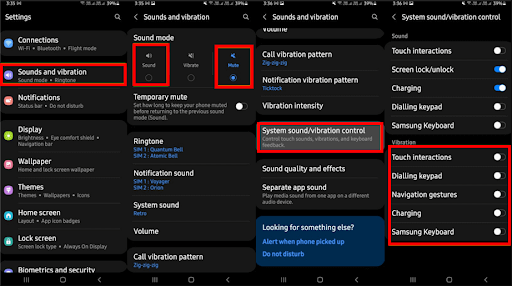
Sound and Vibration
Method 3: Close All Open Apps
Some apps on your Android or iPhone may be responsible for the random vibration issue. Therefore, if an app is running in the background, you should close it.
To do this, tap the three vertical lines available in the lower-left corner of your mobile screen, which will display all your recent apps. Simply tap the "Close All" option or swipe up to complete the task.
Method 4: Update Software
If a software bug is causing the random vibrations on your phone, updating the software is likely to resolve the issue. Follow the steps below to fix the problem causing your phone to vibrate randomly.
For iPhone
Step 1: Open the Settings menu on your iPhone. Select the "General" option.
Step 2: Tap on the "Software Update" option. This will check if any updates are available.
Step 3: Choose the "Download and Install" option. This will install the available software update.
For Android Devices
Step 1: Go to the Settings menu on your phone. Scroll down until you find the Software Update option.
Step 2: Select the "Download and Install" option to check if any updates are available.
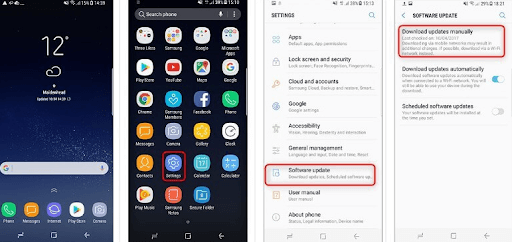
Manually download updates
Step 3: If a software update is available, click on the Install Now option to download it automatically.
Method 5: Factory Reset Your Phone
If your smartphone continues to vibrate after the update, the last option is to reset it. Your smartphone will lose all its contents or data if you perform a factory reset, which includes all apps, photos, movies, and other media. You should back up your smartphone before resetting it if you don't want to risk losing any important data.
On iPhone
Open the "Settings" app on your iPhone, then select the "General" option. Scroll down until you reach the "Reset" option > there are a few other reset options available; choose the one that says "Erase All Content and Settings."
On Android
Open Settings and scroll down until you see General Management, then click on it. To reset, select the Reset option > from the available options, choose "Factory Data Reset."
Conclusion
In this article, we discussed how to stop your Android or iPhone from vibrating for no reason. When your phone vibrates without a clear cause, you may find yourself wondering why it's happening. There are various reasons for such occurrences, and in this article, we provided some tried-and-true solutions to resolve the issue.
When your phone starts vibrating for no reason, start with the easy fixes first - restart it. If the vibrations persist, back up your files and reset it to factory settings.
We hope the information shared in this article helps you quickly resolve this issue. If you have any suggestions or additional information regarding this, feel free to let us know in the comments section below.


