


How to Use Meta AI on Instagram: This article discusses how to access Meta AI on Instagram, reveals how to utilize this AI-powered tool within the Instagram app, and explains how to use Meta AI to create AI-generated images, animations, and stickers.
Where to Find the Meta AI Tool on Instagram
The Meta AI tool is free for all Instagram users on both iOS and Android apps. You can access some of its features while creating a story on Instagram, but the main Meta AI tool is located in the messaging section.
Open the Instagram app on your device and tap the messages icon to open your inbox.
Tap the circular Meta AI icon in the search bar to start a chat with Meta AI. Alternatively, you can also initiate a conversation with the tool by typing directly in the search bar.
If you don’t see the Meta AI icon, you may need to update your Instagram app.
Type a request or message as you normally would when chatting with someone else on Instagram; you can also select any of the prompt templates that will appear in the chat the first time you use Meta AI.
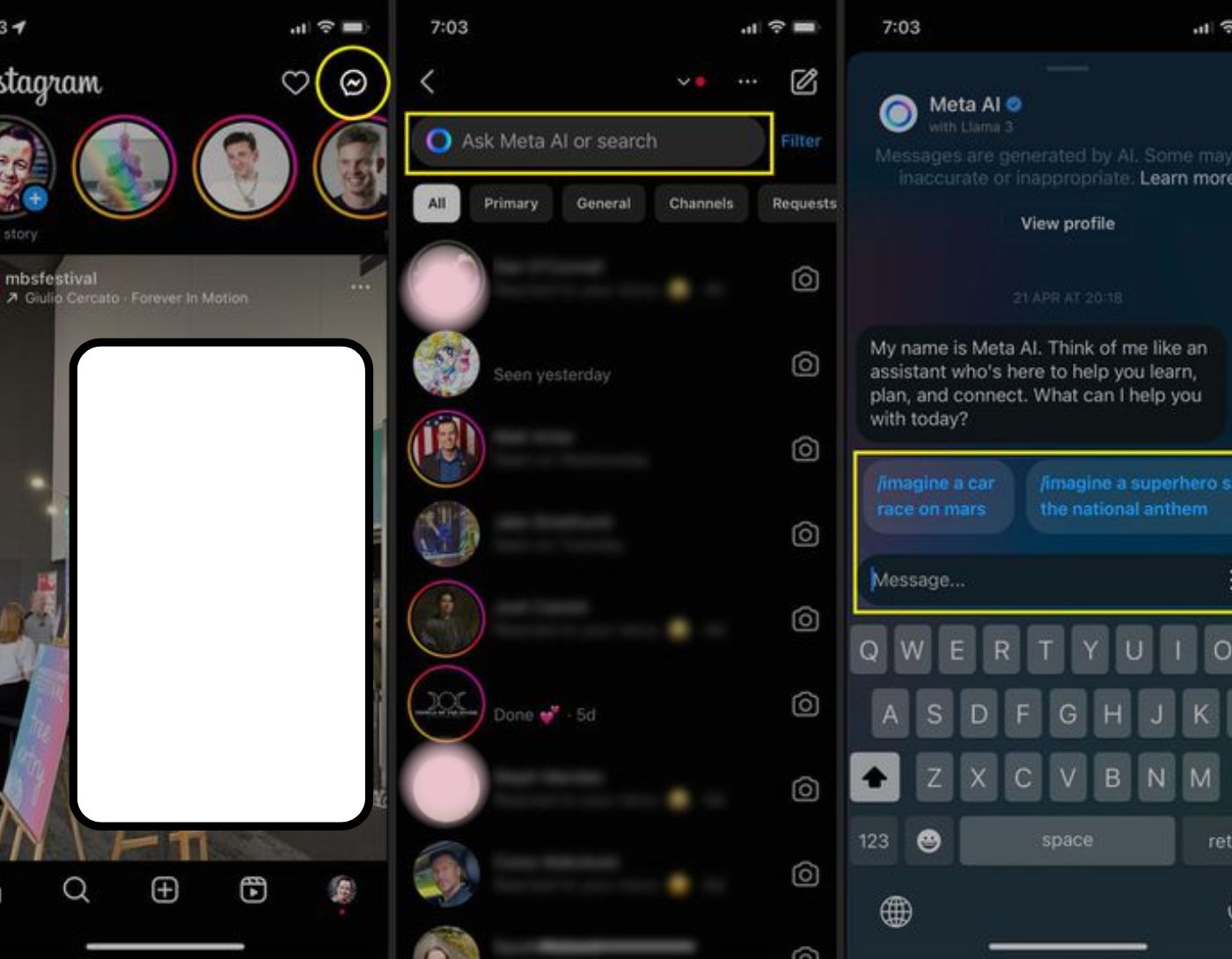
Three images of the Instagram app on iPhone highlighting the messages icon, Meta AI icon, and chat prompts.
For more examples of prompts, tap the hamburger menu icon, which looks like three horizontal lines. This menu contains a vast list of pre-written phrases that you can click on.
Similar to other AI tools, you can ask Meta AI direct questions like "What can you do?" or "How can I use you?"
To access Meta AI in a regular chat with other Instagram users, mention @MetaAI in the chat, followed by your prompt.
:max_bytes(150000):strip_icc()/Hamburger-menu-Meta-AI-8314b037dd3f445bbfd5518a567511e8.jpg)
Two images of the Instagram app on iPhone highlighting the hamburger menu icon.
How to Create Images Using Meta AI on Instagram
The Meta AI app features a built-in Emu function that allows you to create images and AI animations directly within Instagram messages for free. Here’s how to use Meta AI to create images on Instagram:
To create an AI-generated image, type "/imagine" followed by a description of the image you want to create within the message itself. In this example, we’ll use "a dragon drinking coffee."
In your description, you can add as many details as you like, such as actions, adjectives, and even artistic styles.
Don’t worry about forgetting the correct prompt language; you can also use informal language to create images with AI on Instagram. In this case, the informal prompt would be "create an image of a fairy drinking coffee."
Do not use "imagine" when using the "create an image..." request.
:max_bytes(150000):strip_icc()/Meta-AI-prompts-0544b0d4dbbd4d6db7620ea71dca370d.jpg)
To make changes to an image, tell Meta AI what modifications you’d like to see in the chat; we’ll say here "change the time of day to night."
You don’t need to start from scratch when making changes to an image; type your change requests directly after the image in the chat, or long-press the image, select reply, and type your request if the image isn’t the latest addition to the conversation.

Images from the Instagram app using Meta AI to create an image of a fairy drinking coffee.
You can also ask Meta AI to significantly change the mood of the image using some basic prompts; for example, we can use the phrase "make the fairy scary" to change the image from a cute fairy to a more frightening one.
One really cool thing Meta AI can do is turn the AI-generated image into a 3D model to create short animations. To do this with any image you’ve created, long-press the image, then tap "animate" and type your request.
You can also save your AI-generated image from the same long-press menu.
How to Create Meta AI Stickers on Instagram
One of the most praised features of Meta AI is its ability to create custom stickers. Unlike the other Meta AI functions found in messages, the AI sticker creation tool is located in the Instagram story menus.
Trying to create AI stickers in a chat conversation using Meta AI will pull text from websites via Bing about how to create stickers.
Here’s how to create AI stickers on Instagram using Meta AI.
Start by creating a story on Instagram as usual and select the stickers icon.
AI stickers work in both photo and text Instagram stories.
Tap on the AI stickers.
Enter a brief description of the stickers you want to create.
:max_bytes(150000):strip_icc()/MetaAI-stickers-4487aa9f26c6421f84c8a8c8f5b2398c.jpg)
Instagram Story screens highlighting the stickers, AI stickers, and text field.
Click create.
Scroll through the generated stickers and select the one you like.
Drag the new AI sticker and resize it on your Instagram story just like any other sticker.
:max_bytes(150000):strip_icc()/Meta-AI-sticker-options-c88d28f3583340d2b526c0f85df402fe.jpg)
AI stickers in the Instagram story editor highlighting "Rainbow Fairy" and the sixth sticker.
Repeat this for as many AI stickers as you want, then publish your story when you’re ready.
AI stickers that are created are not saved, so you’ll need to create new stickers each time you want to use them.
What Can AI Do on Instagram?
Meta AI is similar to other chatbots in that you can ask it questions and use it to pull information from search engines and websites. Here are some examples of things you can ask the AI on Instagram.
"What’s the weather like today?"
"Tell me a joke."
"Show me some posts about hijab fashion."
"What are the most popular tourist destinations in Qatar?"
Frequently Asked Questions
What is AI on Instagram?
The term Meta AI refers to the artificial intelligence technologies developed by Meta (formerly Facebook) that are integrated into Instagram. These technologies enhance the user experience by providing features such as automatic content recommendations, facial recognition, and personalized content.
How does Meta AI personalize my experience on Instagram?
Meta AI uses machine learning algorithms to analyze your behavior on Instagram, such as the posts you like, comment on, and interact with. Based on this data, it recommends posts, stories, and ads that match your interests.
Can I disable descriptive AI features on Instagram if I prefer not to use them?
Yes, you can control some AI features on Instagram. You can manage and control your ad preferences by going to settings > ads > ad activity to manage these preferences.
Is the Meta AI app safe to use on Instagram?
Meta implements privacy and security measures to protect user data processed by AI technologies on Instagram. However, users should regularly review and adjust their privacy settings to control how their data is used and shared.
Can Meta AI recognize faces in photos and videos on Instagram?
Yes, Meta AI includes facial recognition technology that helps identify faces in photos and videos uploaded to Instagram. This feature can be used to tag friends and family in posts and stories.
How can I provide feedback or report issues with Meta AI features on Instagram?
If you encounter issues or have feedback about Meta AI features on Instagram, you can report problems directly through the app. Go to settings > help > report a problem to send your feedback to the Instagram support team.
Conclusion
Remember that AI is designed to mimic a real person, so if you’re unsure about what to say, try talking to it as if you were having a real conversation with someone. As with all chatbots, make sure to verify what the bot says, and never provide it with sensitive information.


