


How to Clean Up Your Gmail: Keeping your professional emails, both internal and external, in one place saves you time. However, it requires a lot of organization and time commitment. Ultimately, if you don’t clean up your Gmail, you’ll end up with hundreds (or thousands) of unread messages.
A clean inbox can work wonders for email users. Since most professional communications and task assignments happen via email, dedicating some time to organize this space is crucial.
There are several ways to clean up Gmail, which can boost your productivity. But first, let’s explore some concerns that a cluttered inbox can raise.
Why You Should Clean Up Gmail?

An unorganized inbox can cause several issues during your workday. First, you have to sift through a lot of new messages every time you start working. In fact, Gmail statistics show that the average worker deals with around 120 emails a day related to their agenda.
This means that trying to find what you need when you need it will lead to losing focus on the tasks at hand.
Over time, this results in wasting a lot of time. Consequently, you tend to take longer to finish important tasks, as new information constantly fills your inbox.
However, there are some other reasons to clean up Gmail beyond just increasing productivity:
Better Communication
No one likes to wait long for a response. If your work relies heavily on email, it’s even more important to track incoming messages from colleagues and managers.
But it’s hard to do that unless you clean up Gmail. If your inbox is always cluttered and hard to manage, important emails might slip through your fingers.
This can lead to delays for clients and poor communication, such as two people working on the same tasks, missing deadlines, and incomplete projects. In fact, maintaining a quick response time to emails is key to building great business relationships, so clutter can hinder your work.
Naturally, maintaining excellent customer service metrics is essential for the success of any company, so that’s another reason to clean up Gmail.
Searchability
Searching through emails becomes more difficult if you know exactly what message you want but have no idea where to find it. When you don’t clean up Gmail enough, you risk losing important messages that you may need to search for later.
While this may not seem like a concern during a project, it leads to a lack of professionalism in all areas. For instance, let’s say your sales team is working on a presentation to pitch your services to other companies.
While these conversations happen over email, it’s important to track contracts, proposals, and any negotiations that take place.
Then, as the professional relationship grows, you can use this email history to provide tailored recommendations for additional services, promotions, and even bring up contract renewals when the time comes.
Digital Space Concerns
If you’re using a free Google account, which gives you access to a suite of Google Workspace applications, you have 15 GB of storage. This doesn’t seem like a lot, but as your business needs grow, so does the space you take up in the cloud. Gmail consumes some of this space, especially if you receive a lot of messages daily.
So, by dedicating your time to cleaning up Gmail, you’ll free up space for additional files and documents in your Google account. After that, you can use/edit/share them on Google Workspace applications, accessible from all connected devices.
Tips for Cleaning Up Gmail
If keeping a clean inbox is a priority for you, there are some steps you can take to achieve that. Here are the top tricks to ensure it stays organized in the long run:
1. Archive Conversations
Part of the problem with a cluttered inbox is that old emails linger there, taking up visible space. While you may not be able to delete them, archiving them can be a good idea since emails often contain useful information.
There are two main steps to using email archiving as a way to clean up Gmail. First, archive any completed conversation you may need to refer back to.
For example: if you’re having an email conversation about a project your department is working on, but you’ve now completed it, archive it.
To clean up Gmail by archiving, simply click the archive button at the top left of the message. It will be hidden unless there’s another reply to the topic or you search for it.
You can also archive messages by time. Go to the search bar and look for “before:[date]” with your preferred date. Then, select all messages that fit that date and click the archive button. Done!
2. Delete Old Threads
You can do the same process to delete threads and clean up Gmail. Instead of archiving, click the trash can button at the top left.
You can also search by date to ensure you delete old message threads from your inbox. Messages stay in the trash folder for 30 days before being permanently deleted, but if you’re sure, you can go ahead and empty the trash to clean up Gmail completely.
To simplify email management, consider using automation tools like Clean Email to automatically delete unnecessary emails. They can also help block spam messages and remove unwanted subscriptions.
3. Delete Unwanted Files
One reason your Gmail inbox might be full is the amount of files we receive every day. Some, like images or videos, take up more space than usual.
So if they’re no longer needed, how do you get rid of them? You can search for file type and size in the search bar. Then browse the list and delete anything you no longer need.
To find specific file types, search for “filename:[file type]”. One of the largest file types is PNG and MP4 files. But, of course, depending on your field, you may encounter other file types frequently.
You can search by email size using “larger:[file size]”. Typically, anything over 20 MB is too much for email.
4. Block Spam Messages
Spam messages account for nearly half of all emails, according to statistics. So by getting rid of spam in your inbox, you’ll clean up Gmail effectively. The button in the top left menu allows you to report suspicious messages, which teaches Gmail to automatically report similar emails.
Of course, the process isn’t perfect, so you should check your email folder to see if anything was reported incorrectly. But overall, staying away from spam is a good idea. Not only will your inbox be cleaner, but you’ll also be less susceptible to data leaks and phishing attempts.
5. Unsubscribe from Mailing Lists
Email lists, like marketing newsletters and distribution lists, can be useful. But if you’re receiving many irrelevant messages that clutter your inbox, it’s important to unsubscribe. Most of these emails have an unsubscribe link at the bottom, so you’ll need to do this manually.
However, there’s a great trick to find all the unwanted mailing lists by searching for the word “unsubscribe” in the search bar. This way, you can take a closer look at them and choose which ones to unsubscribe from.
6. Clean by Sender
Let’s say you have a lot of emails exchanged with specific senders, but these messages are no longer relevant. Perhaps the sender is a former collaborator, vendor, or organization you worked with. You might want to delete all threads involving them as they’re wasting your digital workspace right now.
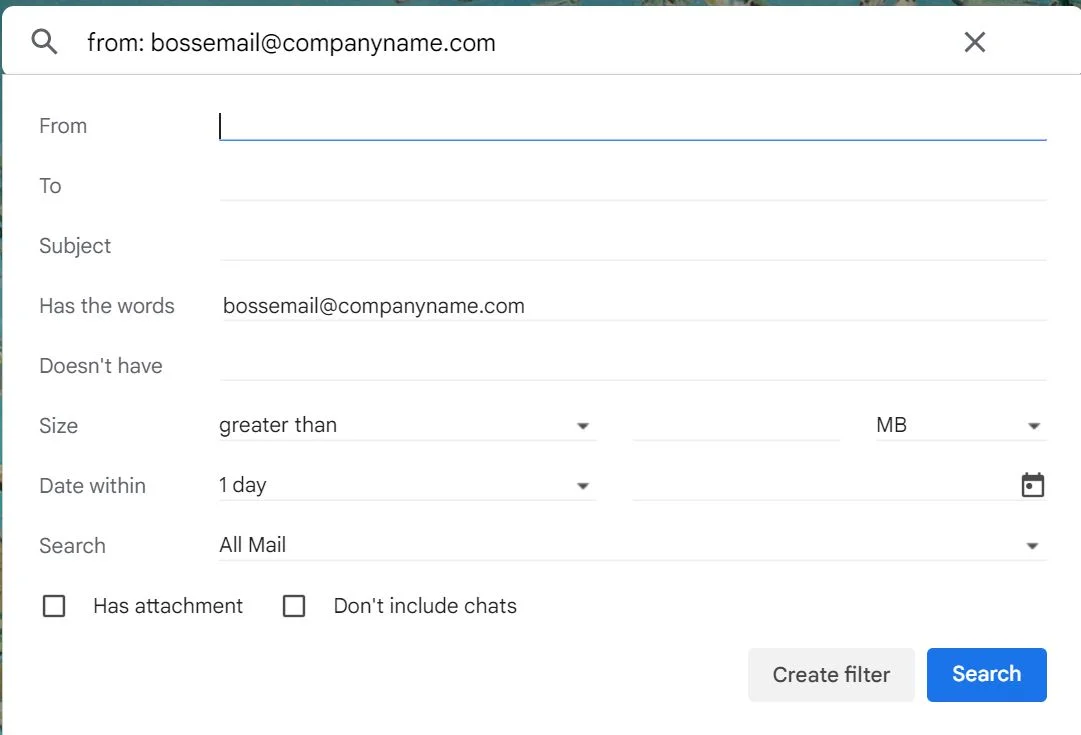
You can search by sender using “from:[email address]” to easily see/manage them all.
7. Clean by Subject
The same idea can be applied to cleaning messages by subject. You can type in keywords related to specific projects using the query “subject:


