

How to Block Someone on TikTok: Can you block someone on TikTok? The answer is yes, and with the help of this article, we provide you with the key techniques to easily block someone on TikTok.
TikTok is a fun platform for interacting with other content creators and social media users; it needs no introduction. However, while using TikTok, you may come across some users or videos that you might not like. In such cases, the best solution is to block that user's content or profile, which will prevent you from seeing their videos anymore.
With the help of this article, we will discuss how to block someone on TikTok.
How to Block Someone on TikTok
In the upcoming sections of this article, we will learn how to unblock or block someone on TikTok. There are various methods or techniques you can use to do this, so stay with us.
How can you unblock someone on TikTok?
If you feel that you have blocked someone by mistake, or if there is someone in your blocked accounts list who posts engaging videos that you want to watch, TikTok gives you the opportunity to unblock them. This can be approached from two different angles, so let’s take a look at how to unblock on TikTok.
Unblocking Using the Blocked List
This technique can also be used to unblock multiple people.
Log into your profile and take a look at your profile page.
You can see the hamburger icon in the upper right corner of your screen, or there may be three horizontal lines; click on it to proceed.
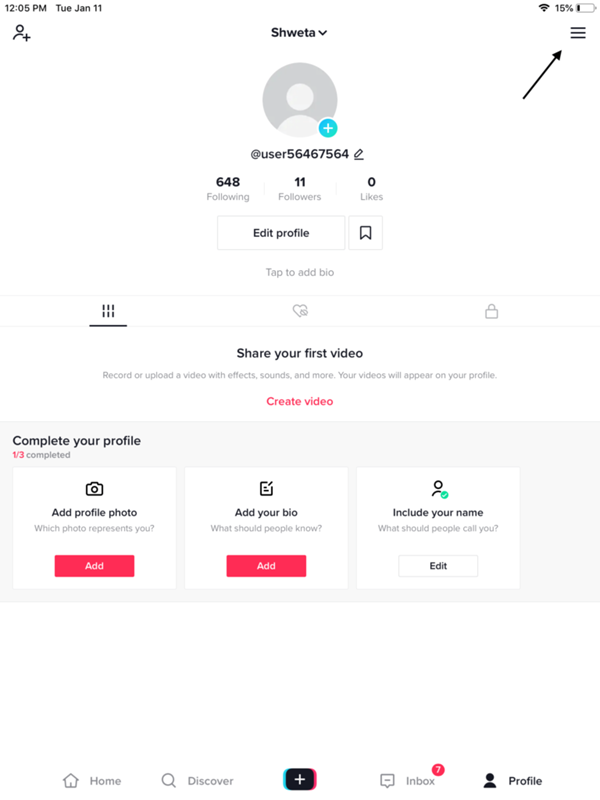
Select settings and privacy from your list.
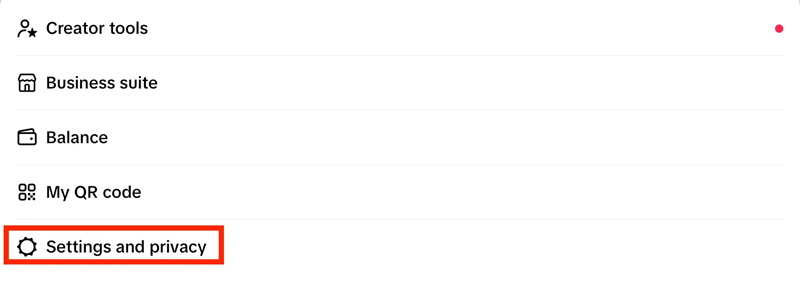
TikTok settings and privacy
This time, choose privacy.
At the bottom of the page, you will see the option to view blocked accounts; select this option.
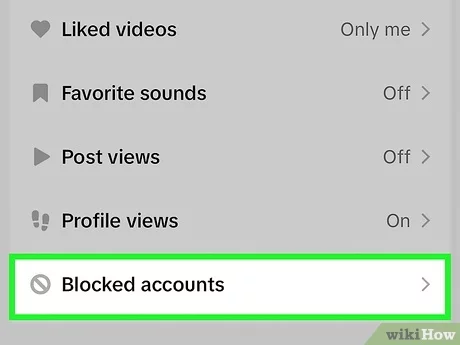
View blocked accounts on TikTok
You can now see all the accounts you have blocked. To unblock the accounts you wish to remove from the blocked list, you need to select the unblock option.
Unblocking Using the User Profile
With the method below, you will proceed to unblock someone from their profile by following all the necessary steps.
Go to the profile of the person you want to unblock (search for their profile or find it otherwise).
In the profile, you should click on the arrow that appears in the upper right corner.
From the menu, select the unlock icon.
What happens if you accidentally block someone on TikTok? Let’s take a look at the answer to this question below.
What Happens When You Block Someone on TikTok and What Does It Mean?
After blocking the account, there are several activities that the person will no longer be able to do. Let’s take a look at what it means to blacklist someone on TikTok:
Your profile will be hidden, along with any videos you upload to TikTok Live and other videos from the person you blocked. It will seem as if you have disappeared from their TikTok world.
All direct messages and chat messages sent from the blocked account will be terminated immediately; there will be no more direct messages, and you won’t be subjected to any unwanted contact.
This means that the blocked person will not be able to comment on the videos you post, and the blocked account will not communicate with you in any way on TikTok, as the platform prevents such communication. On the other hand, if you block an account, you will no longer see the things they post.
How to Block Someone on TikTok? (Combined Method)
If you are the target of a large group of users who dislike your meaningful content and receive many hostile comments on the materials you post, TikTok provides you with the right option to block multiple users at once.
As a measure to protect yourself and your followers alike, the best solution is to block spammers and scammers collectively. On TikTok, you have the ability to block up to one hundred users at once without having to go to each person's profile. Now, let’s take a look at how to block multiple users on TikTok at once.
Press and hold the comment from the account you want to block for a long time; just tap the pencil icon in the upper left corner of your screen, which will provide you with a variety of options.
Select manage multiple comments from the menu, which will give you the ability to select several comments from people you believe are engaging in fraudulent activity or making hostile comments. Choose all the accounts you want, with a maximum of one hundred accounts.
There will be two options available to you; select block accounts.
TikTok will ask you for confirmation; use the block accounts option again.
So, this is a straightforward and effective way to get rid of unwanted accounts in just minutes. If you want to block a single user on TikTok, we will explain how to do that on both desktop and smartphone.
How to Block a User Using Desktop?
Note: The steps to block someone on TikTok from a device running Windows are the same as those for macOS as well.
If you, as a TikTok user, are using the desktop version of TikTok, here’s how to block someone on TikTok. Follow the steps mentioned below.
Use a desktop computer to log into your TikTok account.
Find the profile of the person you want to block and click on it. You have the option to search for the profile using the search bar, or through the notifications page, or from the For You page.
When you are on the user’s profile, hover your mouse over the three dots and click on them.
The next step is to select the block option.
Assuming you are sure you want to block, you must then confirm the message, and you’re done!
This is how you can easily block anyone using the desktop version of TikTok.
How to Block a User Using a Smartphone?
Note: The steps to block someone on TikTok from an Android device are the same as those for an iPhone or iPad as well.
Log in using the TikTok app on your mobile device.
Go to the profile of the person whose account you want to block; you can locate profiles in several different ways:
Notifications and alerts: If you have blocked a user who recently liked or commented on your materials, you will go to view their profile through the alerts you receive.
Search bar: If you know their username, you can locate their profile using the search bar.
If their video appears on the For You tab, you can access their profile by clicking on their username.
If you are currently on the user’s profile, you should look for the share arrow in the upper right corner of the screen. The share option is represented by these dots.
To block anyone, select block from the option that appears; a confirmation notification will ask you if you are ready to proceed with the process.
To complete the procedure, you must confirm the block by clicking the confirm button in the confirmation message. After completing this action, TikTok will prevent this account from interacting with you in the future.
Conclusion
In this article, we discussed how to block someone on TikTok. TikTok does not send notifications when someone is blocked, so there’s no need to worry about the blocked account receiving an alert during the blocking process. Once you remove someone from your contacts list, they will no longer be able to communicate with you, see your posts, or locate your profile. However, there are some exceptions to this rule; you will still be able to participate in the same group chats and watch the same live streams from time to time.
If you have any further inquiries, feel free to reach out to us using the comments section below.


