


File Size: Multiple ⏬ Direct - File Extension: RAR - Best Methods for Uninstalling Programs from Your Computer
Best Methods for Uninstalling Programs from Your Computer
In the name of Allah, the Most Gracious, the Most Merciful
We will explore the best methods for uninstalling programs installed on your computer. It is known that some programs allow you to uninstall them using an uninstaller tool that comes with the program, but this tool may not completely remove the program and can leave some files behind.
In this post, we will learn how to completely remove a program using several methods and tools.
Method One: Control Panel
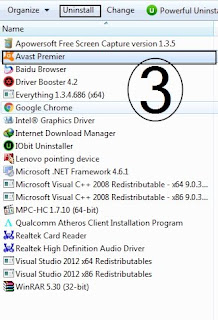
Windows provides you with a list containing most of the programs installed on your computer, and you can uninstall the desired program by accessing this list. All you need to do is press the Windows key on your keyboard while holding it down, then immediately press the letter 'r'. A window will open where you can type 'control panel'. Once the list opens, you will find the 'Programs' option, and directly below it, 'Uninstall a program'. Enter this option, and in the final list that appears, you will see the installed programs. Just select the program you want to uninstall, and you will find the 'Uninstall' option at the top of the list. Click on it, and the uninstallation process will begin.


Method Two: AV Uninstall
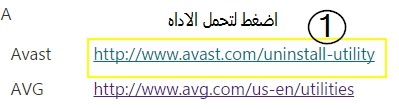
AV Uninstall is a website that includes a large number of tools for uninstalling programs and contains almost all programs.
Using the site is easy and straightforward. Visit the site from here AV Uninstall, and you will find a list of all security programs. However, this list does not contain the programs themselves, but rather the tools for uninstalling them. Choose the program you want to uninstall, and it will direct you to a page to download the tool. After downloading the tool, open it, and the uninstallation will start immediately.
Method Three: Everything
The Everything tool is easy and simple to use. All you need to do is type the name of the program you want to uninstall, and the tool will display any file on your computer that has the program's name. The Everything tool is very small, not exceeding 3 MB. Download it according to your computer type, whether it's 32-bit or 64-bit.
Download the tool Everything 32-bit
Download the tool Everything 64-bit

Method Four: Revo Uninstaller
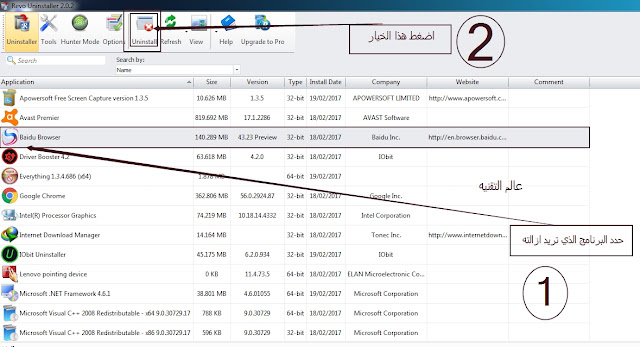
Revo Uninstaller is the most powerful and easiest tool to use among those mentioned. It is highly efficient and literally destroys the program, leaving no trace behind. However, it is worth noting that it does not include all programs on the computer, but it covers most of them. Its size is very small, and its usage is easy and straightforward.
Download the tool:
Method Five: IObit Uninstaller
IObit Uninstaller is definitely the best and most popular program among all those mentioned, as it belongs to the well-known IObit company, which has several programs. We have previously discussed IObit Uninstaller on the Tech World blog.
The program has a high capability to uninstall programs. It is not free, but a license is available.


To download the program
: IObit Uninstaller
To download the activation for the
32-bit version
_IObit Uninstaller
To download the activation for the
64-bit version


