


Peace be upon you
In this new post, we will explore Clip Converter, a fantastic site used for trimming specific parts of videos and supporting various formats including MP3, M4A, AAC, Video MP4, 3GP, AVI, MOV, and MKV. You can convert from MP4 to MP3 without needing to download the video to your computer. We will explain how to do this with images and videos below (check the images and video below).
Clip Converter supports URLs from most popular sites, if not all, allowing you to copy the URL from Facebook, YouTube, Twitter, Yahoo, and others, paste it into the site, and within moments, with a few adjustments, the site will begin the task of trimming and converting the video to its new format if you choose to convert it to another format. The size of the video is not significantly affected by these operations.
Initially, the site is completely free, meaning you won't find the site's logo on the video you trimmed using the site. Additionally, the site supports multiple languages, although Arabic is not one of them; it supports English, French, German, and others. The interface of the site is very simple and easy to navigate, and you can upload, convert, and trim videos in various qualities depending on the site and the person who uploaded the video, with the site allowing up to 4K quality.
Now, let's explain how to use the site
1 👉 Go to the site using this link ( here)
2 👉 Copy the URL of the video you want to convert or trim
3 👉 Paste the video in this box

4 👉 Choose the video format from these options

5 👉 A set of settings will appear; follow the image
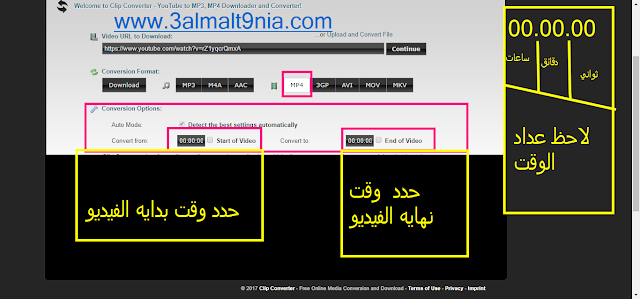
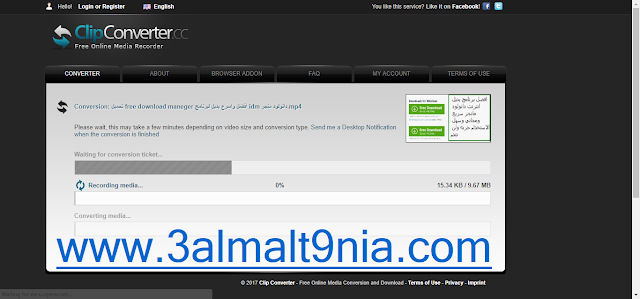
6 👉 After that, click on start to begin converting and trimming the video
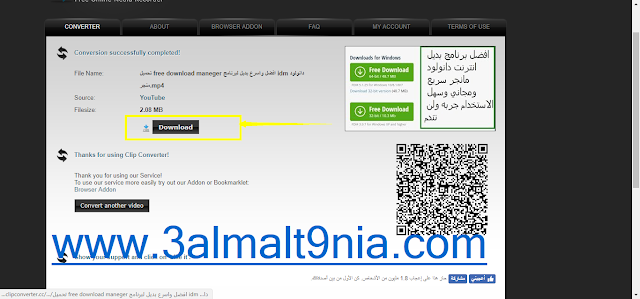
7 👉 The final step is to click on the word download
Watch the tutorial video (( Don't forget to subscribe ))


