

FlexClip: A fast and efficient video maker for creating digital ads and social media content
Are you looking for the most user-friendly video creation and editing software for digital advertising and social media posting?
If so, you’ve come to the right place. This time, I will introduce you to an easy-to-use online video maker that allows you to create videos in minutes, even if you’re a beginner. The platform is called FlexClip.
What is FlexClip?
Do you want to share your story with the world through video? Get everything you need with FlexClip. Besides being versatile, FlexClip is one of the fastest video makers and editors available, helping you create stunning videos in just a few minutes. With FlexClip, you can create promotional videos, storytelling clips, ad videos, Instagram stories, social media videos, product videos, music videos, educational videos, and much more.
What are the benefits of using FlexClip?
When you decide to switch to FlexClip as your chosen video maker and editor, you will immediately enjoy the following benefits:
1. Save time and effort
With FlexClip, you only need a maximum of 10 minutes. Yes, you will be able to create a video using drag-and-drop tools without needing to download any additional software on your computer.
2. Save your money
FlexClip offers very affordable and transparent pricing, starting with a free plan, a Basic package at $4.99 per month, and a Plus package at $7.99 per month. In fact, if you choose an annual plan, you can save 50% off the regular price.
3. Access to millions of stock photos, videos, and music
FlexClip has a library of millions of free stock photos, videos, and music that are continuously updated. All options can be used for commercial purposes.
4. Modern and flexible templates
You can maximize your videos using a variety of templates with FlexClip. The template library covers many themes and categories, including social media, business, promotions, education, and more.
5. Ready-made components
Edit your video using flexible editing tools like transitions, filters, and text animations that you can choose from in FlexClip.
The intuitive interface of FlexClip makes it essential for anyone struggling with digital advertising and social media posting, requiring no professional video editing experience.
Who is FlexClip particularly important for?
1. Websites and blogs
Bring your website and blog to life with video storytelling. Use the FlexClip Storyteller option to get started.
2. YouTube channels
You can increase your viewers on your YouTube channel using FlexClip to create music videos, educational video tutorials, video lists, video subtitles, and various other videos in a short time. Wait a few days, and you’ll get more than you expected.
3. Video ads
Video ads displayed on AdSense will be active when users click the play button. FlexClip has advanced features that can attract users to click the play button on your video ads.
4. Social media video posting
In addition to using video ads, businesses also establish their presence through social media platforms like Facebook and Instagram. Video posts on these social media platforms can only be a maximum of one minute long. FlexClip is the fastest and most impressive solution for creating video posts on social media.
How to use FlexClip?
First, access FlexClip through this link https://www.flexclip.com/ and then log in or sign up for an account to get started. You don’t need an account to use FlexClip, but with one, you can save your projects in the cloud without any data loss. You can connect your account to Facebook or Google.
On the next page, select the 'Create New' button, then start from a template or a new blank project.
Upload your materials by clicking on Add Local Media. You can now choose your image, video, or background music from your computer. Alternatively, browse the FlexClip stock library and select the materials you want.
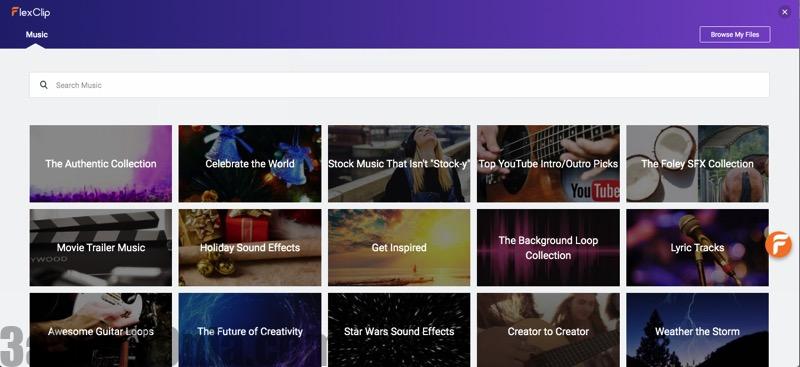
Once you’ve added your materials, you can now add text to your video. FlexClip offers pre-made text animations. Choose your favorite text animation and edit the font, color, size, and more as you wish.
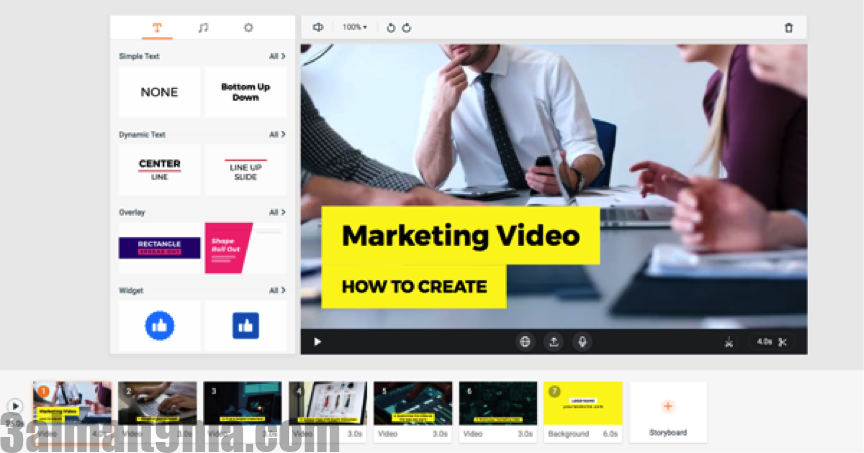
To further customize your video, you can apply transitions between slides or add special filters with just one click.
When you’re done, click 'Export Video' and choose the quality to download it.
Conclusion
FlexClip is a fantastic platform for creating stunning videos. Are you ready to give it a try? Create your videos with the power of simplicity and exceptional functionality using FlexClip. No matter what purpose you want to create videos for, FlexClip will help you achieve it.


