


File Size: Site Explanation⏬? - File Extension: RAR - How to create a PayPal account without needing a Visa card
Welcome, dear followers, to this new topic where we will discuss how to create a fully functional PayPal account without needing a Visa card, allowing you to send and receive money easily.
The steps we will follow are as follows:
Requirements
1: Obtain a US address
2: Get a US phone number
3: Acquire a US ID
Method of Operation
1: To get a US address, simply visit this website
**here **
Fill in the details as follows:

Select your gender in the highlighted box in black
And choose (state: New York (NY) in the highlighted box in red
Then click generate
You will receive a result like this:
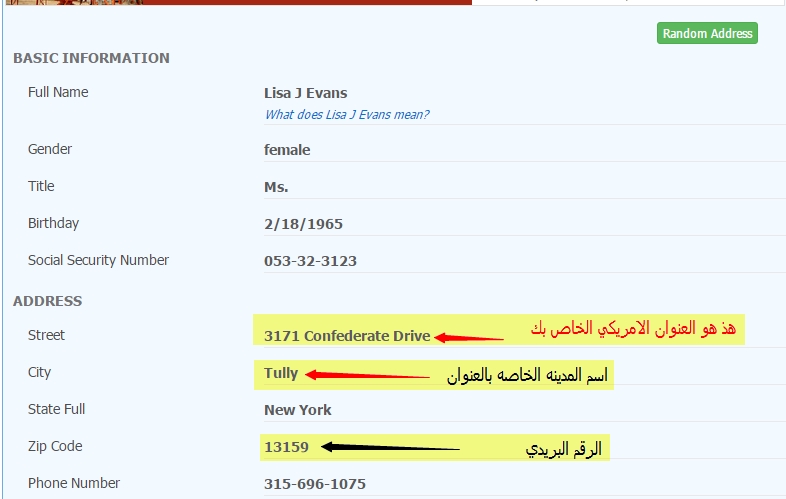
Keep this website open in a tab as we will need it when filling out the PayPal information
Obtaining a US phone number
Go to this website ** here ** to create a US phone number and register either through Facebook or by entering your details
After registering on the site
You will see a page like this; click as shown in the image ((text & call online))
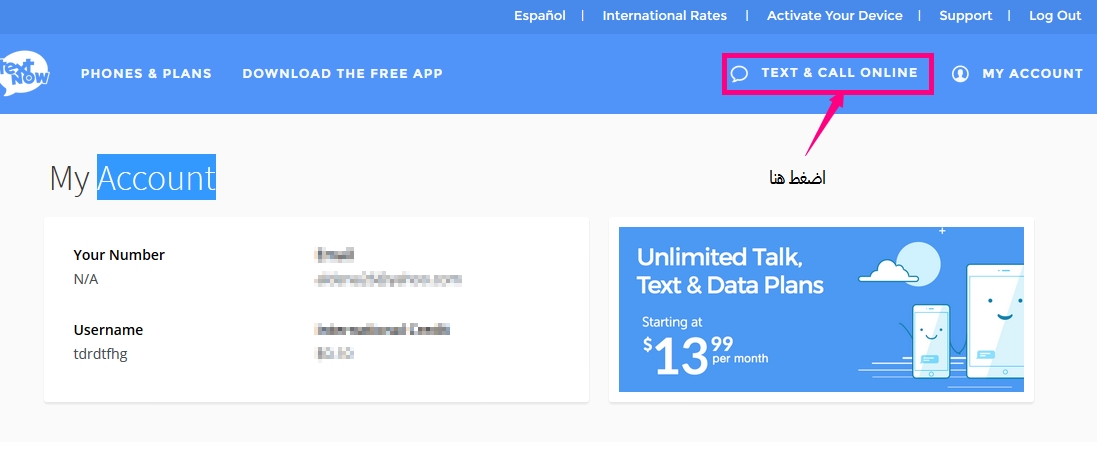
After doing this, you will see an image like this; enter any three random numbers

Your US number will appear like this; do not close the site window, keep it open as we will need the number for creating the PayPal account
We will also need this site, so do not close it
Obtaining a US ID
All you need to do is download the extension that changes your device's ID to a US ID
To download the extension for Google Chrome **here **
To download the extension for Firefox ** here **
After downloading the extension, you will need to register
To make the extension work, register either by entering your email
and setting a password or by registering through Facebook

After entering your details, you will have completed the registration task, and now it's time to change your ID. Follow the instructions as shown in the image

After this step, everything is ready to create a PayPal account that you can use to send and receive money.
Finally, creating the PayPal account
Go to the official PayPal website ** here **
And start creating a new account by clicking on SIGN UP
Select personal account
Then we will fill in the details as shown in the image; some may see this image in English, but that's okay, just follow along

After entering your details, click continue
</


