


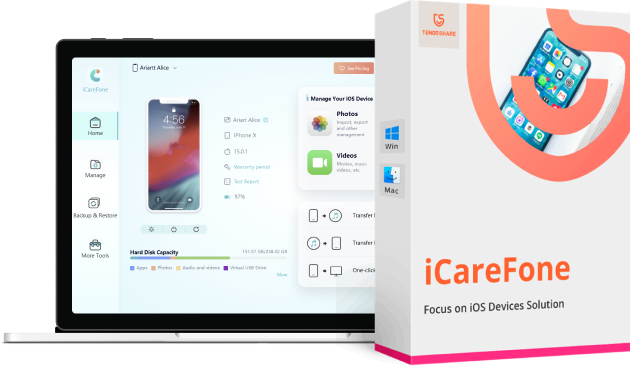
Overview of Tenorshare iCareFone
Smartphones can store large amounts of files and documents, as well as run various applications, which means they can encounter the same issues as your computer when it comes to unwanted files and slow response times. Therefore, it can be beneficial to perform regular cleanups and backups in case you need to restore them later.
Tenorshare iCareFone is a software tool that helps you keep your mobile phone in peak condition by removing unnecessary files from its memory and speeding up the entire operating system. To achieve this, you can perform cleaning actions, free up disk space, and improve response times and accessibility.
Upon startup, you can check the name, type, capacity, version, and serial number of your connected iOS device, along with the last scan, cleanup time, and backup. This is also where you can quickly access the file manager, junk file cleaner, backup and restore feature, ad remover, and iOS installer provided by Tenorshare iCareFone.
The application can be used as a means to transfer content from your phone to your computer quickly and efficiently. Thus, you can copy anything from contacts, notes, music, and bookmarks using a USB cable connection between the devices. As expected, these files can be previewed within the main window.
Another interesting feature is the backup and restore function, which can detect any available backups on your iPhone or iPod or create new ones as well. Additionally, you can also restore previous states of the file system or delete them entirely to free up more disk space.
Overall, Tenorshare iCareFone offers a wide range of features that can be used to maintain your iPhone, iPad, or iPod. Moreover, the user interface is clean and has intuitive functions with separate tabs for each type of operation you may want to perform on your device.
How to Use Tenorshare iCareFone for Phone Repair
Note: The software supports Arabic 100% and you can switch between languages and select Arabic through the program settings
Download the software Tenorshare iCareFone
Special thanks to the video source
Channel: Ali Abdelwahab on YouTube
Features of Tenorshare iCareFone
- Transfer music, photos, videos, contacts, and SMS without restrictions
- Backup and restore your data selectively and instantly
- Save your iPhone/iPad/iPod from common iOS issues
- Enhance your device's performance
- Restore WhatsApp Backup to iPhone, iPad, and Android
- Admit transferring WhatsApp from iPhone to Android and vice versa
- Transfer and play your music collection from iTunes to devices.
- Always keep your photos and videos updated on iPhone, iPad, iPod, or computers.
- Manage your valuable data systematically: export, import, add new, or merge.
- Effortlessly copy other files from iOS devices to PC/Mac and vice versa.
- Single and batch transfer, two-way transfer, all allowed to make file sharing more flexible.
- No risk of data loss after restoration using iCareFone. You can be completely assured.
- Clear and straightforward file view for you to preview, access, and organize without hassle.
- Transfer files across devices without being restricted by the same Apple ID requirements.
- Provide a better way to back up your device without any restrictions. Everything is very easy.
- Fix various iOS issues like a pro. No complex technology required.
- Migrate photos and other media files like music and videos in just one click.
- Simpler and easier than iTunes or iCloud. Everyone can handle it easily.
- Rescue your smartphone from common iOS problems
- Backup and restore your device with ease
- Transfer and play your music collection smoothly
- Keep your photos and videos accessible across all devices
- Securely export and import your contacts and text messages

Transfer Videos and Photos
Built-in converter for encoding videos, displaying recommended settings, and connected to install an unlimited number of mobile tools directly from your computer. Quick and flawless video or photo conversions help you save your cherished memories on the desktop. You will find separate tabs containing all categories to browse, delete, restore, install, uninstall, and update.
Backup and Restore Data
iCareFone helps you save space by backing up data from your iPhone to your Mac or PC. You can view simplified multimedia files on other screens, export data from your mobile to your PC or new mobile, and save all important personal information, photos, and audio on your computer. With one click, your data will be backed up, and you can gain additional storage space on your phone.

Compatible with Windows
With diverse compatibility with all types of devices, the application has special compatibility with all types of Windows ———- Windows 10, 11, Windows 8.1, Windows 7, are primarily operating systems for running the application smoothly and reliably. Additionally, it requires 32-bit and 64-bit setup. Mobile users will have to wait a bit as the application is currently not available for mobile devices.
Fast and Reliable
The program performs multiple tasks like WPS applications adapted for desktop, document writing, email exchange, note-taking, and switching between many applications. Despite the challenging settings, the program offers fast and accurate simulation for a smoother user experience.

Easy Access
Tenorshare iCareFone with a computer software license for Windows is designed for laptops and PCs, offered to all software users as a free trial for a limited time, free download with potential restrictions. It belongs to the iPhone tool category and was developed by Tenorshare.
Conclusion
The software Tenorshare iCareFone provides comprehensive solutions for all your storage needs, and we highly recommend relying on this program for managing your device as it is efficient, fast, simple, and includes multiple options.


