PC Booster Premium is a professional tool designed to enhance the performance of Windows devices. It tackles slowdowns and freezes by cleaning temporary files, leftover program data, and precisely repairing the system registry. Upon startup, the program conducts a comprehensive scan for unnecessary components and data, allowing you to choose what to delete or keep, ensuring your personal files remain safe. Thanks to its simple interface and automatic scheduling feature, you can maintain your computer's speed and stability without needing advanced technical skills.
Main Features of PC Booster Premium
Now that we've briefly covered how PC Booster Premium works as a system cleaner and registry error fixer, let's dive deeper into its features and how they can positively impact your daily computing experience:
Comprehensive System Cleaning
The program scans for temporary files, remnants of uninstalled programs, and unnecessary browsing records. These files burden the system and negatively affect performance, so removing them helps speed up the device and free up storage space.
Registry Repair
It features a powerful tool to scan and fix corrupted or invalid registry entries, reducing unexpected crashes and enhancing overall system stability.
Boost Startup and Performance
By disabling unnecessary startup programs, PC Booster helps cut down boot time and improve system responsiveness. It can also optimize system settings to speed up application and game launches.
User-Friendly Interface
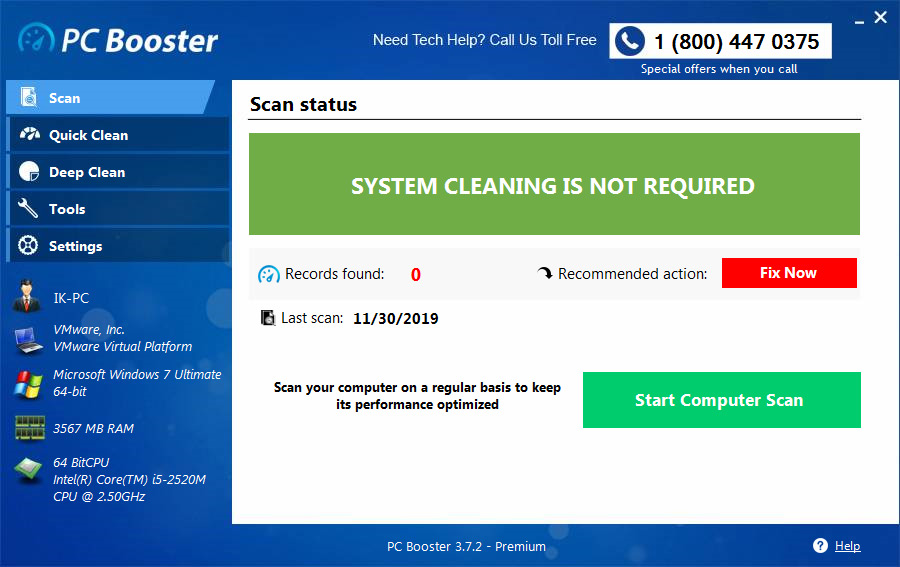
The program's interface is straightforward and organized, with clear menus and direct buttons, making it easy to use even for those without technical expertise. Users can easily select the type of scan or task they wish to perform.
Security and Privacy
The program offers tools to delete browsing traces, cookies, and usage logs, helping protect user privacy. It contains no spyware or annoying ads, as confirmed by user reviews on trusted sites.
Practical Tips
By using PC Booster Premium regularly, you’ll enjoy a more stable and faster-running device, with fewer chances of sudden freezes or hangs. We recommend running a full scan weekly and activating the night cleaning schedule if you leave your computer on overnight. Also, ensure you back up important files before any deep cleaning—even though the program is safe, it's always wise to be cautious.
Backup and Restore
Before any repair or deep cleaning, the program offers an automatic backup feature for registries and adjustable system settings.
If you notice any issues after maintenance, you can easily restore the previous state with a single click. It's an effective tool for boosting your device's performance, especially if you're dealing with system slowdowns or unnecessary file accumulation, combining simplicity with effectiveness.
It's a good option for users seeking a quick and easy solution to improve their device's performance without needing technical expertise.
Comparison with Other System Optimization Tools
When comparing PC Booster Premium with popular tools like CCleaner or Advanced SystemCare, each has its strengths and weaknesses, but PC Booster stands out for:
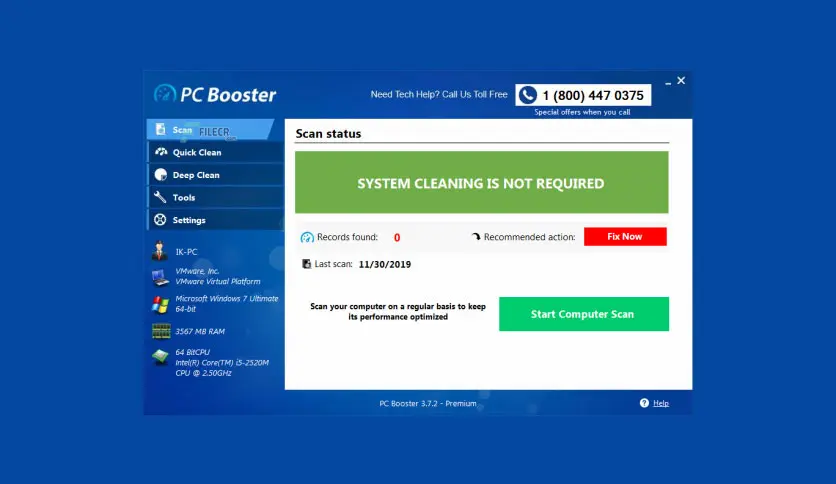
- A simplified interface that doesn't require technical knowledge, making it suitable for beginners.
- Small size and fast performance, without requiring large resources.
- Direct focus on cleaning and speeding up without overwhelming users with too many options.
- However, other tools might excel in areas like Arabic language support, live performance monitoring tools, or continuous updates.
Tips for Maximizing the Program's Benefits
- Use it regularly (e.g., once a week) to maintain device performance.
- Manually review scan results before deletion to avoid removing important files.
- Create a system restore point before making significant changes.
- Combine it with good usage habits like closing unused programs and updating the system.
Drawbacks of PC Booster Premium
Here are some drawbacks of PC Booster Premium that might affect some users' experience, despite its performance-enhancing benefits:
- It lacks live performance monitoring tools and doesn't display direct indicators like CPU or memory usage, a crucial feature in modern optimization tools.
- It isn't updated regularly, with the last known version dating back to 2020, meaning it might not fully align with the latest Windows updates or new devices.
- It doesn't support Arabic, with the interface available only in English, which might make it harder for some Arabic-speaking users.
- Lacks automatic backup feature and doesn't create a system restore point automatically before making changes, which could risk the system in case of an error.
- While simple, the interface is limited; it doesn't provide detailed explanations of options, which might lead to accidental deletion of important files.
- Doesn't offer advanced features like some competitors, lacking tools such as game performance optimization, advanced startup program management, or advanced privacy protection.
PC Booster Premium is an effective tool suitable for users seeking a straightforward and quick solution to enhance their device's performance. With its easy interface, clear options, and lightweight size,
it can be an ideal choice for those struggling with system slowdowns or unnecessary file accumulation. While it doesn't include some advanced features found in other tools, it serves its primary purpose: making your device faster and more stable without complication.

 File Name:
 Downloads:
 Version:
 Full Version:
 Created By:
 License Type:
 Release Date:
 Languages:
 Tags:
Tags: