If you're seeking a solution that combines precise design and manufacturing within a single comprehensive environment, downloading InventorCAM 2025 SP2 HF1 for Autodesk Inventor is the answer to your needs. This software not only generates CNC machine toolpaths but also provides advanced tools to speed up production, reduce errors, and achieve the highest quality in every piece. Whether you're an industrial engineer, run a manufacturing workshop, or aspire to enhance your production processes, this program offers you the power and flexibility to complete your tasks efficiently and professionally.
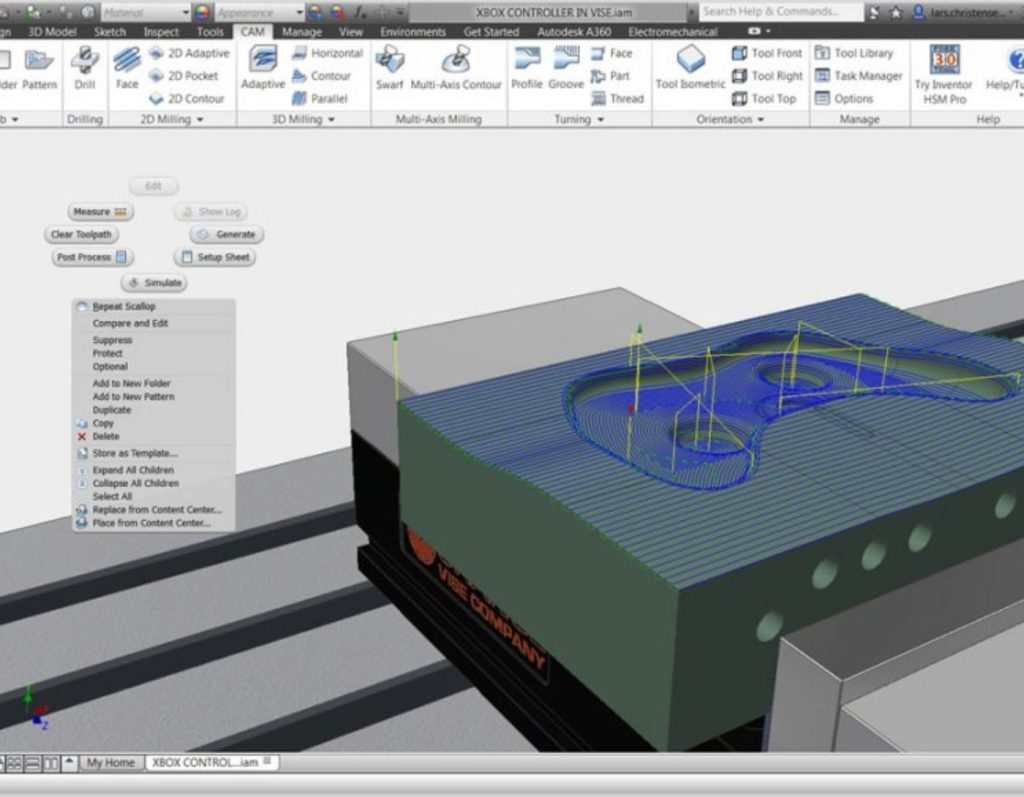
Overview of InventorCAM 2025 SP2 HF1 for Autodesk Inventor
InventorCAM is a specialized computer-aided manufacturing (CAM) software that functions as an add-on within Autodesk Inventor. It assists engineers and designers in transforming 3D models into precise operating instructions for CNC machines like milling and turning, without the need for external software.
InventorCAM is considered an advanced tool in the field of computer-aided manufacturing (CAM), used for executing a variety of precise industrial operations. One of its prominent uses is in milling, which allows for the accurate shaping of complex parts, supporting up to 5-axis operations that enable multiple movements simultaneously. It is also used in turning to manufacture round parts like shafts and pipes, providing precise dimensional control.
For those looking to combine multiple processes in one project, the software offers a Mill-Turn feature that integrates milling and turning within the same working environment, enhancing operational efficiency and saving time. Additionally, it supports Electrical Discharge Machining (EDM) technology, which is used to create very detailed features using electrical sparks, ideal for parts that are difficult to shape using traditional methods.
InventorCAM is compatible with Autodesk Inventor, functioning as a direct add-on within the design environment without the need to export files or use external programs, simplifying workflow and reducing errors. It also features an intuitive and user-friendly interface, allowing users to set up toolpaths quickly and efficiently, even for complex projects.

The software supports multiple strategies for generating toolpaths, offering users great flexibility in choosing the most suitable method based on the type of operation and material used. Thanks to these features, InventorCAM is ideal for small to medium-sized factories and manufacturing workshops that rely on CNC machines, as it helps improve production quality, reduce waste, and increase productivity.
InventorCAM is used to speed up production processes, improve manufacturing quality, and reduce waste, providing users with precise control over every step of the operation, making it a powerful tool in the design and manufacturing environment.
Features of InventorCAM 2025 SP2 HF1 for Autodesk Inventor

- Reduces calculation time in Adaptive Clearing operations, especially when dealing with large or multi-area models.
- Improves processing speed when disabling path sorting by depth.
- Fixes gouging issues that caused unwanted scratches.
- Prevents collisions with raw material during 3D Adaptive operations.
- Uses the "Box Test" algorithm to identify pockets that should be processed first, improving path order and saving time.
- Makes transitions between paths smoother, reducing stops and increasing operational efficiency.
- Works directly within the Inventor 2025 environment, making it easier for designers to use manufacturing tools without needing to export files.
- Saves engineers and designers significant time in setting up paths and reduces errors.
- For factories and manufacturing workshops, it reduces waste and improves the quality of the final product.
- For advanced users, it provides greater control over operational and design details.
- Functions as a direct add-on within Autodesk Inventor, allowing for design and manufacturing in the same environment without the need to export files or use external programs.
- The user interface is simple and organized, allowing for quick setup of toolpaths, even for users not specialized in CAM programs.
- Provides smart tools for efficiently processing paths, reducing operation time, and improving the quality of the final surface.
- Contains advanced tools to avoid collisions and errors during operation, protecting machines and parts from damage.
- Serves the needs of small to medium-sized factories that rely on CNC machines, offering practical solutions to enhance productivity and reduce waste.
System Requirements for InventorCAM 2025 SP2 HF1 for Autodesk Inventor

- Operating System: Windows 10 or Windows 11 (64-bit only)
- Processor: Intel Core i7 or equivalent AMD Ryzen – multi-core preferred for rendering and processing tasks
- Memory (RAM): Minimum 16 GB, 32 GB or more preferred for large and complex projects
- Graphics Card: Professional card supporting DirectX 11 or higher, such as NVIDIA Quadro or AMD Radeon Pro, with at least 4 GB of memory
- Screen Resolution: 1920×1080 pixels or higher
- Storage Space: SSD with at least 100 GB available, system on SSD preferred for performance boost
- Internet Connection: Required for license activation and software updates
Conclusion
We hope InventorCAM offers you an enhanced design and manufacturing experience. With its compatibility with Autodesk Inventor and support for milling, turning, and electrical discharge machining, you can turn your engineering ideas into precise, high-quality products. If you're looking for speed, accuracy, and error reduction in a familiar work environment, InventorCAM is the best choice.


 File Name:
 Version:
 Full Version:
 Created By:
 License Type:
 Release Date:
 Languages:
 Tags:
Tags: