

StopUpdates10 v4.7.2025.424 Free Download - 3almalt9nia
Free Download StopUpdates10 v4.7.2025.424 Latest Offline Installer - Easily allow or block Windows 10 updates.
About StopUpdates10
StopUpdates10 allows you to enable or block Windows 10 updates anytime you want. This app came at the perfect time for us. Our VMware setup started installing updates, causing slowdowns and errors, even though we had used similar apps to block Windows updates before. Microsoft changed how Windows updates work, rendering most update-blocking apps ineffective. Enter StopUpdates10.
Now, you can block or allow Windows updates again. Normally, it would be challenging to test how effective this program is, but we are in a unique position to know that Windows updates continue running within five minutes of starting VMware.
We're pleased to report that they stopped updating. We waited 30 minutes to be sure.
Updates are crucial for your safety. It's always recommended to update Windows. However, I find it really frustrating when Windows 10 interrupts my work and forces me to restart my computer to install its updates/upgrades. Unfortunately, there's no way to control Windows updates through the Windows interface.
Back in the days of Windows 7, you could control updates using the Windows Control Panel.
In the era of Windows 10, this option was removed.
Why is this a problem?
Windows updates can actually slow down your computer.
What if you need to complete urgent work or just want to play games, but Windows updates slow down your system and prevent you from doing so?
Windows Update can disrupt your work and gaming enjoyment.
You open your laptop just to send a message, but it starts with a black screen: "Upgrading Windows...".
You don't have time to wait for updates to finish. But you can't stop it!
You think you know a good trick to fix it. You just need to stop the Windows Update service and create some registry keys.
Ha! It doesn't work!
Microsoft prevents disabling Windows updates using several methods:
Special scheduled tasks (USOClient, Windows10Upgrade, UpdateAssistant).
The hidden service "WAAS Medic".
That's why I created a small but powerful tool, StopUpdates10, to regain control over my updates.
Features of StopUpdates10
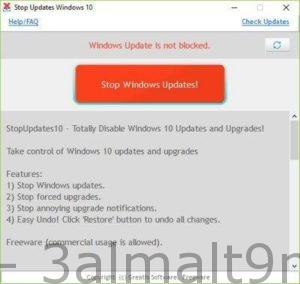
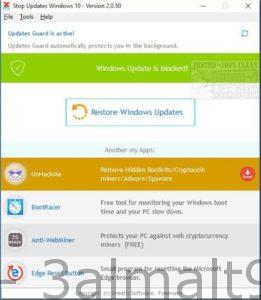
StopUpdates10 requires installation but is easy to use. By default, you should see 'Windows Updates are not blocked' in red letters and a red button that says 'Stop Windows Updates!' Once blocked, everything reverses to green letters with text saying 'Windows Update is blocked!' and a button that reads 'Restore Windows Updates'.
Additionally, Greatis offers links to its other free software, including UnHackMe, BootReacer, Anti-WebMiner, and Edge Reset Button.

 File Name:
 Downloads:
 Version:
 Full Version:
 Created By:
 License Type:
 Release Date:
 Languages: