

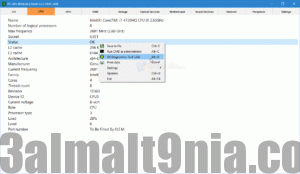
PC Info has been updated to the latest version: PC Info 4.0.2.294
PC Info Description
If you truly want to call yourself an admin user, you must first know everything about your computer, from hardware to software. PC Info is a software solution that consolidates all the essential data in this category to help users understand their devices' capabilities and how to utilize them more efficiently. The new PC Info has been redesigned and enhanced for the best possible experience.
It will quickly scan your computer and provide access to a variety of services and programs.
You can download the PC Info Tool from our software library for free. If you really want to call yourself an admin user, you must first know everything about your computer, from hardware to software. PC Info is a software solution that gathers all the necessary data in this category to make users aware of their devices' capabilities and how they can exploit them more efficiently.
- The new PC Info has been redesigned and improved for the best possible experience.
- It will quickly scan your computer and give you access to a variety of services and programs.
- The application not only provides valuable information about computer configurations but also gives you access to a series of controls that you frequently use.
PC Info is a software solution that consolidates all the essential data in this category to inform users about their devices' capabilities and how they can utilize them more efficiently.
Keeps You Informed About Your Computer's Configuration
First and foremost, it's worth noting that the program features a straightforward user interface that organizes information about your computer's hardware configuration clearly.
The application's capabilities serve a primary informative and descriptive purpose, with a series of sections you can switch between by clicking their names at the top of the main window. It should summarize the operating system, CPU, GPU, RAM, storage, optical drives, motherboard, audio devices, network, and peripherals, covering everything you need to know about the physical components you interact with when using your computer.
However, alongside this relatively fixed purpose, the utility includes a "settings" category where you can actually interact with the program itself. This is because it provides you with quick access to a series of application settings, useful commands, as well as services, processes, and applications.
In reality, there’s nothing you can’t access on your own, simply by navigating through Windows capabilities, but bringing all these controls together should definitely reduce the time required for these tasks.
For example, any of the following commands are available with a single click: access to the Recycle Bin, go to Task Manager, explore Control Panel, modify Windows Firewall, adjust date and time, and much more.
As for the options strictly related to computer information itself, they allow you to customize its behavior to make it as unobtrusive as possible. You can set it to run at Windows startup, keep it always on top, reset to default settings, close or minimize the system, and more.
PC Info Features
Quick scan of your computer
Access to a variety of services/programs directly from the application
Ability to change the program's theme
Option to add the program to the system tray
The program is translated into three languages: English, Русский, Українська
Get information about all system processes
The application not only provides you with valuable information about computer configurations but also gives you access to a series of controls that you frequently use.
• Quick scan of your computer
• The program is translated into three languages: English, Русский, Українська
• Retrieves information about all system processes

 File Name:
 Downloads:
 Version:
 Full Version:
 Created By:
 License Type:
 Release Date:
 Languages: