

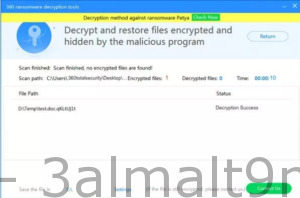
The 360 Ransomware Decryption program has been updated to the latest version: 360 Ransomware Decryption Tool 1.0.0.1276
360 Ransomware Decryption Tool can assist in decrypting files that have been locked for free. Currently, it can decrypt over 80 types of ransomware, including WannaCry and Petya.
Features of 360 Ransomware Decryption Tool
Attempt to recover data without paying the ransom
- This specific application promises to securely decrypt files that have been taken hostage by cybercriminals, allowing users to recover their data without having to pay a dime.
- It is compatible with the three types of malware mentioned above, but it also supports other variants of ransomware.
The 360 Ransomware Decryption Tool can help decrypt locked files for free. Currently, it can decrypt over 80 types of ransomware, including WannaCry and Petya. We were disappointed to see that it wasn't portable, which is something we believe every removal tool should be. Over time, it is known that more aggressive malware can easily prevent the installation of applications like this. The interface is straightforward, similar to other tools. Select the folders you want to scan and hit "Scan." Pressing "Cancel" returns you to the main screen. We chose to scan the UserMajorGeeks folder, which only contained a few files and folders from a clean Windows installation, and it took one minute and five seconds.360 Ransomware Decryption Tool is one of those essential tools for technicians. Scan times are reasonable, and there are very few tools that claim to decrypt over 80 different types of ransomware. While the chances are that it won't decrypt all eighty every time, it's worth a shot.
This software tool promises to become a real weapon against ransomware, providing you with a quick way to decrypt locked files.
Ransomware threats have become more prevalent in recent years, leading major security companies to focus on fixing or preventing these types of attacks. Ransomware is essentially a program that installs itself on your computer or hard drive partition, encrypting files and preventing you from accessing them. To regain access, the attacker then demands a sum of money to unlock your information - this is ransomware, in short, where the attacker takes your data hostage for a ransom.360 Ransomware Decryption Tools is a powerful anti-ransomware tool designed to unlock your files after a ransomware attack. The program attempts to decrypt the encrypted files and restore your access to that computer. It is currently capable of decrypting attacks carried out by WannaCry, Petya, GoldenEye, and other less common ransomware attacks.
If you are a victim of ransomware or just want to protect your data, we highly recommend using 360 Ransomware Decryption Tools; it’s free and does its job most of the time.

Select the target folder and let the application do the rest
- 360 Ransomware Decryption Tools has a simple appearance and intuitive controls, allowing the user to navigate to the folder that stores the encrypted files. The location where the decrypted files are saved can be customized, but that is the only available setting. After that, one must press the "Scan Now" button to start the decryption process.
- While the application does its work, users can see the currently scanned file, the number of encrypted and decrypted files, and the elapsed time.
- What users should keep in mind is that although 360 Ransomware Decryption Tools does its best to decrypt locked files, the process may not succeed every time.
A decryption tool with extensive ransomware support
- 360 Ransomware Decryption Tools are user-friendly and provide a simple way to decrypt files locked by ransomware, or at least that is the developer's intention. Although it may not work in all cases, it is worth trying before reinstalling the operating system and losing all data or paying the ransom demanded by cybercriminals.

 File Name:
 Downloads:
 Version:
 Full Version:
 Created By:
 License Type:
 Release Date:
 Languages:
