


Description of x-plore file manager:
X-plore is a dual-pane file manager with a tree view, supporting LAN/FTP/Root/Clouds and more.
● Dual-pane tree view
● Root, FTP, SMB, Sqlite, Picasa, Zip, Rar, 7zip explorer
● Access to cloud storage: Google Drive™, Dropbox, Box.net, Mega.co.nz, SkyDrive, Webdav, Yandex.disk, Ubuntu One, SugarSync, Dump Truck, Copy.com
● Application manager
● File management from a web browser
● Favorite folders
● Built-in viewers for images, videos, audio, and text
Quick view with zoom and slide for previous/next images
● Thumbnails for images and videos as well as various file types (depending on the associated app)
● Multi-selection is always available but not intrusive
● View APK files in ZIP format
● Sharing: Send files via Bluetooth, email, or any supported device, from anywhere
● Configurable buttons and keyboard shortcuts
This is a dual-pane explorer, displaying two folders simultaneously, allowing common operations like copying files from one pane to another.
X-plore shows the folder hierarchy in a tree view for clear navigation and quick switching to other locations.
You can explore the internal parts of your device, and if you are an advanced user, you can make changes to system data, backup files, uninstall unwanted apps, etc.
If you are a standard user, you can choose to hide the internal memory from view to ensure the system remains untouched.
You can easily view the contents of external storage on your device or USB memory.
The simple application manager allows you to view, run, copy, share, uninstall, and explore installed applications.
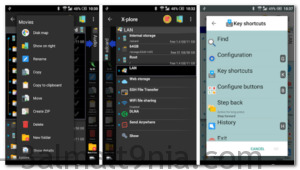
More about x-plore:
Access from a web browser on your computer
Manage files on your Android device from your PC.
Support for FTP and FTPS (secure file transfer protocol) access.
Multiple servers can be configured.
X-plore can display shared folders on other computers in the LAN (Local Area Network).
The system allows access to shared folders on computers connected to the LAN or even a remote server if it supports the SMB protocol.
X-plore can access multiple "Cloud" servers online, allowing access to their files.
You need to have an account with a supported web service, then you can access files stored online through X-plore.
Main operations are related to file and folder management. Viewing, copying, moving, deleting, zipping, extracting, renaming, sharing, and more.
Picasa albums
X-plore can insert images into Picasa albums, download them, create albums, upload images, delete them, and edit captions.
Archives (currently supported formats like Zip, Rar, and 7zip) are displayed as other folders.

 File Name:
 Version:
 Full Version:
 Created By:
 Release Date:
 Languages: