

With the evolution of operating systems and the increasing size of temporary files, having effective tools to keep your system clean and enhance its performance has become essential. One of the standout tools is Cleanmgr+, a modern and improved alternative to the classic Disk Cleanup tool found in older Windows versions. In this article, I'll highlight the key features of this program and explain why it's an excellent choice for Windows users.
What is Cleanmgr+
This free program helps free up hard drive space by removing unnecessary files such as temporary files, error reports, old update files, and internet browser leftovers. It was developed as a modern replacement for the Disk Cleanup tool, which Microsoft has gradually phased out.
Features of Cleanmgr+
Cleanmgr is one of the most powerful free tools available today for enhancing Windows system performance and cleaning out unnecessary files. It combines the simplicity of Disk Cleanup with the strength and flexibility of modern cleaning tools. Key features include:
Enhanced User Interface
This version features a simple and user-friendly graphical interface, allowing users to quickly and clearly navigate through different options, with an accurate display of the space that can be freed up.
Comprehensive Cleaning
The program supports cleaning:
- Previous Windows update files
- Log files
- Temporary internet files (Cache)
- Crash reports
- Windows Defender cache files
- Temporary files for all users
Support for Windows 10 and 11
The version is fully compatible with the latest Windows operating systems, including Windows 10 and 11, making it a safe and efficient tool for current users.
Fast and Lightweight Performance
The program is small in size and doesn't consume much system resources, making it ideal for older or less powerful devices.
Wide Customization Options
Users can select the files or folders they wish to clean, with the ability to save settings as a template for future use.
Silent Mode
The program can run without a user interface, which is useful for advanced users or when scheduling automatic cleanups.
What's New in the Version
- Improved overall performance and increased analysis and cleaning speed.
- Fixed some bugs from previous versions.
- Added better support for Windows 11.
- Enhanced language support and translation capabilities.
- More responsive user interface with precise detail display.
How to Use Cleanmgr?
- It can be downloaded from the developer's official site or trusted sources.
- Run the program as Administrator.
- Select the items you want to clean.
- Press the Clean Up button to start the cleaning process.
Tips for Using Cleanmgr Effectively
- Run it once a week to maintain optimal system performance.
- Avoid deleting sensitive system files if you're unsure of their function.
- Create a system restore point before performing major cleanups.
Impact of Cleanmgr on System Performance
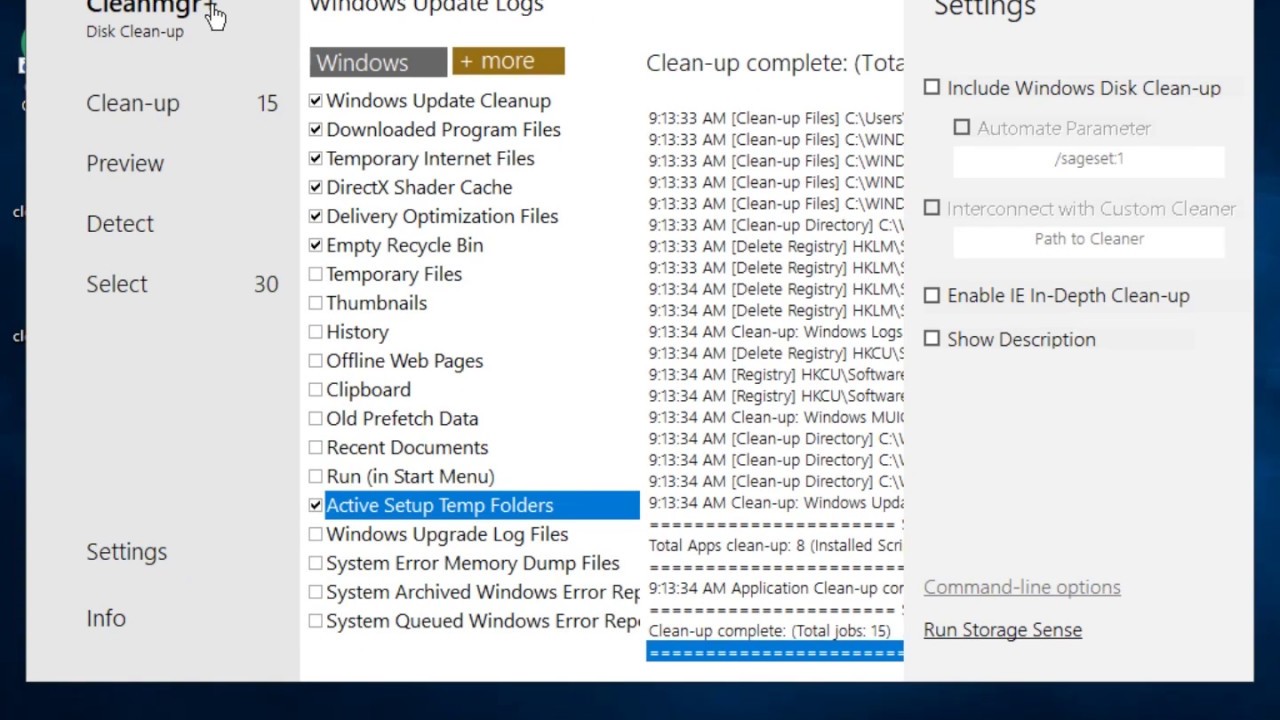
Regular use of Cleanmgr+ will noticeably improve boot speed, program responsiveness, and reduce sudden freezes. This is because removing hundreds or thousands of temporary files eases the system indexing burden and speeds up read/write operations on the disk.
Especially if you're using an HDD instead of an SSD, the results are usually evident after the first comprehensive cleanup, with users typically reclaiming 1-5 GB on standard systems, potentially exceeding 10 GB if cleaning hasn't been done in a long time.
Privacy and Security
- Cleanmgr does not upload any files to external servers; everything is done on your device.
- The version is signed with a trusted certificate to prevent tampering with the executable file.
- The program provides a log file you can review to see exactly what was deleted, useful for auditing or recovering files via backup.
How to Schedule Automatic Cleaning (Silent Mode)
- Open Task Scheduler from the Start menu.
- Choose Create Basic Task, and enter a name like Cleanmgr Plus Weekly.
- Set the Trigger to Weekly (choose a low-activity day like Friday evening).
- In Action, select Start a Program, and specify the path to Cleanmgr.exe.
Drawbacks of Cleanmgr
While Cleanmgr is an effective and useful tool for system cleaning, there are some drawbacks and considerations users should be aware of before using it:

Not Fully Open Source
Although it's free, the program is not fully open source, meaning users cannot directly verify the source code, which may raise concerns for those focused on privacy and transparency.
Limited Browser Cleaning Support
While tools like CCleaner support cleaning cache and cookies from all browsers (Chrome, Firefox, Edge, Opera...), Cleanmgr primarily focuses on Windows system components and doesn't offer extensive browsing data cleaning support.
Simple Design May Not Appeal to Everyone
Though the interface is simple and easy to use, it may appear too traditional or outdated to some compared to other programs with modern and attractive designs. Some users prefer more interactive or colorful interfaces.
Potential to Delete Important Files if Not Careful
The program offers advanced options like deleting system restore points, Windows updates, and old WinSxS files, which could lead to problems if the user is not aware of what they're doing, especially in systems that rely on these files for maintenance or rollback.
Lacks Additional Tools like Program Management or Disk Analysis
Unlike tools like CCleaner that offer features for uninstalling programs, managing startup items, disk space analysis, and finding duplicate files, Cleanmgr is limited to cleaning operations without any additional supportive features.
Doesn't Work Perfectly on All Windows Versions
Although it supports Windows 10 and 11 well, some users have reported compatibility issues with older versions like Windows 8.1 or when running on modified Windows versions (such as Windows Lite or Tiny 10).
Limited Official Documentation and Technical Support
Cleanmgr lacks a comprehensive official user guide or direct developer support. Most information comes from user experiences on forums, which may make it difficult for new users to understand the program's functions in depth.
Requires Running as Administrator Always
Some functions of the program only work if run with Administrator privileges, which may be inconvenient for some or hinder automatic running without manual intervention.
Interface Doesn't Officially Support Arabic
Despite its simple

 File Name:
 Downloads:
 Version:
 Full Version:
 Created By:
 License Type:
 Release Date:
 Languages:
 Tags:
Tags:


