If you're looking for a simple and fast video cutting program without needing technical expertise or complex tools, Xilisoft Video Cutter is the perfect choice for you. This software is specifically designed to meet the needs of users who want to remove unwanted scenes or extract specific clips from videos easily and accurately.
Whether you're preparing an educational video, a promotional clip, or just want to save a special moment from a movie or personal event, Xilisoft Video Cutter provides the tools you need to get the job done quickly while maintaining the original video quality without the hassle of re-encoding. Thanks to its support for multiple formats and easy-to-use interface, this software became a favorite tool in 2025 for anyone looking to cut videos efficiently and flexibly.
Xilisoft Video Cutter Program
Xilisoft Video Cutter is a specialized program for precisely dividing and cutting video files. It allows you to specify the start and end of any segment within a long video and save this part as a separate file. With its ability to handle a wide range of formats like MP4, AVI, MOV, MKV, and WMV, it lets you edit any type of file effortlessly.
What is Xilisoft Video Cutter?
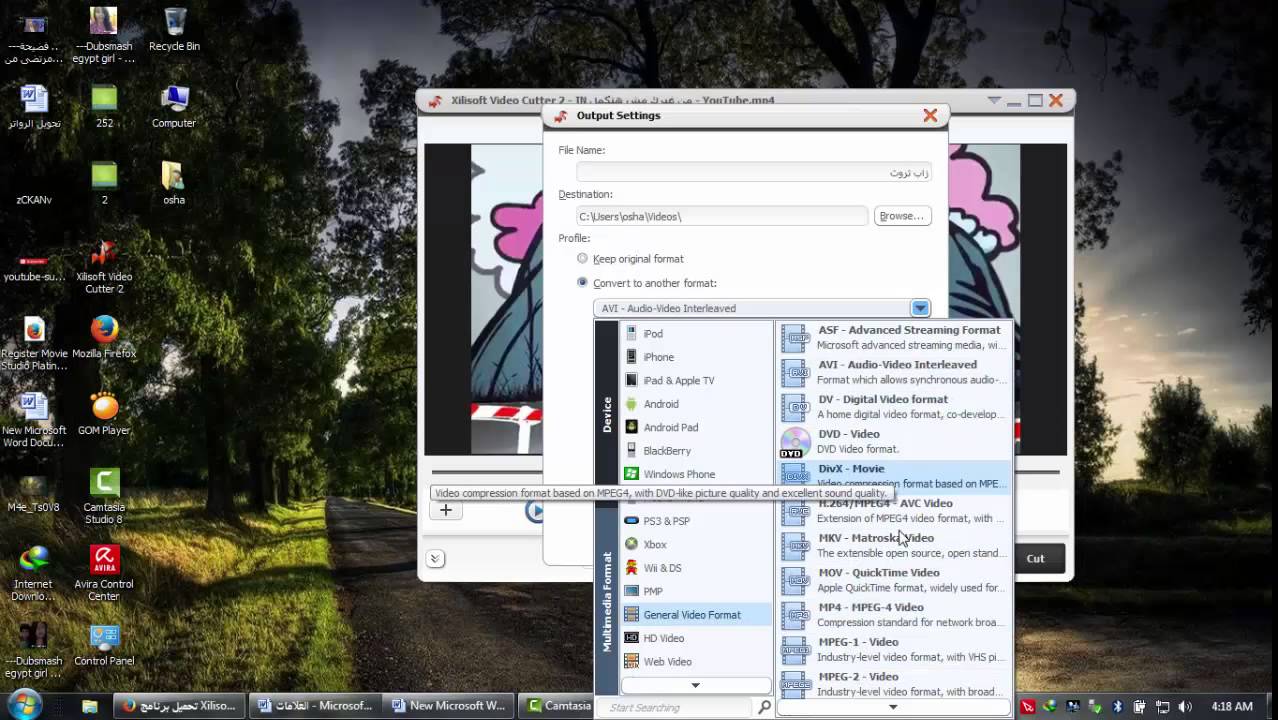
The program isn't just about cutting; it also offers tools for precise video previewing, accurate frame selection, and saving the new file without the need for re-encoding or wasting time. All of this is done through a flexible and smooth user experience that doesn't require high system specifications or prior technical knowledge.
One of the key features of this program is that it maintains the original video quality because cutting doesn't require re-encoding. This means less processing time and the output file will be almost identical to the source in terms of quality.
Popular Uses of Xilisoft Video Cutter in 2025
In 2025, with the growing need for fast and customized visual content, the uses of Xilisoft Video Cutter have increased, including:
- Preparing educational content: Teachers break down long lectures into focused lessons that are easier for students to follow, enhancing the effectiveness of e-learning.
- Content creation for social media: Content creators use it to trim engaging clips from longer videos and post them on TikTok, Reels, and YouTube Shorts to attract viewers more quickly and interactively.
- Editing personal event videos: Like weddings or family trips, where unwanted parts can be removed without needing to learn professional editing software.
- Processing surveillance or meeting recordings: Extracting only the important scenes from long videos to save time and space.
- Preparing short ads or promotional clips: Using specific shots from larger videos to design a quick and effective showcase for a product or service.
Advantages of Downloading the Full Xilisoft Video Cutter
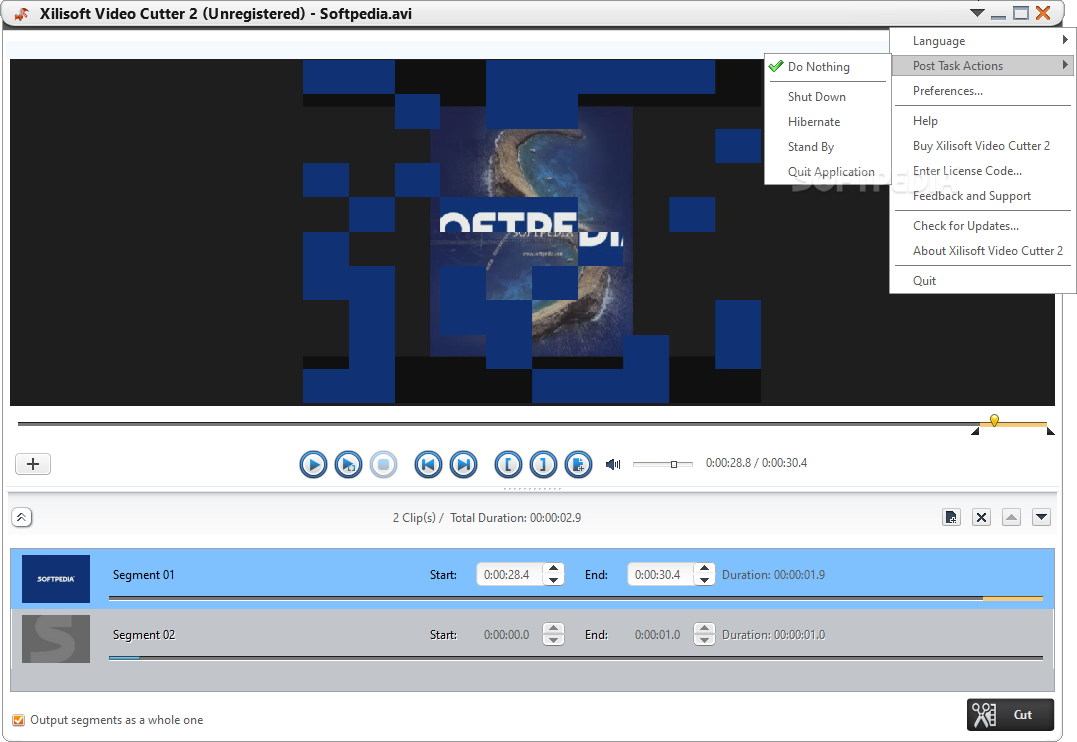
Key Features
The program is equipped with a range of important features that make it an essential tool for users who need to cut videos, including:
- Precise cutting control by accurately setting the start and end points using a timeline interface.
- Instant preview during work to select the right frames before cutting.
- Save the video without losing quality as the program doesn't re-encode but directly cuts the desired segment.
- Support for a large number of popular and modern formats, making it easy to work with files from different sources.
- A simple and clear graphical interface makes the program easy to use even for non-professionals.
- Ability to handle large files without consuming significant system resources.
New Version Features
The latest version of the program comes with several improvements that make it more efficient and reliable:
- Enhanced support for 4K video, allowing high-quality file cutting without delay.
- Improved speed and overall performance when handling large files.
- Fixes for technical issues like audio-video synchronization problems in some formats.
- Better support for embedded subtitles, maintaining them during cutting.
- Expanded output options, including support for more resolution settings and frame rates.
- Redesigned user interface for easier navigation and access to important options.
How to Download via Direct Links
Step-by-Step Download Instructions
- Go to the official program page.
- Click the Download Now button to get the trial version.
- Choose the appropriate system (preferably Windows 10 or 11).
- Wait for the download to finish and save the file in a suitable folder.
- After completion, open the executable file (EXE) to start the installation.
Tips to Avoid Issues During Download
- Use a stable internet connection to prevent file corruption or download interruption.
- Choose the official site or trusted sources only to avoid downloading malicious or fake software.
- Temporarily disable antivirus programs if they cause download or installation blocks.
- Ensure there's enough disk space for smooth program installation.
- Save the installation file in an easily accessible location for later use or reinstallation.
Installation and Activation After Download
Installation Method
- Open the downloaded installation file.
- Choose your preferred language and click "Next".
- Agree to the license agreement and choose the installation location.
- Click "Install" and wait for the process to complete.
- Once done, click "Finish" to launch the program.
How to Activate the Full Version
- Run the program after installation, then click the "Register" button.
- Enter the license details you received upon purchase (email + activation key).
- Click "Activate", and the trial version restrictions will be removed.
- You can now save your videos without watermarks and in the best

 File Name:
 Downloads:
 Version:
 Full Version:
 Created By:
 License Type:
 Release Date:
 Languages:
 Tags:
Tags: