


iTools Pro is an impressive application for syncing and managing iPad, iPhone, iPod, and iPod touch devices. With this program, you can create backups of your messages and download firmware.
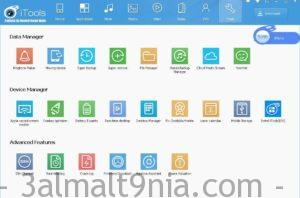
iTools Pro requires iTunes to connect to your devices, so initially, it will automatically check if iTunes is installed on your computer. The program features a simple and user-friendly interface that allows you to browse your local computer library and device content. Once your phone is connected, you can view media files, iBooks, and other documents stored on your device. The local library is organized into three different sections: one for device applications, another for media files, and the third for other tools. The "Apps" module lets you add various programs in IPA or PXL format and install them on your device. You can assign custom tags to each app for easy identification. The second section is dedicated to media files that you need to import from your computer, whether they are music, ringtones, or wallpapers. iTools Pro features a ringtone maker, allowing you to select a music file and create your own ringtone with just a few simple clicks. There is also a wallpaper section that lets you preview and sort the images you add before importing them to your device. Additionally, it has a backup feature, enabling you to use this application for backing up and restoring folders, apps, SMS messages, contacts, call logs, and system settings. Overall, iTools Pro is an impressive application that can be used to manage the contents of iPhone, iPad, iPod, and more.
Features of iTools Pro:
Here are some features and characteristics of iTools Pro:
- An excellent application for syncing and managing iPad, iPhone, iPod, and iPod touch devices.
- Ability to create ringtones, back up your messages, and download firmware.
- Requires iTunes to connect to your devices.
- Very simple and straightforward user interface that allows you to browse your local computer library and device content.
- Custom tags can be assigned to each app for easy identification.
- Ringtone maker feature, allowing you to select a music file and create your own ringtone with just a few clicks.
- Backup feature that lets you use this program for backing up and restoring folders, apps, SMS messages, contacts, call logs, and system settings.
System Requirements for Running iTools Pro:
Before you start downloading and installing iTools Pro, make sure your computer meets the minimum system requirements.
- Operating System: Windows XP / Vista / 7/8 / 8.1 / 10.
- Memory (RAM): 1 GB of RAM required.
- Hard Disk Space: 500 MB of free space required.
- Processor: Intel Pentium 4 or newer.
The program is pre-activated and does not require a serial number, crack, or any activation.
To avoid issues with extraction, it is recommended to use WinRAR for decompressing files.

 File Name:
 Downloads:
 Version:
 Full Version:
 Created By:
 License Type:
 Release Date:
 Languages: