

Download Outbyte Driver Updater with Activation
Outbyte Driver Updater has been updated to the latest version: Outbyte Driver Updater 2.2.3.15993
You can download Outbyte Driver Updater for free from our software library. This smart tool can identify outdated drivers and search for the latest ones, allowing you to install them manually or automatically. Additionally, it provides detailed information about your devices.
The first thing the application does after installation is perform a comprehensive scan of your device statistics and outdated drivers. The system overview lists components such as the CPU, GPU, motherboard, hard drives, memory, and even the operating system.
Manufacturers sometimes include enhancements in their driver updates to improve the performance or speed of their devices. The Driver Updater allows you to take advantage of these enhancements by obtaining driver updates as soon as they are released. It helps prevent driver-related crashes and keeps your computer running faster and smoother.
Manually searching for the correct driver can be time-consuming and may lead to incorrect driver versions or even malware infections that cause bigger issues. The Driver Updater saves time and reduces these risks, ensuring you get the correct drivers for your device type and model.
Features of Outbyte Driver Updater
Provides extensive system information
The first thing the application does after installation is conduct a full scan of your device statistics and outdated drivers. The system overview lists components such as the CPU, GPU, motherboard, hard drives, memory, and even the operating system. All details about these items are listed in the first half of the diagnostics tab.
Scrolling down takes us to a new subsection called the current device status report. The information you get from this list is for reference only, as it takes some metrics and compares them to average results that may be relevant for the current year. The comparison is made for CPU speed, load values, memory specifications, SSD speed, and free disk space. If you have a powerful computer, the gold bar should easily surpass the white bar, but if the system is a bit older, the bars should at least be equal.
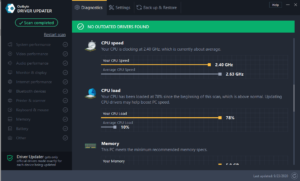
Checks device performance and drivers
This will be the title of the most important subsection. Here you will find information about all outdated drivers and a way to update them. Clicking on a specific driver will show the currently installed version and the latest version. The application will also provide information about the manufacturer. This way, you can ensure that the recommended drivers come from original sources.
However, updating drivers requires registering the application, meaning you will need to spend some money to unlock this feature. But there is a way to check if the application is worth your time and money, which is activating the basic version, allowing you to perform a one-time update.
Overall, Outbyte Driver Updater seems to be an excellent application for extending the life of your computer and keeping it as smooth as possible. On the other hand, there isn’t much you can do in the free version, except check system information and outdated drivers.
Scans and updates your drivers
With the latest drivers, your devices perform at their best
The Driver Updater will scan your computer for outdated, damaged, or missing drivers and allow you to easily update them to the latest stable versions all at once or one at a time. This can help resolve driver-related computer issues and device crashes, ensuring better performance.
Saves time and ensures efficiency
No more wasting time on manual updates
Trying to find the correct driver manually can be time-consuming and may lead to incorrect driver versions or even malware infections that cause bigger issues. The Driver Updater saves time and reduces these risks, ensuring you get the correct drivers for your device type and model.

 File Name:
 Downloads:
 Version:
 Full Version:
 Created By:
 License Type:
 Release Date:
 Languages:
3 thoughts on “Download Outbyte Driver Updater 2.2.3.15993 with Activation”
danke fur euish
Very goog
big thankssssssssssss