

What sets the Advanced Download Manager Pro app apart from other download applications on smartphones? The answer lies in its comprehensive toolset for managing and organizing downloads. It not only downloads files at lightning speed but also provides users with a professional experience that includes control over the number of files downloaded simultaneously, splitting files into smaller parts to enhance speed, and resuming interrupted downloads without data loss. Since its launch in 2012, the app has achieved over 100 million downloads, a clear testament to user trust and its widespread popularity.
Overview of the Advanced Download Manager Pro App
The Advanced Download Manager Pro app is one of the most prominent tools that emerged on the Android system for managing and organizing downloads. Its role goes beyond merely downloading files from the internet; it offers users a comprehensive experience in handling large and multiple files. The app allows complete control over the download process, starting from selecting the number of files to be downloaded at the same time, through the program's ability to split files into smaller parts to increase download speed, to organizing files into specific folders based on their type, making them easier to access later.

The app boasts several features that make it the top choice for many users. It allows downloading multiple files simultaneously, saving significant time, especially when dealing with various files. Additionally, the file-splitting feature provides extra speed, as the app divides the file into smaller parts that are downloaded concurrently and then reassembles them at the end. One of its standout features is the ability to resume downloads after an internet interruption or device shutdown, reducing data loss and offering users greater peace of mind. Furthermore, the app includes a built-in browser that enables direct downloading of videos and files from websites, along with advanced notifications that alert users when downloads are complete through sound or vibration, making it more interactive and suitable for daily use.
Using ADM Pro is not just about speed; it also encompasses professional file organization. Images, videos, and documents are saved in separate folders, simplifying the search and access process later. The app is an ideal tool for students and researchers who frequently need to download large files, as it saves them time and effort while ensuring no data is lost in case of any connection issues. Additionally, the multiple download feature allows users to accomplish several tasks simultaneously, enhancing productivity and making the app suitable for both personal and professional use.
Features of the Advanced Download Manager Pro App
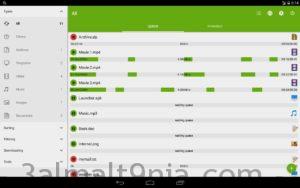
- Download multiple files at the same time (up to 3 files simultaneously).
- Accelerate downloads using file-splitting technology (up to 9 parts or more).
- An intelligent algorithm that increases download speeds.
- Resume downloads after interruption or internet connection failure.
- Ability to download in the background without needing to keep the app open all the time.
- Schedule downloads to start at a specified time.
- The app automatically intercepts download links from browsers and the clipboard when links are copied.
- Compatible with various browsers like Chrome, Firefox, and others.
- You can choose different folders based on file type (video, images, documents...).
- Save files directly to the SD card (depending on the Android version).
- Easily download videos and music from the internet.
- Notifications with sound or vibration when downloads are complete.
- Ability to change the maximum speed in real-time during downloads.
- Support for downloading very large files (over 2 GB).
System Requirements for Running the Advanced Download Manager Pro App
- Requires operating system: Android 8.0 or higher
- Content rating: Suitable for ages 3 and up
- Permissions: Requires access permissions for storage and internet
Conclusion
In conclusion, the Advanced Download Manager Pro app remains one of the strongest solutions for managing downloads on Android devices. It combines high speed, the ability to resume downloads, and professional file organization, along with an easy-to-use interface and continuous updates since its launch in 2012. With over 100 million downloads worldwide, the app has proven to be a reliable choice for users seeking a practical and effective tool to simplify their digital lives.

 File Name:
 Downloads:
 Google Play:
 Requirements:
 Version:
 Full Version:
 Created By:
 Release Date:
 Languages:
