

(Discover what's new in Photoshop for 2024) Explore the latest in Photoshop for 2024: In the ever-evolving world of design and photo editing, staying ahead is crucial. With each new update, Photoshop not only pushes the boundaries of creativity but also significantly enhances the workflow for professionals in the field. This year, Photoshop 2024 arrives with a suite of groundbreaking innovations designed to boost efficiency and unlock new creative possibilities.
From Generative Fill to improved tools like Gradient, each enhancement is a testament to Adobe's commitment to keeping its users at the forefront.
Let's dive into the nuances of these updates and explore how they can revolutionize your work in Photoshop. Whether you're a seasoned pro or an enthusiast, get ready to discover how Photoshop 2024 can enrich your art and efficiency in the digital world.
Discover What's New in Photoshop for 2024
In this content, we will delve into the following new features:
1) Generative Fill
Photoshop 2024 marks the official launch of generative AI technology. One standout feature here is Generative Fill, which allows you to create selections and use text prompts in over 100 languages.
Photoshop intelligently matches lighting, perspective, and depth for a seamless result.
The Generative Fill layer stores multiple variations, giving you the flexibility to choose the best outcomes. And here's the best part – it works with both photos and illustrations.
You can even use it to remove unwanted elements from your images.
In the Adobe Firefly toolkit, powered by AI, Generative Fill has the capability to create images from instructions in Photoshop, generating separate and editable layers. Initially available only in the beta version, as of September 2023, it became part of the standard program release.
To create an image, simply select an area, click "Generative Fill" in the Task Bar, and enter a description of what you want. Photoshop will then generate three image alternatives on the layer.
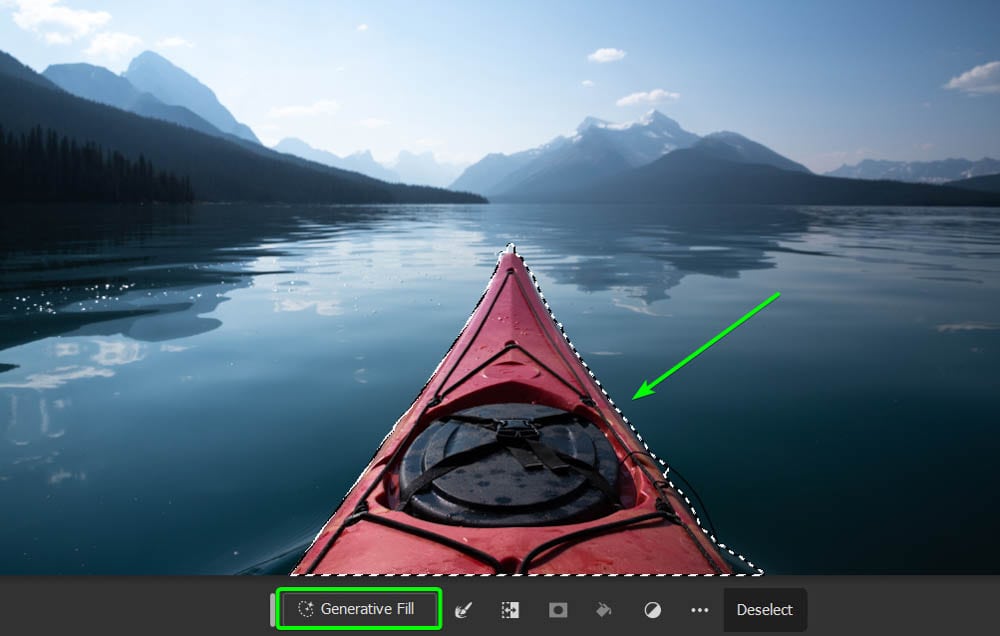
Photoshop will automatically recognize the content of your image by understanding the light, perspective, and depth of the scene. If you're not satisfied with the three shapes, you can simply request new alternatives in the properties field.
The generative tools in Photoshop and other Adobe programs will begin using what's called "Generative Fill," which will be reloaded monthly. Each feature, like "Generative Fill," will cost one credit. The number of credits available varies based on your subscription, and you can check the details on the Adobe webpage.
2) Generative Expand
Click on the Crop Tool and choose Generative Expand from the dropdown menu. When you change the aspect ratio of an image, Photoshop magically fills the transparent areas with AI-generated content. The results are stunning, as you'll see when compared to the old content-aware fill.
This innovation is integrated into the "crop" option. When the image you want to resize is open, simply drag the crop tool over the image to resize it or enter the desired dimensions in terms of width and height.
Then, by clicking on "Generative Expand" and then "Create," the program will automatically fill the blank areas.
Similar to the "Generative Fill" feature, the program will offer three alternatives on a separate layer, allowing you to choose the option that best suits your needs.
This function greatly simplifies the process of resizing images in Photoshop and can be a valuable tool for those looking to learn more about the program.
3) Update to the "Remove" Tool
A highly practical tool for hiding parts of an image, making the editing task more efficient.
With it, you no longer need to go through the hassle of applying the "Remove" brush over the entire area you wish to edit; now, it's enough to select the area of interest.
This innovative function, integrated into Photoshop, identifies the area you select and automatically conceals the internal content. In other words, when you trace the outlines of the area to be hidden, the program immediately understands what you want to do and performs the hiding without the need for additional manual intervention.
This feature provides efficiency in photo editing, saving time and effort, and is particularly useful in situations where you want to hide certain elements of an image, such as sensitive information, faces, or any other details you wish to conceal.
In short, this feature represents a valuable advancement for those looking to enhance their editing skills in Photoshop, simplifying the task of hiding parts of an image in a precise and effective manner.
4) Task Bar Update
Another feature added is the Task Bar, a small menu that appears around the workspace, offering you quick actions. The immediate downside of this menu is that it moves around the workspace, often covering your image and hindering the editing process.
Previously, when opening a document, this bar would appear in random locations within the window or follow the mouse click position.
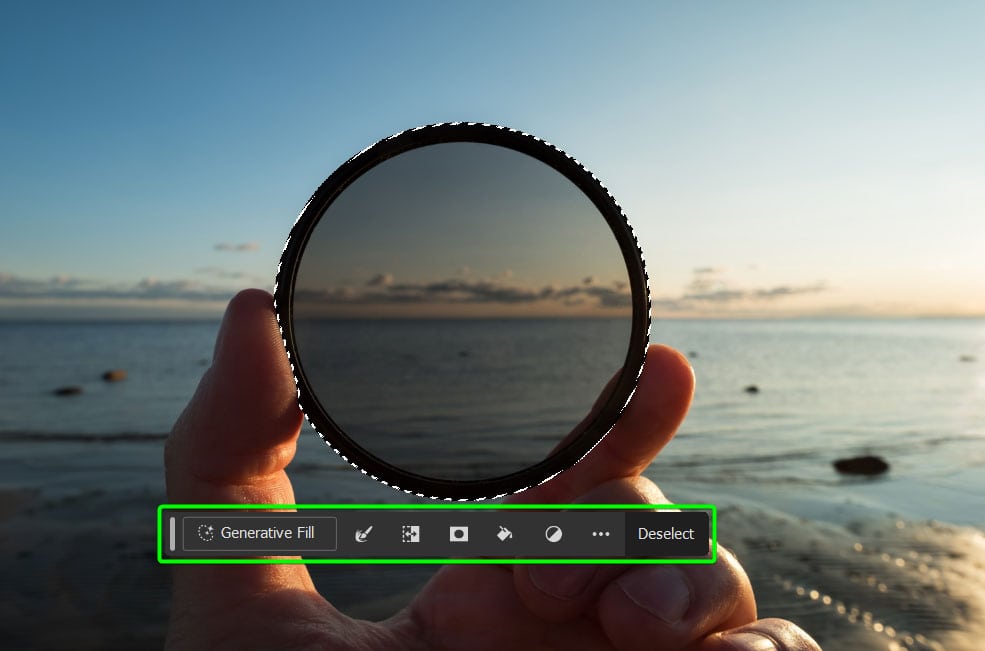
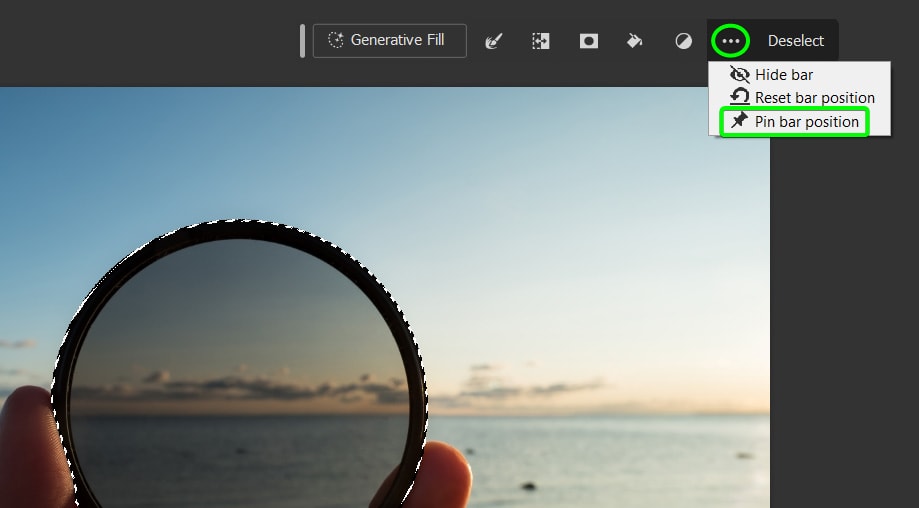
In the 2024 update, you now have the option to pin the Task Bar to an area of the workspace, and Photoshop remembers this position even when you close and reopen the program.
Drag the menu to your desired location, then click the three dots on the right of the menu and select the Pin bar position. The menu will stay in place until you follow the same steps and uncheck the option, providing greater consistency and ease of use.
The menu now also includes more hiding features and generative AI to enhance your workflow.
5) Gradient Tool
In previous versions of Photoshop, when drawing gradients, the control line would disappear immediately, adding some complexity to the process.
However, in the current version, creating gradients has become much easier in Photoshop. The new interface for this tool features a more intuitive and practical design, providing a smoother editing experience.
The Gradient Tool in Photoshop, with its improved interface, keeps the controls visible throughout the editing process. This change represents a significant improvement, making it easier to handle the gradient and select the colors that compose it, providing greater control and clarity in the editing process.
6) Lens Blur
A notable addition to Adobe Photoshop 2024 is the Lens Blur filter, a tool with great potential for adding realistic effects to your images. This feature uses advanced algorithms to simulate the lens blur effect, providing more control over the shape and size of the blur.
With various options to adjust the amount of blur, angle, and other parameters, you can easily achieve professional-looking results. When accessing the filter and selecting the "Camera Raw" option, a new panel called "Lens Blur" will appear, allowing you to apply Optical Blur and realistic bokeh to your image by clicking the application box.
Within this panel, the "Amount of Blur" slider allows you to increase the blur, while the available options let you choose the specific type of bokeh that Photoshop applies. Additionally, the "Intensify" slider provides the ability to adjust the intensity of the bokeh effects as desired.
It's important to note that, by default, Photoshop automatically sets the focal range using advanced target detection through AI. This function provides greater optimization and customization in applying the Lens Blur filter, enhancing the quality and accuracy of the final result.
7) Content Credentials
Adobe Photoshop 2024 will automatically include content credentials in the metadata of images created using the "Generative Fill" and "Generative Expand" features. This implementation aims to mitigate the spread of misinformation online, providing transparency regarding image authorship and allowing control over the information to be shared.
To configure content credentials, go to the "Window" option and select "Content Credentials." In this panel, activate content credentials by clicking the corresponding blue button.
To see how all this information will be displayed, use the preview button, which will show the specific content credentials for the image in question.
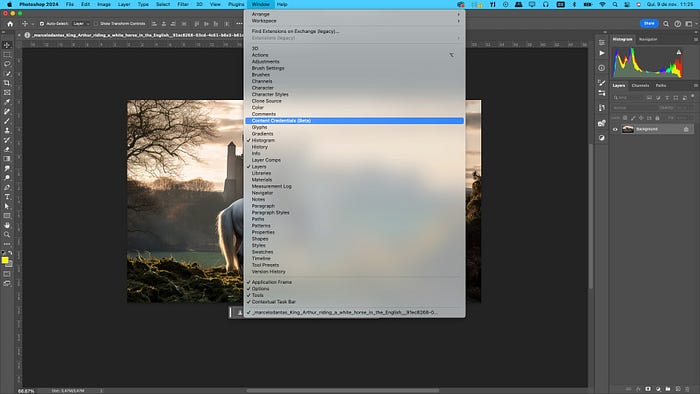
To more thoroughly verify the content credentials in any accessible file, you can use the contentcredentials.org/verify platform. When uploading an image, the window will display all the content credentials metadata associated with that file, providing a detailed and transparent view of the information linked to the image.
8) Photoshop on the Web
Photoshop on the Web has finally launched after being in beta for nearly two years. All users with a paid Photoshop subscription can access and use the web version. Photoshop on the Web offers the most commonly used tools from the desktop version (new tools and features are continuously being added), including the latest AI capabilities powered by Adobe Firefly.
In addition to streamlining your favorite processes on the web, you can share, edit, and provide feedback on projects among team members. You can also easily open your current project in the desktop app for more in-depth edits.
Note: You need an active Creative Cloud subscription to any Photoshop plan to use this feature.
Once the program is open in your browser and an image is uploaded, you can quickly edit, share, and design your projects.
Photoshop needed to release a web version to keep up with competitors, and creating a simplified version was a smart move in my opinion. Photographers can now easily edit and design on the go. Although the web version won't replace the full desktop version, it's an excellent addition to the benefits of a Photoshop subscription.

 File Name:
 Downloads:
 Version:
 Full Version:
 Created By:
 License Type:
 Release Date:
 Languages:
5 thoughts on “Adobe Photoshop 2024 Free Download Full Version with Activation”
ممكن التفعيل منفصل
الرجاء اعادة رفع الملف ..
يوجد مشكلة بالملف الموجود
شكرا
بارك الله فيك على المجهود المبذول احسن موقع للتحميل
لينك التحميل بايظ
موقع متميز جدا فعلا جربت منه اكتر من حاجة شكرا ليكم بجد بعد اذن القائمين على الموقع فيديو توضيحى للتفعيل وشكرا جزيلا