If you've tried traditional engineering design software and faced issues with installation, updates, or file sharing, it's time to try something different. Download Onshape for 3D design - direct link. This software allows you to create 3D designs directly from your browser without downloads or technical hassles. Whether you're working solo or as part of a team, Onshape offers a flexible and secure environment for instant collaboration, automatic data management, and access to your projects from any device, anytime.

An Overview of Onshape Download
Onshape is a fully online 3D CAD software that requires no installation or file downloads. It allows users to create models, assemblies, and technical drawings directly from the browser with full support for real-time team collaboration. Onshape is a complete data storage platform, meaning all your data is securely saved on servers and accessible from anywhere at any time. No manual updates or file management are needed as everything is handled automatically within the system.
The software enables multiple users to work on the same model simultaneously, with changes visible in real-time. This feature makes Onshape ideal for engineering teams working remotely or across multiple locations.
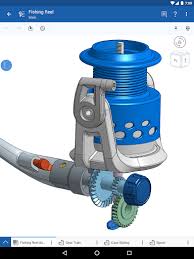
Onshape provides powerful tools for 3D modeling, sheet metal design, creating assemblies, and technical drawings. It also supports importing and exporting CAD files in various formats like STEP, IGES, STL, and DWG. Onshape can be used on Windows, macOS, Linux, and ChromeOS, along with dedicated apps for Android and iOS, allowing users to work from any device.
Onshape offers enterprise-level security, including data encryption, access permissions management, and activity logging. It has an integrated system for version and change management without the need for external software. Onshape is widely used in educational institutions for teaching engineering design and is also relied upon by startups and industrial companies to accelerate development processes and improve production efficiency. Onshape was developed in 2012 by a group of veteran CAD engineers, including the founders of SolidWorks, aiming to reinvent the engineering design experience.
In 2015, the software was officially launched as the first fully cloud-based CAD platform, operating from the browser without needing installations or powerful hardware. Since then, Onshape has rapidly evolved, with hundreds of new features added annually, such as sheet metal tools, integrated data management, real-time collaboration, and mobile support.
In 2019, PTC acquired Onshape, enhancing its integration capabilities with PLM and IoT solutions and paving the way for deeper developments in performance, security, and enterprise compatibility.
Features of Onshape
- No need for installation or manual updates
- Runs directly from the browser on any operating system
- Access projects from anywhere at any time
- Multiple users can work on the same model simultaneously
- See changes instantly without sending files or multiple copies
- No need for external file management software like PDM
- Automatically tracks changes and versions within the system
- Works on Windows, macOS, Linux, and even tablets and smartphones
- Dedicated apps for iOS and Android
- Data encryption and access permissions management
- Support for enterprise security standards
- Over 700 improvements released in 2024 alone
- No waiting or reinstalling to get new features
- Supports 3D modeling, assemblies, sheet metal, and technical drawings
- Tools like G2 Boundary Surface to enhance surface quality and flow
- Ability to create custom features using Onshape FeatureScript
- Compatibility with external tools like SimScale and KISSsoft
- Simple and smooth user interface
- Available educational resources like courses, videos, and interactive community
System Requirements for Onshape

Operating System:
- Windows 10 or Windows 11 (64-bit)
- Also supports macOS, Linux, and ChromeOS
Recommended Browser:
- Google Chrome (most compatible)
- Mozilla Firefox
- Microsoft Edge
- Safari (for macOS only)
The browser must support WebGL technology to smoothly run 3D graphics.
Internet Connection:
- Continuous internet connection
- Recommended speed of 5 Mbps or higher
Processor (CPU):
- Modern multi-core processor like Intel Core i5 or higher
Memory (RAM):
- Minimum 8 GB
- 16 GB recommended for large and complex projects
Graphics Card (GPU)
- Card supporting WebGL
- No need for professional cards like NVIDIA Quadro, but performance improves with a dedicated GPU
Conclusion
In conclusion, Onshape stands out as the best in engineering design, thanks to its organizational structure that allows instant access, real-time collaboration, and hassle-free data management. It has surpassed the traditional limitations of desktop CAD software and opened new avenues for engineering teams seeking speed, flexibility, and security. Whether you're in a startup or a large industrial company, Onshape provides the tools you need to efficiently design your products from anywhere, on any device. It's not just a design program, but a comprehensive platform that supports innovation and development in a modern digital environment.

 File Name:
 Downloads:
 Full Version:
 Created By:
 License Type:
 Languages:
 Tags:
Tags: