Dropbox is a file hosting service and application. At its core, it's a cloud storage service that offers file syncing capabilities. It's like a magical little folder on your hard drive where you drop files, and they are automatically synced with the cloud.
You can then access them from anywhere and on any device. File syncing and sharing have never been easier than with Dropbox. You probably know what cloud storage is and how crucial it is to sync and share files quickly.
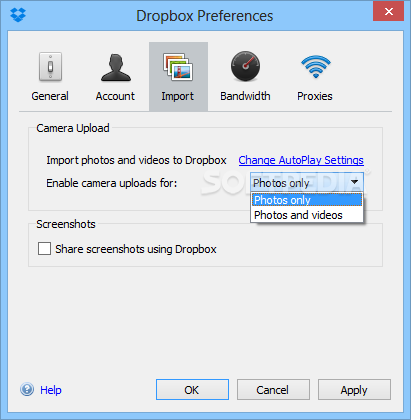
That's why we will discuss some useful yet lesser-known features of this application. You can easily share screenshots by enabling the screenshot sharing feature. When this option is enabled, screenshots are automatically saved and a sharing link is added to your clipboard. You can then paste the link (Ctrl + P) wherever you want to share the screenshot.
Did you know that you or others who have access to your files (like coworkers, project managers, friends, etc.) can write comments? You no longer need emails to track changes, as every file supports commenting. Users are also notified when new comments are posted. You don't need programs like Microsoft Word, Excel, or PowerPoint to preview your files.
The Dropbox file preview tool can open many types of files without requiring any additional software. All you need for previewing is a web browser. The service can also open PDF files. It includes a zoom tool for large documents, and you can even print from the file viewer. You can choose which files and folders you want to sync from the cloud to your computer using the Selective Sync feature.
This allows you to have only the most important documents (the ones you work on most often) on your computer. Keep in mind that this feature can save a lot of space when dealing with large files like images and videos.
With the favorites feature, you don’t need an internet connection on your mobile device to access your most important files. When you favorite a file on your device, it is automatically downloaded in Dropbox on that device, making it accessible anytime. In conclusion, it is an extremely reliable file storage and sharing application.
You get 2 GB of space with the free plan. Although you don't get much storage compared to what OneDrive and iCloud offer, the applications are convenient to use. It also works on any platform, whether on mobile or desktop.
Store and sync your files in the cloud and easily share any of them with your friends online using this straightforward application.
Dropbox is a free online file storage service based on the web. This service allows you to easily transfer all your videos, photos, and documents anywhere and share them. This means that any file you save on Dropbox will automatically be saved on all computers and mobile devices, as well as on the Dropbox website.
The application also makes it very easy to share what you've learned with others, whether you're a student, professional, parent, or grandparent. Even if you accidentally spill a latte on your laptop, there's no need to worry!
You can relax knowing that Dropbox always provides you with protection, and you will never lose any of your files. The application works just like any other folder on your computer, but with some differences.
Any files or folders within the Dropbox application will sync with Dropbox servers and any other computer linked to your account.
Green checkmarks will appear on your files to indicate that they are synced and up to date. All data is transferred over SSL and encrypted with AES-256 before storage. Dropbox tracks every change made to any of its contents.
There are a total of 10 clients, including versions for Microsoft Windows, macOS, and Linux (both official and unofficial). There are also versions for mobile devices, such as Android, Windows Phone, iPhone, iPad, and BlackBerry. A web-based client is available when no local client is installed.
The service uses a free financial model, providing its free service with 2 GB of free online storage. Users who refer others to use Dropbox can get up to 8 GB of free storage. Major competitors of the service include Box.net, Microsoft OneDrive, Ubuntu One, SugarSync, Mozy, ZumoDrive, SpiderOak, and Wuala.
Dropbox allows you to upload your files or folders to the cloud so you can access them from a web browser or any device compatible with Dropbox. It is compatible not only with Windows but also with Mac OS X, Linux, Android, iOS, Windows Phone, and Blackberry OS.
To start using Dropbox, you need to create an account (you get 2 GB of free storage). You can either set the tool to sync all folders in your Dropbox, or you can use "Selective Sync" to choose specific folders.
Essentially, Dropbox installs a folder on your computer where you can copy or move data to share online. This means that if you want to access your Dropbox files from another location, you just need to log in with your username and password.
You can view, download, or upload content directly in the web browser if you do not have the Dropbox application installed on your computer.
Of course, if you want to, for example, download your shared files on Dropbox from another computer, the task will be much easier and faster if Dropbox is installed on that specific computer.
In the online browser, you can search for files and folders in your Dropbox, create a new folder, view deleted files and events (similar to a log file), send invitations to your friends, and more.
In the "Preferences" menu, you can disable desktop notifications and LAN sync, unlink the computer from the current account to add a different account, set download and upload rates, configure proxy settings, enter the Dropbox location, change the interface language, and more.
The program uses a moderate amount of system resources and includes very comprehensive documentation aimed at helping users navigate.
In summary, Dropbox offers one of the simplest solutions for sharing data online, and we highly recommend it to all users.
Programs You Might Like:

 File Name:
 Downloads:
 Version:
 Full Version:
 Created By:
 License Type:
 Release Date:
 Languages:
 Tags:
Tags: