

In a world that heavily relies on organizing information and quickly jotting down ideas, Microsoft OneNote for Mac stands out as a powerful tool that helps users collect and arrange notes professionally within the integrated macOS environment. The program offers a seamless user experience that aligns with Apple's device design while maintaining Microsoft's robust features in note management and cloud synchronization. Whether you're a student recording lectures, an employee managing meetings, or a creative person gathering project ideas, Microsoft OneNote for Mac provides you with an organized digital workspace that allows you to write, insert images and files, and collaborate with others easily—all in one accessible place at any time.
Overview of Downloading Microsoft OneNote - Direct Link
Microsoft OneNote for Mac is one of the strongest note-taking applications offered by Microsoft for macOS users, providing an organized environment that helps in gathering and arranging ideas within flexible and user-friendly digital notebooks.
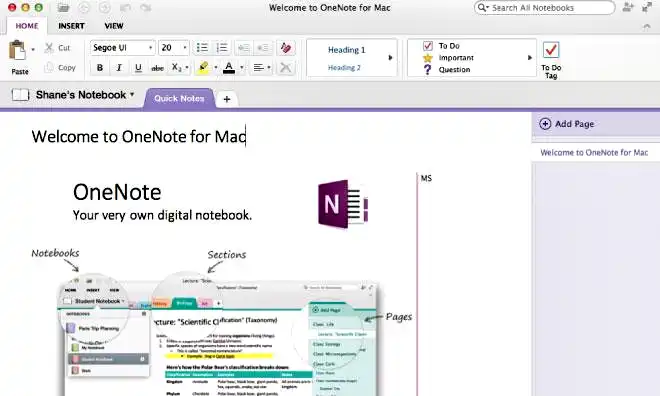
The program relies on a system of notebooks, sections, and pages, giving users complete freedom to divide content according to their needs, whether for study, work, or daily personal use.
Microsoft OneNote for Mac features an interface that harmonizes with Apple's device design while retaining Microsoft's recognizable identity, making the user experience comfortable and smooth even for newcomers.
Microsoft OneNote for Mac supports cloud synchronization through OneDrive, allowing access to all notes from multiple devices such as iPhones, iPads, and Windows devices without losing any data.
The program enables the insertion of images, files, tables, and audio recordings within pages, along with text search support to facilitate quick access to information.
Microsoft OneNote for Mac enhances productivity by supporting collaboration and sharing notebooks with others, making it an ideal choice for students, employees, and project owners looking for professional and effective organization.
Features of Microsoft OneNote
- Organize notes within notebooks, sections, and pages to facilitate clear and quick access to ideas and content.
- Create unlimited notebooks to customize each one for a specific area such as study, work, or personal planning.
- Write freely on the page without restrictions on text placement for flexible content arrangement.
- Insert images, tables, audio files, videos, and various attachments within pages.
- Record audio notes directly within the program to document lectures and meetings.
- Support for digital pen writing on touch-enabled devices, with the ability to draw and create illustrations.
- Highlight texts in different colors to facilitate review and distinguish between types of notes.
- Quick search within all notebooks and pages for instant access to information.
- Automatic saving of notes and edits without the need to press a save button.
- Sync notes via OneDrive for access from any macOS or iOS device.
- Share notebooks with colleagues and collaborate on them, with real-time synchronization of edits.
- Protect sections with a password for increased privacy and security of sensitive notes.
- Direct integration with Microsoft 365 applications like Outlook, Teams, and Word for easy information transfer.
- Use ready-made templates to organize meetings, plans, and projects.
- Drag and drop items within the page easily to move or rearrange them.
- Convert notes into tasks and link them to the Outlook application.
- Support for OCR text recognition within images for copying or searching.
- User-friendly interface suitable for both beginners and professionals.
- Multilingual support with full Arabic language support and control over text direction.
- Manage sections and pages flexibly with the ability to create internal links between pages for easier navigation.
Technical Details and System Requirements for Microsoft OneNote
System requirements for running the program:
- Processor: 1.6 GHz or faster, 2-core.
- RAM: 2 GB RAM
- Graphics Card: 1280x720 or higher screen resolution.
- Space after installation: 10GB of available hard-disk space for installation
- Operating System: One of the three most recent versions of macOS.
- Sound Card: ASIO compatible or Microsoft Windows Driver Model
Advanced Features of Microsoft OneNote
- The nested notebook tool allows for creating an advanced organizational structure of main notebooks containing sections and subpages, making it easier to manage large projects and complex notes.
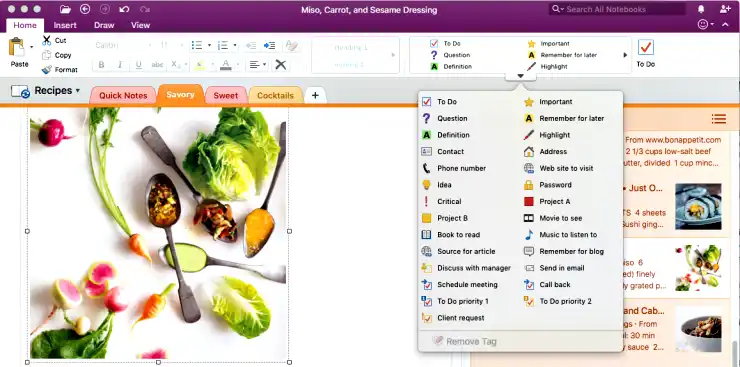
- The smart Tags tool provides a variety of tags such as urgent task, question, idea, reference, with the ability to customize new tags and use search to extract all related items in one place.
- The OCR text recognition tool enables the program to extract text from images and scanned files for searching or copying directly without the need for manual data entry.
- The handwriting-to-text conversion tool allows handwritten notes with a digital pen to be converted into editable, formatted, and shareable text easily.
- Version management and page history allow viewing previous versions of the same page and retrieving the desired version to preserve important data.
- The integration tool with Outlook for tasks allows converting any text or line into a task with a due date to appear in the daily task list in Outlook.
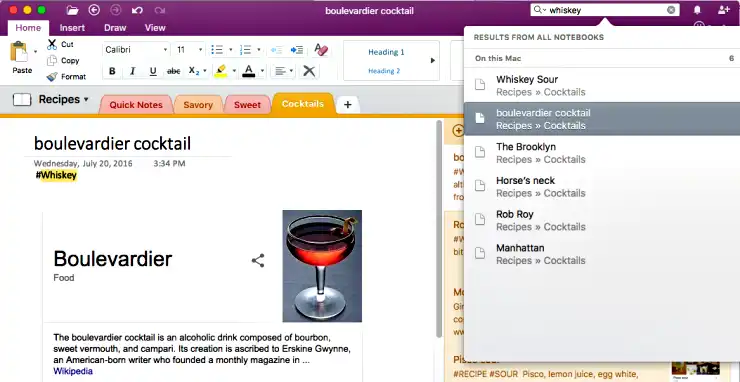
- Advanced search can search within a specific notebook or all notebooks, supporting searches within texts, images, and tags to find information quickly.
- Real-time sharing and collaboration allow sharing an entire notebook or a specific section with the team, with edits appearing in real-time and knowing who made the changes.
- Password protection for sections prevents unauthorized access to sensitive information, ensuring privacy and security.
- The internal linking feature between pages facilitates navigation between different pages within the same notebook or other notebooks to build an interconnected knowledge network.
- Advanced drawing tools provide multiple thicknesses and colors of pens, along with geometric shape tools for drawing mind maps and explanatory diagrams.
- Smart synchronization via OneDrive automatically saves edits and syncs them as soon as connected to the internet, resolving version conflicts in an organized manner to ensure no data loss.
 Microsoft OneNote[/caption>
Conclusion
In conclusion, Microsoft OneNote for Mac proves to be more than just a note-taking application; it is a comprehensive workspace that helps you organize your ideas, tasks, and daily projects in one flexible and professional place. Whether you're a student following lectures and taking notes, an employee managing meetings and projects, or a creative person gathering project ideas, OneNote for Mac gives you the ability to write, record audio, draw, and add files with instant synchronization and seamless sharing with others, making information management smarter and boosting your productivity.
Start your experience with Microsoft OneNote for Mac now and turn your ideas and notes into an organized and efficient system with all the smart tools that help you work effectively and professionally. Share your notebooks with your colleagues or team to benefit from real-time collaboration and achieve faster and more accurate results.

 File Name:
 Downloads:
 Requirements:
 Version:
 Full Version:
 Created By:
 License Type:
 Languages:
 Tags:
Tags:

