

MediaHuman Audio Converter is one of the top audio file conversion programs for Windows, offering a comprehensive solution for converting audio tracks between dozens of different formats with impressive speed and quality. The program features a simple, user-friendly interface, allowing users to convert audio files without needing extensive technical knowledge, while also providing a wide range of advanced options for professional users.
Whether you're looking to convert an entire music library, prepare audio files for various devices, or extract audio from video files, MediaHuman Audio Converter offers a professional experience that combines speed, efficiency, and ease of use. You can download the program from the Tech World website and take advantage of all the features it offers on Windows devices.
Overview of Downloading MediaHuman Audio Converter for Windows - Direct Link
MediaHuman Audio Converter is a professional tool specialized in converting audio files across a wide range of different formats, while maintaining the original audio quality as much as possible during the conversion process.
The program supports the most popular audio formats currently in use, such as MP3, AAC, FLAC, WAV, OGG, WMA, AIFF, ALAC, and others used across various devices and systems.
The program excels in performing batch conversions, allowing users to add hundreds of audio files at once and convert them in a single operation, saving a lot of time and effort.
It also supports retaining Metadata for audio files, including artist name, album name, release year, cover image, and various classifications, which helps organize music libraries professionally.
MediaHuman Audio Converter includes a tool for extracting audio from video files and converting it directly into standalone audio files, making it useful for users who want to save music tracks, lectures, or audio recordings from videos.
The program offers advanced options for controlling the quality of output files, including Bitrate, Sample Rate, and Codec type, allowing for the right balance between quality and file size.
The program takes advantage of modern multi-core processors to speed up conversion processes and enhance performance when handling large files or massive audio libraries.
The program is designed to use minimal system resources and is highly compatible with various Windows versions, making it suitable for daily use on both home and professional devices.
Features of MediaHuman Audio Converter
- Audio file conversion
- Windows support
- User-friendly interface
- MP3 conversion
- AAC conversion
- FLAC conversion
- WAV conversion
- OGG conversion
- WMA conversion
- AIFF conversion
- ALAC support
- Support for dozens of audio formats
- Batch file conversion
- Maintain audio quality
- Preserve Metadata
- Retain album artwork
- Extract audio from video
- Support for Lossless files
- High-quality audio support
- Fast conversion
- Multi-core processing
- Manage conversion queue
- Drag and drop support
- Low resource consumption
- Support for large files
- Quality customization
- Bitrate control
- Sample Rate control
- Advanced codec support
- Automatic file organization
- Support for massive music libraries
- Modern interface
- High stability
- Continuous updates
- Excellent Windows compatibility
- Professional audio tools
- Support for full album conversion
- Folder conversion support
- Preserve folder structure
- Flexible file management
- Support for portable devices
- Enhance file compatibility
- Easy operation
- Advanced tools for professionals
- Suitable for beginners
- Ideal for content creators
- Perfect for musicians
- Great for professional users
- Excellent processing speed
- High conversion quality
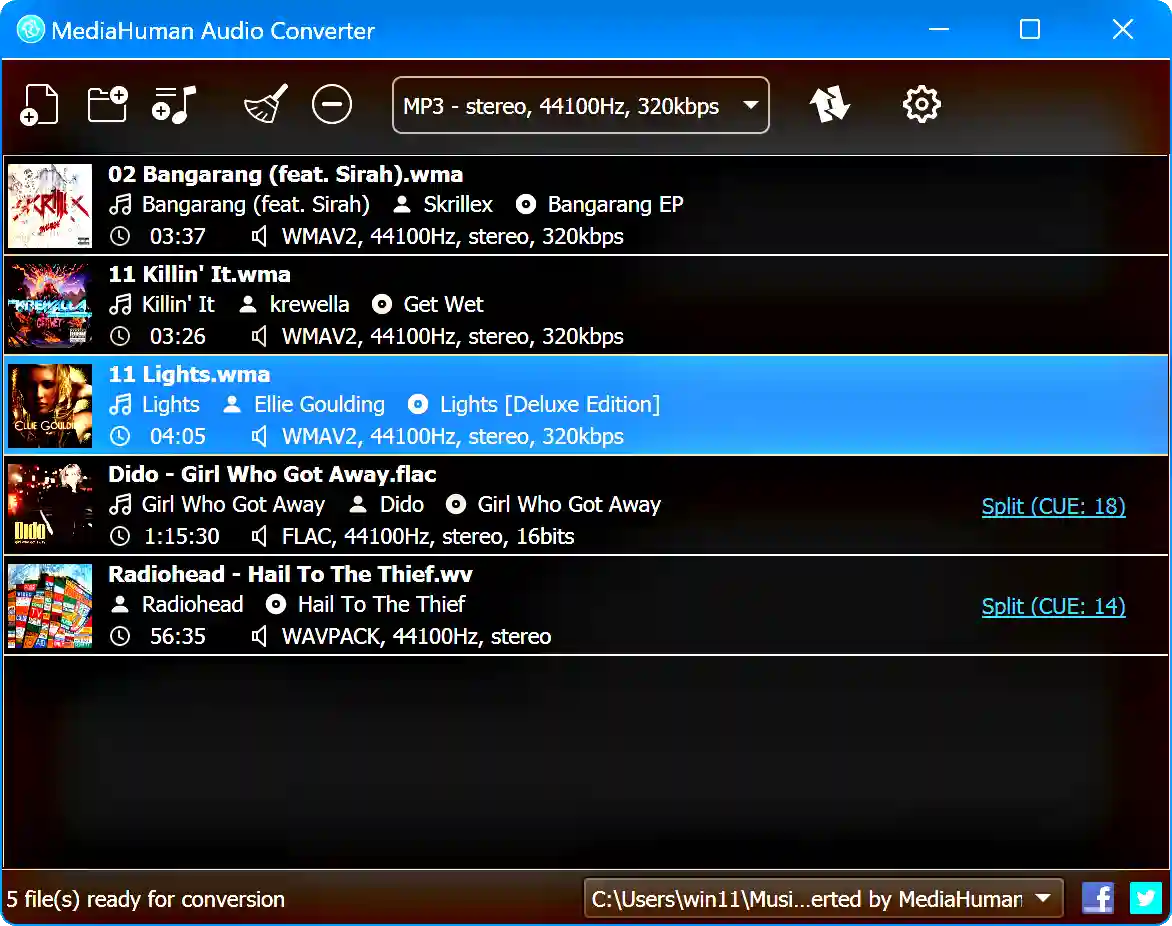
Technical Details and System Requirements for MediaHuman Audio Converter
System requirements for running the program:
- Processor: Intel, AMD.
- RAM: 512MB of RAM
- Disk space for installation: 80/100MB of free hard drive space for installation
- Operating system: Windows 11, 10, 8, or 7 (32-bit or 64-bit).
Advanced Features of MediaHuman Audio Converter
Advanced Audio Conversion Engine
The program relies on a sophisticated conversion engine capable of handling various types of audio files with high efficiency. It converts files between different formats while preserving as much of the original audio quality as possible and minimizing detail loss during compression and conversion.
Professional Batch Processing System
This feature allows users to convert hundreds or even thousands of audio files at once through a unified conversion list. The program can perform operations automatically without continuous user intervention, making it ideal for large music libraries and professional projects.
Lossless Audio Conversion Support
The program supports uncompressed and high-quality formats like FLAC, ALAC, and WAV, allowing for the preservation of all original audio data without quality loss. This feature is crucial for audiophiles, musicians, and producers.
<p data-section-id="1f2mfln"

 File Name:
 Version:
 Full Version:
 Created By:
 License Type:
 Languages:
 Tags:
Tags:


