


About Reg Organizer
Reg Organizer 8 is available for free download from our software library. This feature-rich application is designed to edit, clean, maintain the registry, fix system errors, and enhance computer performance. Its deep registry search feature helps locate all registry keys related to a specific application. The program allows you to preview and edit registry files (.reg) and view their contents directly from Windows Explorer. It includes a registry cleaner that safely compresses, repairs, and optimizes the registry. With Reg Organizer, you can thoroughly search the registry to find all keys related to a specific application - Reg Organizer performs this task faster and better than other similar programs. Other features of "Reg Organizer" include the ability to search for and replace registry entries, automatic registry cleaning, a disk cleanup tool, and access to many undocumented Windows features.
The ability to expand with plugins offers unlimited possibilities for third-party enhancements. There is also a built-in application uninstaller, allowing you to completely remove duplicate applications from the system.
With Reg Organizer 8, you can customize the "Open With..." context menu, remove items from the "Add/Remove Programs" dialog, specify programs to run at Windows startup, analyze shared dynamic link libraries (DLLs), and more... The last set of features will be useful for administrators as well as regular users.
Reg Organizer® is a feature-packed program that offers integrated services for Microsoft Windows. The software speeds up and optimizes your operating system, freeing up additional system resources.
The utility allows you to remove unwanted programs from the system and search for traces of uninstalled software. If there are "heavy" programs that automatically run at startup in your Windows OS, disabling them in the advanced startup manager can, in some cases, speed up boot time and system operation. The disk cleanup feature frees up space on your system drive. And this is just part of the tool's features.
A feature-rich application designed to edit, clean, maintain the registry, fix system errors, and enhance computer performance. Its deep registry search feature helps locate all registry keys related to a specific application. The program allows you to edit registry files (.reg) and view their contents directly from Windows Explorer.
With this program, you get an excellent system registry manager, and after running it, you can not only edit but also search and replace, as well as completely remove programs from there, take registry snapshots and restore them later. You can also clean the registry quickly and thoroughly, either automatically or manually, and optimize it as well. The link below allows you to download Reg Organizer from our project.
Additionally, the tool provides you with the necessary tools for precise and accurate Windows tuning. It will be possible to edit configuration files and clean hard drives of various accumulated junk over time. The Reg Organizer interface is as convenient as possible, for example, you'll be able to edit the registry without any problems, search for keys and replace them, quickly navigate through records, and so on.
Reg Organizer optimizes the registry in two ways: first by compressing it and then defragmenting it, achieving maximum effect. If you think about the compression process, it will remove different records from the registry, and the defragmentation process will merge all file parts, speeding up registry startup.
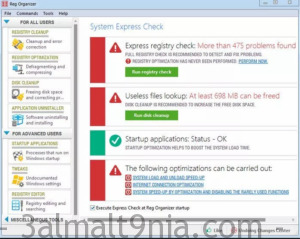
Reg Organizer, as mentioned above, knows how to adjust system settings. For example, you can completely remove unnecessary programs by taking a snapshot of the operating system, done before and after the program installation, erasing all traces, and configuring the interface as well. You can also monitor any changes in the system registry, done through snapshots. In general, there isn't much more to say about Reg Organizer. As you can see from the screenshot after launch, you can immediately see all the issues the program found, and then you can choose to resolve them or ignore them, it's up to you.
Soft Organizer Uninstaller Tool. It allows you to completely uninstall unnecessary applications from your system. It features a wide range of options that lead to a complete and trace-free uninstall of any application in the system. Additionally, the program features an intuitive and user-friendly interface. Here are some unique capabilities of the program: it works faster than many industry tools because Soft Organizer silently monitors all changes on your disks in real-time, rather than saving changes before and after installation, which can be time-consuming. It also features quick access to all installed applications in the system. You don't have to search for the standard Programs and Features tool or the uninstaller that comes with the program.
Soft Organizer aims to solve this problem: it allows you to completely uninstall unnecessary applications from your system.
Main Features of Reg Organizer
• Registry editor to view and edit the system registry, handle registry keys and values, export, import, copy them, etc.
• Reg Organizer's registry cleaner can detect many types of registry errors. These include searching the registry for invalid file and folder references, DLL files, invalid uninstall data; searching for old and invalid file extensions, and other issues. Reg Organizer can fix many of these registry issues.
• The registry search feature can find all keys related to a specific application and delete them if necessary. This feature can be useful if you manually delete some applications that do not have an uninstall feature. In this case, its keys can remain in the registry and interfere with the normal operation of other programs. Reg Organizer provides the deepest search and can often find those keys that cannot be identified by other similar programs.
• Defragment and compress the registry: increase registry performance and thus the overall performance of your system.
• Ability to change many undocumented Windows settings (tweak). In particular, it can speed up your system by sending a command to the system to increase cache size or by unloading unused libraries, etc.
• Ability to get information about any specified registry key and monitor changes in specific keys.
• Preview registry files (*.reg) before adding their contents to the system registry. Files can be viewed directly from Windows Explorer. Reg Organizer presents the file contents in a tree-like form, helping to visualize all the keys that will be imported into the registry.
• Functional registry file editor, allowing you to edit keys and values, add and delete data containing .reg files.
• Provide quick access to all programs that run automatically when you start your computer or log in. With Reg Organizer, you can examine, edit, or disable these programs.
• The registry search and replace mode offers you a variety of options for searching the registry and replacing records that match specified criteria.
• Built-in uninstaller. It can take snapshots before and after installing an application and eliminate all system changes made by an application as if it was never installed. Besides, this feature can be used to view changes made by an application to each system component.
• The disk cleanup tool allows you to automatically remove unnecessary files from your computer's hard drive, search for and fix invalid shortcuts.
Ability to change many undocumented Windows settings (tweak). In particular, it can speed up your system by sending a command to the system to increase cache size or by unloading unused libraries, etc.
The advanced registry editor in Reg Organizer allows you to perform various operations with the system registry - you'll be able to export, import, copy key values, and do much more. The registry editor has far more features than the registry editor in Windows.
The search and replace in the registry allows you to find keys related to the concerned application and delete them if necessary. This is useful, for example, if the application does not have an uninstaller and after deleting it "manually," unwanted files remain in the registry, which can affect other applications. At the same time, Reg Organizer performs a deeper search and often allows you to find keys associated with this application that cannot be found by other similar programs.
- Functional registry file editor, allowing you to edit keys and values, add and delete data containing .reg files.
- Provide quick access to all programs that run automatically when you start your computer or log in. With Reg Organizer, you can examine, edit, or disable these programs.
- The registry search and replace mode offers you a variety of options for searching the registry and replacing records that match specified criteria.
- Built-in uninstaller. It can take snapshots before and after installing an application and eliminate all system changes made by an application as if it was never installed. Besides, this feature can be used to view changes made by an application to each system component.
- The disk cleanup tool allows you to automatically remove unnecessary files from your computer's hard drive, search for and fix invalid shortcuts.
- Clean design and user-friendly interface allow you to control every aspect of the program's capabilities with just a few clicks.
- Displays all the applications downloaded to your computer.
- Allows you to choose how you want to sort and organize your data (table, large icons, by developer, date, tracking status, etc.).
- Built-in easy-to-use search function allows you to quickly find an application you know you want.
- Gives you the opportunity to monitor any changes made to your system when downloading and installing new applications on your system.
- Allows you to view any changes made to the Windows registry and file system.
Programs You Might Like:
Download Advanced SystemCare Ultimate 15.3.0.115 Full with Activation Crack
R-Studio 9.1 Build 191020 Full for PC 2021 with Crack for Lost File Recovery

 File Name:
 Downloads:
 Version:
 Full Version:
 Created By:
 License Type:
 Release Date:
 What's New:
 Languages:
 Tags:
Tags:
