

Have you ever lost your important photos or messages from your iPhone unexpectedly and searched for a reliable solution to safely recover your data? This is where downloading iMobie PhoneRescue for iOS comes into play as one of the most powerful tools specialized in data recovery for iOS devices. It offers smart and effective solutions to deal with issues like accidental deletion, system crashes, and update failures, all through an easy-to-use interface suitable for all users. The program combines deep file recovery capabilities with system repair in one tool, making it an ideal choice for anyone looking to protect and quickly recover their data efficiently.

Overview of iMobie PhoneRescue for iOS
iMobie PhoneRescue for iOS is a professional solution specialized in recovering data from iPhone, iPad, and iPod Touch devices. It was developed to help users retrieve deleted or lost files due to accidental deletion, system failures, or update issues. The program is distinguished by its ability to handle various data loss scenarios without affecting the current content of the device, making it a reliable option for both individuals and businesses.
PhoneRescue for iOS relies on advanced scanning technologies that enable it to recover a wide range of data types, such as photos, text messages, contacts, call logs, WhatsApp attachments, notes, calendars, and multimedia files. It also provides a preview feature for recoverable files before executing the recovery process, giving users complete control over which data they wish to restore.
The program's functionality is not limited to direct recovery from the device; it also supports extracting data from iTunes and iCloud backups, even if the backups are encrypted or incomplete. This feature is crucial for users who have lost their data after a factory reset or device damage, allowing them to recover their content without needing to restore the entire backup on their phone.
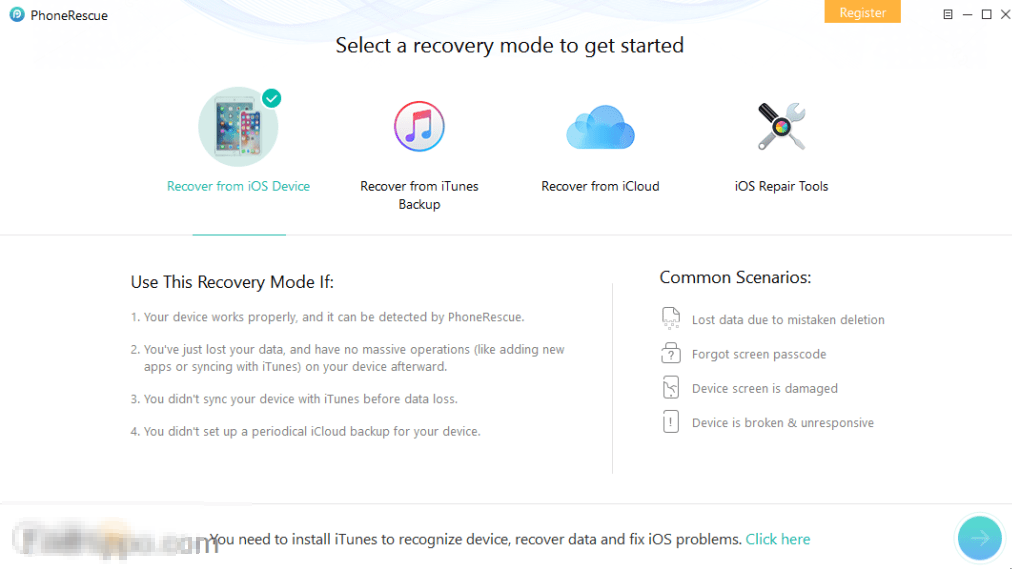
In addition to data recovery, iMobie PhoneRescue for iOS offers effective tools for fixing common iOS system issues, such as the device getting stuck on the Apple logo, entering a reboot loop, or experiencing black and white screens. The program also allows users to remove the screen lock or Screen Time passcode if forgotten, while preserving the device's data as much as possible.
The version features a simple and smooth user interface suitable for all user categories, where the recovery process involves clear steps starting with connecting the device, selecting the appropriate recovery mode, followed by scanning the data, and finally selecting the desired items for recovery. The program is compatible with both Windows and macOS systems and supports a wide range of iOS devices and different system versions.
The idea for iMobie PhoneRescue began as an innovative solution to one of the most common problems faced by iOS users: losing important data, whether it's precious photos, text messages, contacts, or important work files. With the increasing use of iPhone and iPad in daily life, the need arose for a powerful and reliable tool that could easily and safely recover lost data without requiring advanced technical expertise.
iMobie Inc, the company behind the program, was founded with the vision of providing software solutions that help the average user manage and protect their digital data. Thus, PhoneRescue was developed as one of its flagship products, with the company ensuring a simple and user-friendly interface combined with high technical capabilities for data recovery since the launch of its early versions. The program has attracted the attention of many users looking for a tool that can recover their data even in the toughest situations, such as accidental deletion, system crashes, or device loss.
As iOS devices and their versions have evolved, the development team has continued to update the program to be compatible with the latest operating systems, adding improvements that ensure faster scanning and recovery, as well as broader support for various data types and issues. Today, after releasing several advanced versions, the program has reached a version that combines deep data recovery and efficient system repair, making it one of the leading tools in this field.
Features of iMobie PhoneRescue for iOS

- Supports recovering photos, messages, contacts, notes, and call logs directly from iOS devices.
- Ability to recover data from iTunes and iCloud backup copies.
- Recovers app data such as WhatsApp, LINE, and Viber.
- Repairs iOS issues like sudden freezes, black screens, failed updates, or other system problems.
- Helps to reboot the device normally without data loss.
- Gives users the freedom to preview files before recovery.
- Allows selecting only the files to be recovered instead of restoring all data.
- Utilizes NO-DATA-LOSS technology that minimizes the risk of data loss during scanning and recovery.
- Ensures the highest success rate in file recovery compared to competing programs.
- Simple and user-friendly interface even for beginners.
- Organized and clear steps make the recovery or repair process smooth.
System Requirements for Running iMobie PhoneRescue for iOS

Operating System
- Windows 10 (64-bit)
- Windows 11 (64-bit)
- Does not officially support older versions like Windows 7 or 8.
- Processor (CPU): Dual-core at 1 GHz or higher
- Memory (RAM): 1 GB minimum, preferably 2 GB or more for a smooth experience
- Storage (Disk Space): 200 MB of free space for installation and temporary files
- Display: Resolution of 1024×768 or higher
Conclusion
In conclusion, iMobie PhoneRescue for iOS is a comprehensive and reliable solution for anyone facing data loss issues or iOS system failures. It combines ease of use with powerful performance in file recovery and system repair without complications. Thanks to its extensive support for various data types and compatibility with many iOS devices, the program represents a practical option that helps users recover their data with confidence and security, safeguarding their digital content from loss.

 File Name:
 Downloads:
 Version:
 Full Version:
 Created By:
 License Type:
 Release Date:
 Languages:
