


Jdownloader: A Free Video Downloading Tool for Your Computer
Download JDownloader 2.0.1 Rev. 48254 for Free on Windows
JDownloader 2.0.1 Rev. 48254 + Portable Version is a free, open-source downloading tool that allows you to download all your favorite files from the web. Developed by a vibrant community of independent developers working collaboratively, this program aims to enhance usability for everyone. The free download manager for Windows enables you to download multiple files simultaneously.
It is available in several languages, including French and German. The download management tool, licensed under the GNU GPL, offers various themes to customize it according to your preferences and style. It even includes a powerful built-in OCR (Optical Character Recognition) module.
JDownloader requires Java 1.5 to be installed on your device. You can download a single file from multiple sources to speed up the process. It also allows you to work with servers that frequently disconnect or show errors. The program lets you pause and resume downloads at your convenience. Download JDownloader now and enjoy a fast downloading experience.
JDownloader is one of the few download managers available as an open-source project. The file transfer tool features a straightforward interface built with Java, making it easy to get accustomed to. This free and open-source program is compatible with systems running Windows XP and later versions.
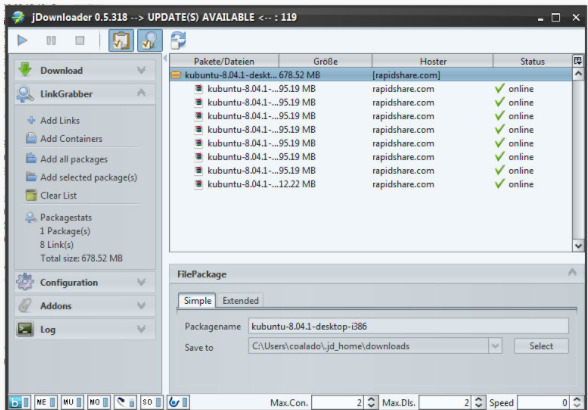
Overview of JDownloader 2.0.1 Rev. 48254
JDownloader 2.0.1 Rev. 48254 is a download management tool with a vast community of developers that makes downloading as easy and fast as it should be. Users can start, stop, or pause downloads, set bandwidth limits, automatically extract archives, and much more. It is an easily extensible framework that can save you hours of precious time every day.
JDownloader 2.0.1 Rev. 48254 is a standalone platform entirely written in Java. It simplifies file downloads from one-click hosts like RapidGator, Uploaded, NitroFlare, Share-Online, etc. - not just for users with premium accounts but also for free users. It provides downloads in multiple parallel streams, captcha recognition, automatic file extraction, and more.
Features of JDownloader 2.0.1 Rev. 48254
Using JDownloader is straightforward. After installation, you only need to update the files to start using it. Add links to the "Link Capturer," check their availability, and select the files you want to add to the "Download" list. Don’t forget to accept the TOS (Terms of Service) for each service.
Here are some key functionalities you should know about JDownloader:
Control the progress of any download with start, stop, and pause functions.
Establish predefined bandwidth limits.
Automatically extract compressed files.
Download files from any direct download server.
Capable of downloading files from YouTube and other platforms.
Automatically capture links copied to the clipboard.
Prioritize downloads according to your needs.
Suitable for users with both premium and free accounts.
Compatible with plugins that enhance its functionality.
Ability to set maximum downloads as well as download speed.
Download files without needing to enter captcha codes.
Support for importing DLC, CCF, or RSFD container files.
Although there are versions for other platforms like Linux, especially Ubuntu-based distributions, and Mac, we still have to wait for this application to be available on Android. However, on this mobile operating system for smartphones and tablets, we can download an APK that can be used as a remote control for the official client thanks to MyJDownloader Remote Official. It’s the official free app for managing or downloading on a Windows PC from our Android device.

 File Name:
 Downloads:
 Version:
 Full Version:
 Created By:
 License Type:
 Release Date:
 Languages:
 Tags:
Tags:







3 thoughts on “Download JDownloader 2.0.1 Rev. 48254 for Windows - Direct Link for File Management and Downloads”
الرابط لا يعمل
الرابط يعمل
https://uptobox.com/4kqwfoif99u9
لو كان ينفع أرف لك صورة كنت أرفقتها