Description of Outline Client VPN
Introducing Outline Client VPN , an easy-to-use application designed for Windows users seeking enhanced online privacy and security. With a simple download, users can effortlessly protect all their devices. This application allows you to create your own virtual private network (VPN), giving you control over who shares access within your network. Securely connect to your server using a unique access key generated by Outline Manager. Join the growing community of users embracing a freer, privacy-focused internet with Outline Client VPN. Take control of your online anonymity today by downloading the application from our website.
Outline Client VPN is a simple and easy-to-use application that allows you to share VPN access with anyone on your network. It provides greater control over online anonymity. This free service allows users to create their own virtual private network, enabling them to share access with anyone on their network.
Outline Client VPN uses DigitalOcean, Google Cloud Platform, and Amazon Lightsail services. These options aim to simplify the process, allowing you to configure a dedicated server at any time through the administrator.
Outline is a very exciting tool that allows users to create their own Virtual Private Networks (VPNs) so they can browse the internet without fear of their privacy being compromised. With a slightly more complex interface than similar but equally user-friendly applications, Outline is a great option for those who want to set up their own VPNs.
Outline can be set up in two very different ways: If you have a pre-created server code, you can simply enter it in its search box to be added to your trusted list. However, if you don't have an invitation, you will have to create this server from scratch. To do this, you just need to download the official tool from the application's webpage and follow all the steps shown during the process.
Outline Client VPN Features
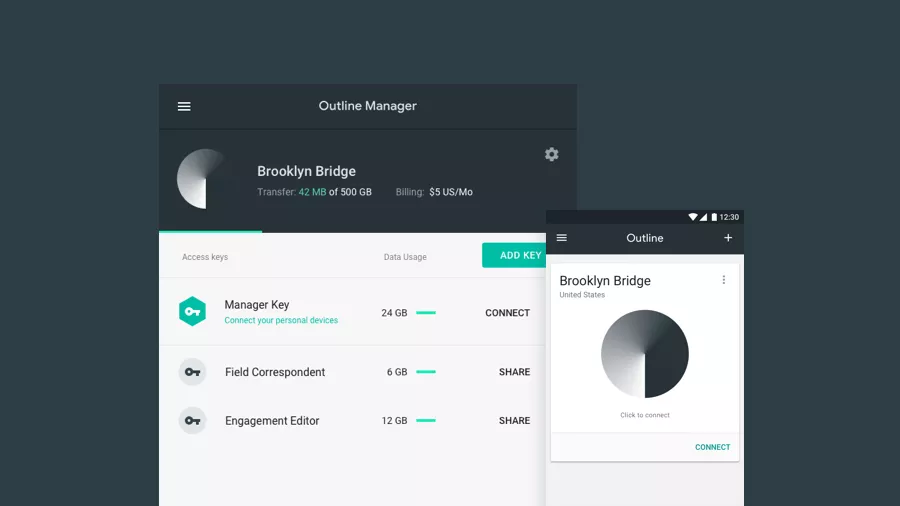
The solution comes with two interconnected programs. The client is where you connect and share access to your VPN network, while the manager is where you set up and manage your VPN server.
The connection is handled on an access key basis, so users will be required to either have one on hand from a previous server setup or start fresh with a cloud service. DigitalOcean, Google Cloud Platform, and Amazon Lightsail are among the available options. While these options are designed to make the process more straightforward, you can set up a dedicated server at any time through the administrator.
What Outline aims to offer is a more transparent VPN experience. Since you don't truly know who can access your data on the other side—even through a VPN—your ability to create and manage your own private server, which only you have full access to, really emphasizes the "private" aspect of a VPN.

 File Name:
 Downloads:
 Version:
 Full Version:
 Created By:
 License Type:
 Release Date:
 Languages:
 Tags:
Tags: