

Saleen Web Downloader is a free tool for Windows that combines a simple browser with file and media downloading capabilities from the internet. It stands out for its ability to download images and videos from sites like YouTube and Flickr with just two clicks, featuring an integrated library for file management, frame-to-image conversion, and a version that offers better stability and faster downloads with an easy-to-use interface for both casual and professional users.
Overview of Saleen Web Downloader
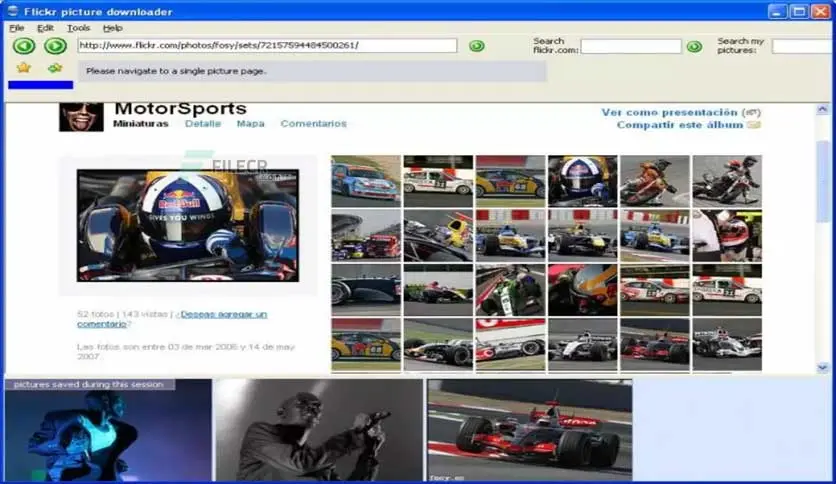
- Saleen Web Downloader combines the functionality of a regular web browser with automatic downloading of images and videos while browsing pages, along with a built-in search tool to automatically identify specific download sites. The program includes:
- A Video Downloader that can generate a still frame from the video.
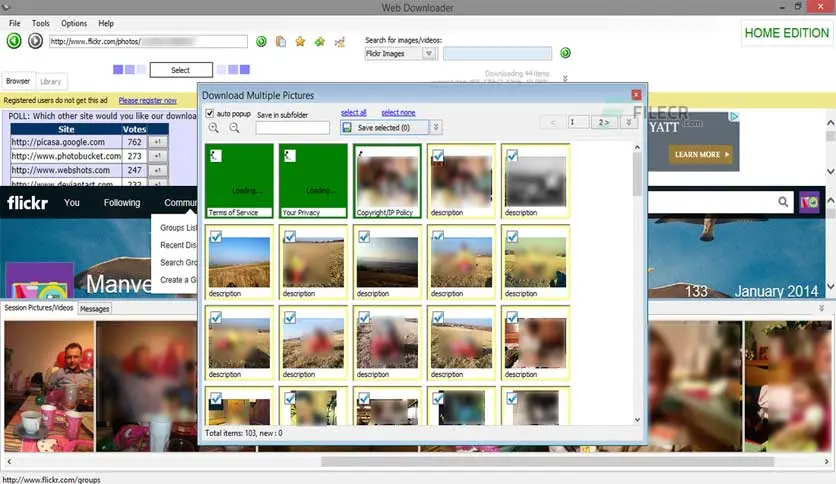
- A Picture Downloader that supports bulk downloading of images from pages.
- A Built-in Library for easy organization and display of media within the program's interface.
Release History and Updates
Version 1.0.0.668 was released about 1.3 years ago, bringing improvements in stability and faster download protocols compared to older versions. There is no information on subsequent updates for this branch, and this is the latest version available on major download sites.
Technical Requirements
- Operating System: Windows 7, 8, 10, 11 (32/64-bit).
- Processor: 1 GHz or higher.
- Memory (RAM): At least 1 GB (2 GB recommended).
- Disk Space: 50–100 MB free for installation and temporary storage of downloaded files.
- Internet Connection: Broadband to ensure better speed and control when downloading large videos.
Main Features
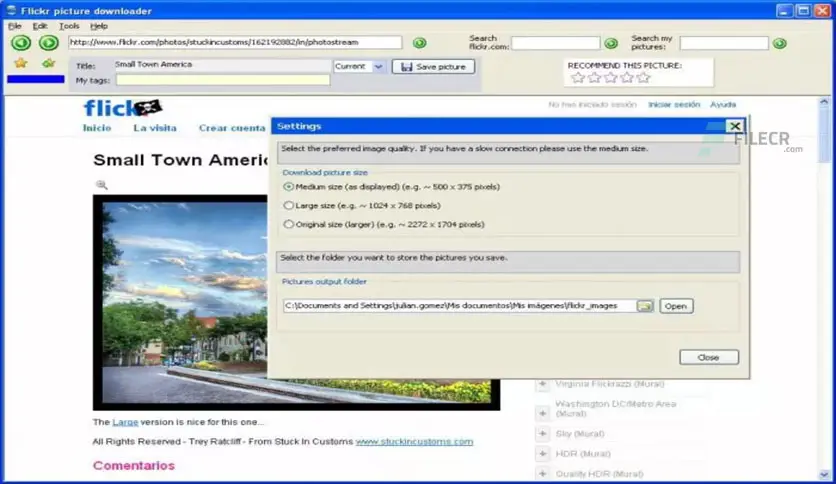
- Integrated web browser that opens pages and automatically detects downloadable content.
- Bulk downloading of images and videos, allowing users to download a batch of images or videos at once.
- Frame Generation to quickly extract a still image from any video.
- Library management for organizing media within the program with options for renaming, searching, and filtering.
- Simple format conversion, allowing users to save videos in common formats (MP4, AVI) and convert images to multiple formats.
- Support for multiple download protocols HTTP/HTTPS with acceleration capabilities through multiple connections.
- Built-in search to automatically find media links within popular sites without leaving the interface.
User Guide
- Open Saleen Web Downloader and navigate to the desired media site (e.g., YouTube or Flickr).
- The download button will appear when images or videos are detected on the page.
- A dialog box will allow you to select the desired files (image or video).
- Choose a save folder or use the default setting.
- Click “Download” to follow the progress bar and complete the download.
- Once finished, you will find the media saved in the program's library or the specified folder.
Pros and Cons of Saleen Web Downloader
Saleen Web Downloader is one of the tools for downloading content from the internet, providing users with the ability to download images and videos from a variety of popular sites. It features a simple and user-friendly interface, making it suitable for those who need a straightforward tool for quick content downloads.
Pros
- The program allows you to download images and videos from various sites like YouTube, Flickr, and Facebook, making it a versatile option.
- It features a simple and easy-to-use interface, where users can easily select the content they want to download without complicated steps.
- The program automatically analyzes web pages to discover downloadable items, saving users a lot of time and effort.
- It provides the ability to manage and organize downloaded content through an internal library, helping users easily find their files.
Cons
- Although it supports many popular sites, there are some sites that may not be compatible with the program, which may limit its ability to download certain content.
- The program lacks advanced tools like format conversion or video editing, making it less useful for users who need additional features.
- Some users may experience compatibility issues when running the program on newer operating system versions, which may require updates or alternative solutions.
Advanced Usage Tips
- The program's internal search engine allows quick access to supported sites automatically, so try adding specific domains in the search settings to enhance media link detection.
- Adjusting the number of simultaneous connections in the options can increase download speed, especially with large files and high-definition videos.
- Use the “Frame Generation” feature to quickly extract still shots from any video and save them as standalone images in high quality.
- Organize media by creating custom folders by topic (images, educational videos, etc.), with batch renaming using available name templates in the library window.
- Although not supported internally, it can be integrated with Windows Task Scheduler to run the program and execute specific download commands during off-peak times to improve performance.
Troubleshooting and Problem Solving
- First, check the updated list of supported sites in the search settings. If the issue persists, try accessing the media via a direct URL.
- The program offers a “Retry on Fail” option, but it does not support true resumption from where the connection stopped; to bypass this, manually split the file using a Download Manager that supports resumption and then merge the parts later.
- If you cannot save a video in MP4 or AVI format, try converting the full frame to FLV first, then use an external converter to change it to the desired format.
- Reduce the number of concurrent tasks to 3 or fewer and monitor memory usage through Windows Task Manager to avoid resource drain.
Security and Privacy
- Copies of the program from untrusted sites may contain malware; it is recommended to always download from verified sites like Pesktop and FileCR.
- When browsing any site within Saleen, check for a security lock in the top bar before downloading media to protect your connection from eavesdropping.
To close any unwanted connection, completely exit Saleen from the tray icon after finishing your download session.
Use an antivirus program to scan downloaded media before running it, especially from unfamiliar sites.
In-Depth Comparison with Alternatives
- MetaProducts Mass Downloader offers strong acceleration, batch downloading, and advanced resumption, but lacks the built-in frame generation feature found in Saleen.
- Mihov Picture Downloader specializes in efficiently downloading images from multiple sites and includes a powerful search engine, but does not support video and direct conversion like Saleen.
- Any Video Downloader Pro supports format conversion and direct audio extraction to MP3, and has a browser extension that automatically detects links, but it is paid and not fully free.
- MetaProducts Flash Media Downloader focuses on RTMP/RTSP streaming protocols and allows full resumption, but does not include a comprehensive media management library.
Saleen Web Downloader is a lightweight and free solution for those looking for a simple tool to download images and videos from web pages without complicated download settings. Despite its simplicity, clear interface, and quick installation, its lack of regular updates and support for advanced requirements like full download resumption or audio extraction makes it less suitable for users needing advanced capabilities. Nevertheless, it remains an ideal choice for anyone seeking a quick and resource-light solution for basic web media downloads.

 File Name:
 Downloads:
 Version:
 Full Version:
 Created By:
 License Type:
 Release Date:
 Languages: