

In an era where the need to enhance computer performance and speed is increasing, system optimization software plays a crucial role in helping users clean their devices, speed up performance, and easily and safely fix technical issues. Among these programs is Easy System Utility Pro, a comprehensive and powerful tool designed to effectively improve the performance of the Windows operating system with a simple user interface. In this article, we will provide a detailed explanation of Easy System Utility Pro, starting with its features, core functions, how to use it, and the benefits it offers to users, along with any potential drawbacks.
What is Easy System Utility Pro?
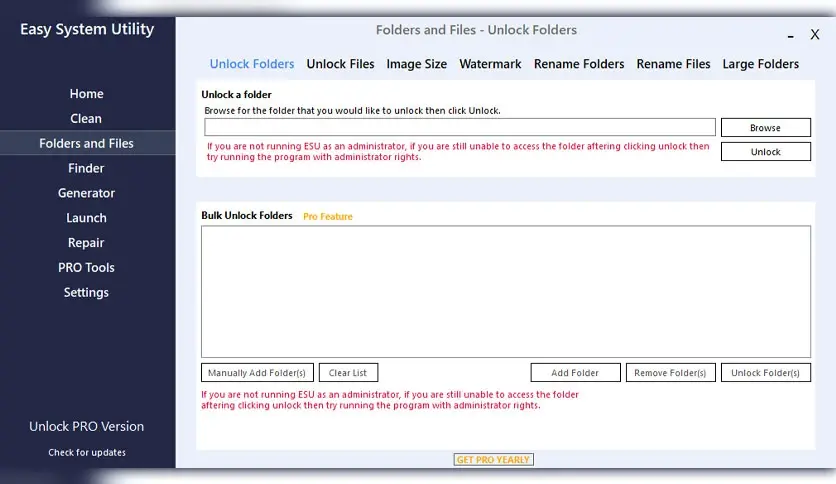
Easy System Utility Pro is a comprehensive program for maintaining and enhancing the performance of computers running Windows. The software helps clean the system of temporary and unnecessary files, fix issues related to the system registry, optimize system settings, and manage programs and applications to improve device speed and stability.
The latest version includes technical enhancements to boost the program's efficiency along with updated databases to provide better cleaning and repair performance.
Features of Easy System Utility Pro
- The program scans the system to find temporary files, cache files, remnants of deleted programs, and unnecessary files that take up hard drive space.
- It includes advanced tools for scanning and fixing registry errors, contributing to improved system stability and startup speed.
- It optimizes system settings and configures device resources for maximum speed and performance.
- It provides options for completely uninstalling programs, as well as managing programs that start automatically with the system to speed up the boot process.
- The program is designed to suit all user levels, whether beginners or experts, with organized menus and clear buttons.
- Additional tools include cleaning browsers of cookies and temporary files, and monitoring hard drive health.
- It supports most modern Windows versions such as Windows 7, 8, 10, and 11.
How does Easy System Utility Pro work?
The program performs a series of tasks that help improve system performance through several key steps:
- It starts by scanning system files and the hard drive for unnecessary files or issues affecting device performance.
- It deletes temporary files, old update files, and remnants of unnecessary programs.
- It searches for incorrect or duplicate keys in the system registry and repairs or deletes them.
- It displays a list of programs that run automatically at system startup, allowing users to disable unnecessary programs.
- After cleaning and repairing, it adjusts system settings to enhance responsiveness and reduce errors.
- It provides a detailed report of the scan and repair results so users can see what has been accomplished.
Benefits of Using Easy System Utility Pro
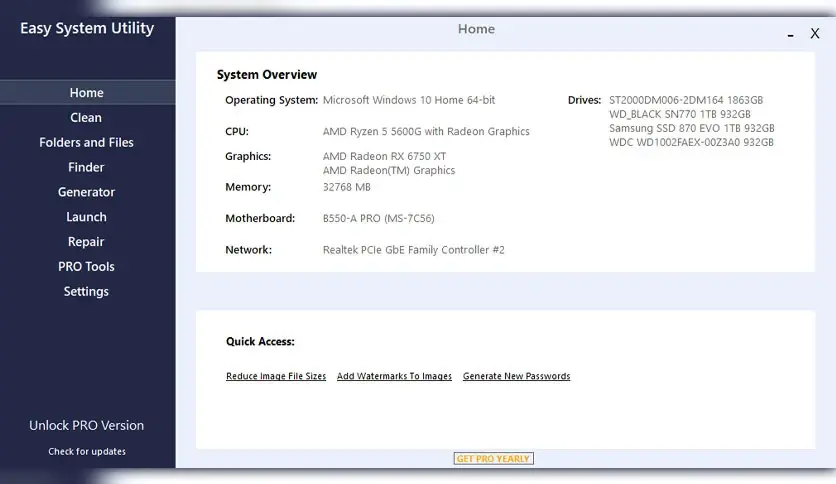
- Improves computer speed by cleaning temporary files and fixing the system registry, making the system faster and more responsive.
- Deleting unnecessary files frees up additional space on the hard drive.
- Fixing registry issues reduces the occurrence of errors and problems that could lead to system crashes.
- The simple interface allows users to perform maintenance tasks regularly without needing extensive technical expertise.
- It saves time compared to dealing with issues manually, providing a quick and comprehensive solution.
- Regular updates are often available to improve the program's database and address new issues.
Drawbacks of Easy System Utility Pro
Despite its significant benefits, users may encounter some potential drawbacks such as:
- Some advanced features may require purchasing the full version.
- If users do not use the program carefully or do not review files before deletion, they may accidentally delete essential system files.
- Relying solely on one program may not cover all complex system issues.
- In some versions, technical support may not be readily available, limiting assistance in urgent situations.
Tips and Guidelines for Using Easy System Utility Pro Safely

System Backup
Before starting to use the program, it is always best to create a full backup of the system or at least of critical points like the system registry and data files. This procedure ensures that you can restore the system to its original state in case of any issues after the cleaning or repair process.
Review Files Before Deletion
After the scan is complete, the program displays a list of files recommended for deletion, and it is important to carefully review these files to ensure that no important files are deleted that could affect the operation of certain programs or the system.
Use the Original Version
Make sure to download the program from official sources or trusted websites to avoid modified or fake versions that may contain harmful software.
Regular Program Updates
Update the program periodically to ensure you have the latest performance enhancements and new databases that help clean the system more accurately.
Do Not Rely Solely on One Tool
Despite the strength of Easy System Utility Pro, it is advisable to use it alongside other protective tools such as antivirus and anti-malware programs to ensure the best protection and performance for your device.
Best Practices for Maintaining Computer Performance
- Keep your Windows system updated regularly to ensure the installation of the latest security patches and performance improvements.
- Use cleaning tools like Easy System Utility Pro regularly to maintain sufficient space and high speed.
- Scan your device with an updated antivirus to avoid malware that could affect performance.
- Installing programs from unknown sources may expose the system to harmful software.
- Reduce the number of programs that start with the system to speed up boot time.
Easy System Utility Pro is an effective and comprehensive tool for improving the performance of computers running Windows. With its multiple functions such as system cleaning, registry repair, and startup program management, the software provides a complete solution for maintaining device speed and stability.
The program is user-friendly and delivers tangible results in enhancing computer performance while reducing technical issues. However, it is always advisable to use it cautiously and review what is being deleted to avoid any unintended problems.
If you are looking for a reliable program to help you maintain your device regularly without complications, Easy System Utility Pro is a good option worth trying.

 File Name:
 Downloads:
 Version:
 Full Version:
 Created By:
 License Type:
 Release Date:
 Languages: