


Download Adobe Illustrator CS5 Direct Link
Full Version of Adobe Illustrator CS5 with Crack
For an application that's been around for over 25 years (and remember, computer years are like five times dog years), Adobe Illustrator continues to evolve thanks to innovative features and useful enhancements. Illustrator is now used more than ever, providing a familiar and reliable design environment that can be utilized to create content for any need across any medium—be it print, web, video, or mobile. The installation of
Illustrator CS5 (upgrade $599 / new $199, and in all configurations of Adobe Creative Suite 5) has significantly improved over previous versions. Adobe has completely rewritten its installer technology; IT managers will now appreciate the ability to perform installations 'silently' over the network. You will be prompted for an Adobe ID during installation—primarily used to access Adobe's new online CS Live services—though you can skip this step and enter the information later. Along with the unconventional new splash screen (each CS5 product features a different one), you’ll find that Illustrator CS5 doesn’t look different at first glance. But don’t worry, this perception will change quickly. Keep reading.
Ask and Ye Shall Receive
Ask an experienced user what they’d like to see addressed in a new version of Illustrator, and you’ll rarely hear a request for something major. In fact, most users tend to want things that seem small—like adding an extra menu command here or there to help with daily tasks—that are repeated over and over. In CS5, Adobe finally addresses many of these 'small' requests—with some innovative twists along the way.
Create a new document in Illustrator CS5 and you’ll notice that the origin point of the ruler is now positioned at the top right of the document. And when using multiple artboards, each artboard now retains its own guides and origin point. Speaking of artboards, you can now assign names to them. The new Artboards panel makes it easy to navigate between artboards and rearrange them. The new Auto-Rotate option in the Print dialog automatically changes paper settings to portrait and landscape so you can print all artboards in the document at once, even if the artboards have mixed orientations.
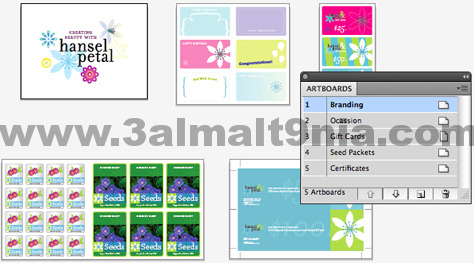
Figure 1: The new Artboards panel in Illustrator CS5 makes managing documents with multiple artboards easier. Click the image below to open a larger version in a separate window.
Illustrator CS5 breathes new life into most core functions, such as selecting, pasting, and editing paths. You can now hold down Command (Mac) or Control (Windows) while making selections to choose objects that are underneath other objects in the stacking order. CS5 also sports two new paste commands: Paste in Place, which allows you to copy an object from one artboard and paste it in the exact location on another. And Paste on All Artboards, which does the same thing—but across all artboards at once. After forcing 14 copies to join my anchor points at once, you can now use the Join command to merge multiple paths and anchor points with a single action.
Illustrator CS5 introduces the concept of drawing modes. In normal drawing mode, every object you draw is added on top of objects in the stacking order. Press Shift-D to toggle to Draw Behind mode, and every object you draw will appear beneath other objects in the stacking order. Select any shape and press Shift-D again to enter Draw Inside mode, where anything you do happens inside the selected object. Generally, Illustrator automatically creates the necessary masks for you. For example, when Draw Inside mode is active, you can use the regular Paste command to paste objects directly into other objects without having to manually select a mask. This is similar to the Paste Inside feature that Freehand users have longed for.
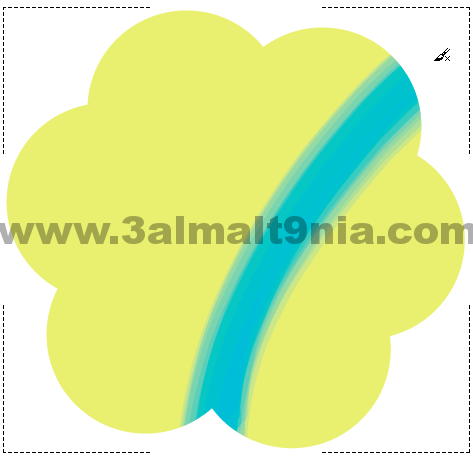
Figure 2: A dashed outline appears around the boundary of an object, indicating that the Draw Inside mode is active.
With each version of Illustrator, the Symbols feature becomes more important and powerful. Along with its ability to work more efficiently, symbols are also compatible with both Flash Professional and Flash Catalyst (Illustrator symbols become flexible graphics in Flex when brought into Flash Catalyst). With CS5, symbols now have their own layer structure, like mini-documents, and support individual registration points and 9-slice scaling directly on the artboard in Illustrator.
Many raster-based effects, including Gaussian blur, now retain their appearance even when changing the resolution value in the Effect > Document Raster Effects Settings dialog. This means you can design at a lower resolution for better performance, then connect the resolution before going to print, without negative consequences. It also makes sharing content between print and web documents easier.
In Illustrator CS4, Adobe added the ability to assign opacity values to individual colors that stop within a gradient. In CS5, Illustrator can now do the same for individual mesh points in a gradient mesh object.
While all these elements are just small enhancements, they significantly impact the bulk of the work you do in Illustrator every day. I covered them here first in my review because I believe they are the most important.
Download adobe illustrator cs5 Direct Link
Strokes Get a Comprehensive Update
Looking back at previous versions of Illustrator, you can point to watershed features like gradients, the Appearance panel, and Pathfinder: things that have significantly redefined the types of art you can create and changed the ways you get your work done. With Illustrator CS5, you can add another feature to this list: variable-width stroke profiles. Users of
Illustrator often take strokes, which are the attributes that control the appearance of paths, for granted. While there are settings like dashes, caps, and joins that can change the appearance of a stroke, the most common adjustment we make to strokes is weight, or thickness. Strokes have always been limited to a single fixed weight distributed along the entire path, but many of us have dreamed of creating strokes with tapered edges or irregular weights. In the past, we struggled with cumbersome solutions, like selecting stroke outlines and manually adjusting anchor points, or applying brush strokes with pressure-sensitive pens and tablets.
In Illustrator CS5, you can use the new Width tool to adjust stroke weight along any part of the path, with absolute precision. Typically, Illustrator draws the stroke along the path line, but with the Width tool, you can easily add or remove thickness from either side of the path individually. While clicking and dragging with the Width tool, Illustrator defines width points that determine the overall appearance of the stroke. You can double-click these width points to enter precise measurements, and you can also drag width points along the path to make adjustments. Then there’s the best part: all the width points applied to a path form something called a width profile, which you can save and easily apply to other paths.
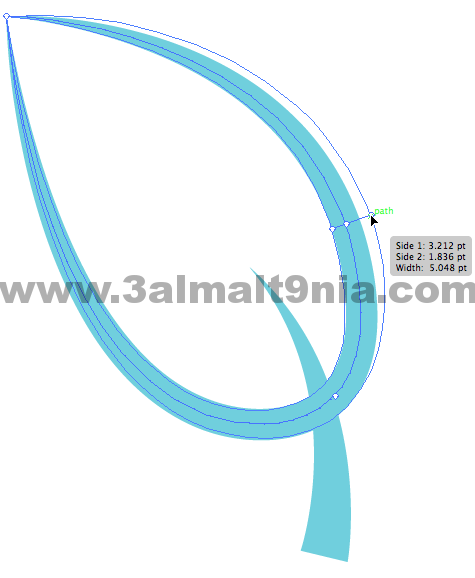
Figure 3: When using the Width tool to adjust stroke thickness along the path, Smart Guides provide you with accurate values.
As an added bonus, you can also use the Width tool to add width profiles to Art and Pattern brushes. You can now define 'areas to stretch' in Art brushes, so they are measured intelligently.
In addition to the Width tool and width profiles for the Width tool, Adobe has also enhanced the way dashes are applied to strokes (corners are now evenly spaced). Instead of having to add and adjust effects, you can now select arrowheads as a stroke attribute directly from the Stroke panel (like in InDesign). You can instantly flip an arrow from one side of a path to the other, and you can even define your own custom arrowheads.
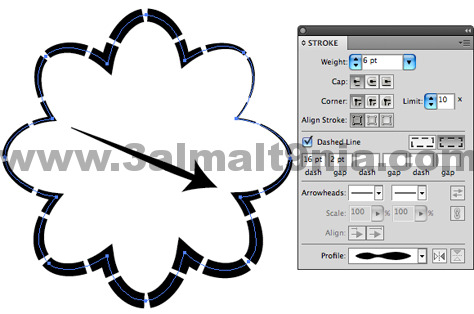
Figure 4: The updated Stroke panel allows you to easily add a width profile and apply perfectly aligned dashes along any path.
Adobe loves to refer to all these settings and enhancements as 'beautiful strokes,' and it’s hard not to agree.
Bob Ross Lives in Illustrator CS5
Illustrator has had a Paintbrush tool since version 8, but it resembles a real paintbrush as much as the Pen tool resembles a real pen. In previous versions, Illustrator supported four types of brushes: calligraphic, art, scatter, and pattern. CS5 adds a fifth type called Bristle Brush, which simulates the bristles of an artist's brush.
The core engine of the Bristle Brush is the same as the new Bristle Tips feature in Photoshop CS5, but with Illustrator, you paint using vectors instead of pixels. However, it’s possible to achieve painterly effects with the Bristle Brush even if you’ve never painted before, although you might want to watch some Bob Ross DVDs. You can select shape brushes that mimic traditional brushes (fan, round, angled, etc.), and you have complete control over brush properties including bristle length, density, thickness, and stiffness. With so many variables, there’s no limit to what you can create with the Bristle Brush. I’ve enjoyed creating artwork ranging from Japanese calligraphy to watercolor paintings.
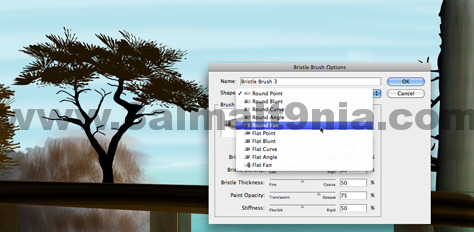
Figure 5: With the Bristle Brush, you can create a variety of effects, such as the leaves on this cypress tree, as well as the painterly sky in the background. Click the image below to open a larger version in a separate window.
The only downside is that to achieve painterly effects with vector paths, the Bristle Brush uses transparency settings on multiple overlapping paths. This can sometimes lead to incredibly complex files and may cause issues during the printing process. If the file contains a large amount of jagged brush strokes, Adobe recommends rasterizing the artwork before printing.
To get the most out of the new Bristle Brush in Illustrator, you’ll need to use a pressure-sensitive tablet. The Bristle Brush also offers additional support for Wacom’s 6D Art Pen, which is available for both Intuos3 and Intuos4 tablets.
Download Adobe Illustrator CS5 Full Free with One Link
Drawing Artwork in Perspective
Artists who need to create artwork in perspective often spend time manually drawing complex grids with horizon lines and vanishing points to ensure correct angles and placements. They then spend even more time aligning the artwork to fit the grids. Once this artwork is created, it can be difficult to adjust or modify the artwork without also adjusting the entire perspective.
<p style="text-align

 File Name:
 Downloads:
 Version:
 Full Version:
 Created By:
 License Type:
 Release Date:
 Languages:

2 thoughts on “Download Adobe Illustrator CS5 with Direct Link and Crack for Full Activation”
ربنا يوفق الجميع
ان شاء الله في ميزان حسناتك اخي علاء