Ocenaudio is considered one of the best free audio editing programs on the Mac system, as it provides an easy and fast experience suitable for beginners and professionals who need to edit audio files without complications or interfaces crowded with tools.
The program is characterized by its high speed in processing audio files with support for a huge number of professional effects and add-ons, making it an excellent choice for podcasters, content creators, and audio recording editing. You can download it from the Tech World website and easily take advantage of all the features on your Mac.
About downloading Ocenaudio for Mac - Direct link
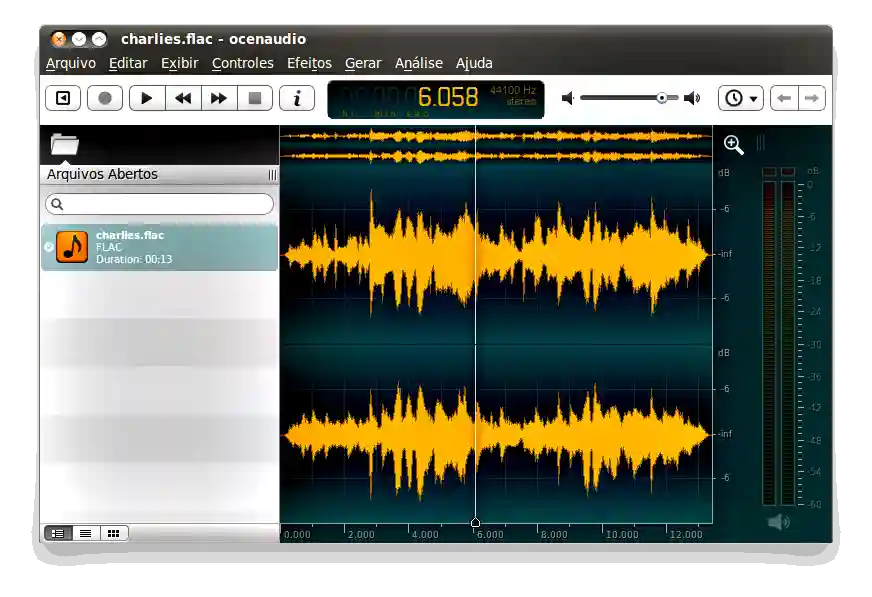
Ocenaudio is a professional audio editor designed to be easy to use and fast-performing, while providing a powerful set of audio editing and analysis tools that help users perform their work with great efficiency.
The program provides support for a large number of different audio file formats, allowing for easy opening, editing, and exporting of recordings, whether they are music files, podcasts, or audio recordings for visual content.
It also features a simple and organized interface that helps the user access tools quickly without needing extensive experience in professional audio editing software, which has made it a favorite program for beginners.
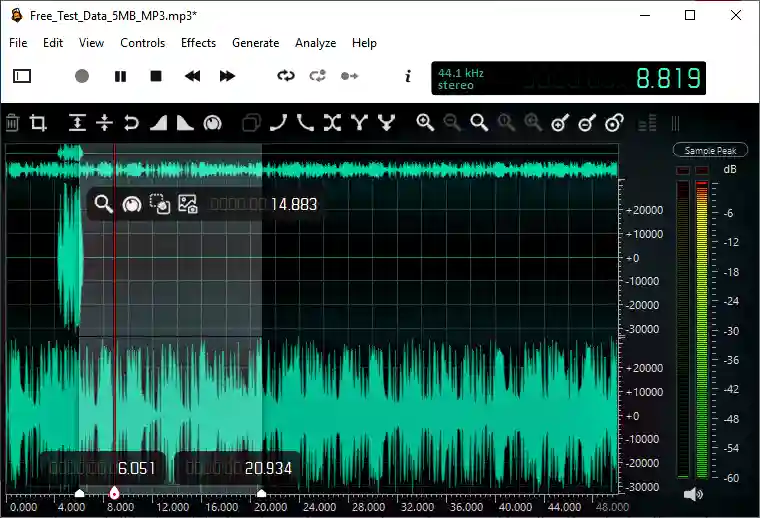
The program supports real-time preview of sound effects, allowing you to hear the changes directly while adjusting the settings, making it easier to achieve the desired result accurately and quickly.
It also provides support for professional VST plugins, allowing the use of external audio effects to improve recording quality and add advanced audio enhancements.
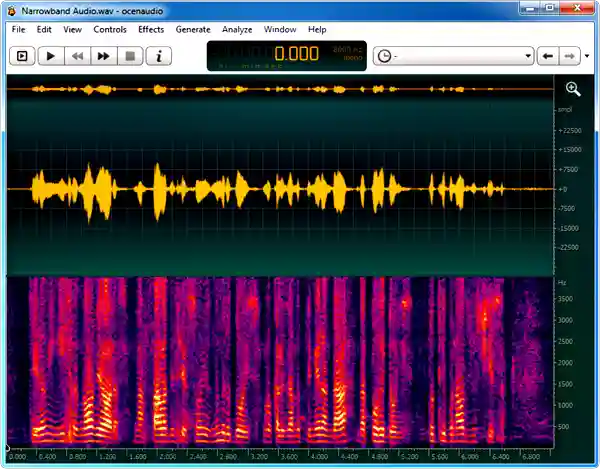
The program contains an advanced Spectrogram tool for visually analyzing audio frequencies, which helps professional users analyze sound and detect problems easily.
It also features the ability to handle large audio files without affecting device performance, thanks to an improved memory management system that allows heavy operations to be performed quickly and stably.
In addition, it works efficiently on modern Macs with Intel and Apple Silicon processors, with continuous updates to improve performance and add new features.
Features of the Ocenaudio program
- Free audio editor
- User-friendly interface
- High speed performance
- Support for multiple audio formats
- VST plugin support
- Instant preview of effects
- Spectrogram support
- Suitable for podcasts
- Suitable for editing recordings
- Full Mac support
- Relatively light on the device
- MP3 file support
- WAV file support
- M4A file support
- Audio cutting and merging tools
- Improving sound quality
- Sound effects support
- High stability
- Continuous updates
- Quick edit support
- Interface customization option
- Suitable for beginners
- Suitable for professionals
- Shortcut support
- audio frequency analysis
- Professional editing tools
- Support for large files
- File opening speed
- Organized interface
- Support for working on multiple files
- Improving productivity
- Supports easy file export
- Reduce memory consumption
- Support for uncomplicated editing
- Suitable for content creators
- Voice recording support
- Audio processing tools
- Supporting external influences
- Flexible user experience
- Professional work support
Technical details and system requirements for Ocenaudio on Mac
System requirements for running the program:
- Processor : 64-bit Intel or Apple Silicon (M1/M2/M3 or later)
- RAM : 2GB of RAM
- Program size after installation : 90MB
- Operating system : macOS 13.3 or later.
Requirements for running the program at maximum capacity:
- Processor : 64-bit Intel or Apple Silicon (M1/M2/M3 or later)
- RAM : 2GB of RAM
- Program size after installation : 90MB
- Operating system : macOS 10.14 to 14.
Advanced features of Ocenaudio software
- The Real Time Effects Preview System
is one of the most important features of Ocenaudio, as it allows the user to hear the sound effects directly while modifying the settings, which helps to reach the desired result quickly and accurately without the need to reapply the effect every time. - The VST Plugin Support Engine
provides full support for professional VST plugins, allowing the use of external effects and tools to improve sound quality and add professional filters and processing suitable for content creators and musicians. - The Advanced Spectrogram Analysis Tool
allows for the visual display and analysis of audio frequencies in an advanced manner, which helps the user to detect noise and audio problems and analyze the quality of recordings with great professionalism. - Multi Selection Editing System:
This feature allows you to select multiple different parts within an audio file and edit them simultaneously, which speeds up complex editing processes and saves the user a great deal of time. - Large Audio File Processing Technology:
The program is distinguished by its ability to handle long and large audio files without massive memory consumption, as it relies on an advanced file management system that maintains speed and stability of performance. - Background Processing Engine:
Heavy operations such as saving and applying effects run in the background without disrupting the program interface, allowing the user to continue working on other files while performing various operations. - Cross Platform Compatibility System
: The program supports working on Mac, Windows and Linux with almost the same interface and features, making it easier for users to switch between different devices without having to learn a new interface. - Noise Reduction and Audio Cleanup Tools:
The program provides tools to improve the quality of recordings and reduce unwanted noise and backgrounds, making it suitable for podcasts and professional audio recordings. - Customizable Interface and Workflow:
This feature allows the user to customize the interface, shortcuts, and workflow to suit their needs, which helps improve productivity and speed up the execution of daily tasks. - Efficient Waveform Editing Tools:
These tools provide the ability to cut, copy, paste, and edit audio clips very quickly, even in very long files, with smooth responsiveness during operation. - Optimized macOS Support:
The software works efficiently on modern Macs with support for Apple Silicon processors and good integration with the macOS system for a stable and fast experience. - Beginner Friendly Editing Environment:
The program is designed to be simple and easy to learn compared to some complex audio editing programs, making it suitable for new users who want to perform professional edits without complication.
conclusion
In conclusion, Ocenaudio is one of the best free audio editing programs for Mac, combining simplicity, speed, and professional features within an easy-to-use interface that helps users edit recordings, podcasts, and audio files with great efficiency. If you are looking for a practical and lightweight audio editing program, this program will be an excellent choice for you, and you can download it from the Tech World website and easily benefit from all its features.

 File Name:
 Downloads:
 Requirements:
 Version:
 Full Version:
 Created By:
 License Type:
 Release Date:
 Languages:
 Tags:
Tags: