

If you work in fields like surveying, GIS, or spatial data analysis, downloading Global Mapper Pro is a great choice. It's one of the most powerful tools available, combining user-friendliness with professional capabilities, making it ideal for both beginners and experts. The program offers a comprehensive environment for managing, processing, and analyzing all types of geographic data, including aerial imagery, topographic maps, elevation models, and LiDAR data.

Overview of Global Mapper Pro Download
Global Mapper Pro is a leading GIS and spatial data analysis software, known for its ease of use and advanced technical features. It supports hundreds of geographic data formats, making it an ideal choice for engineers, surveyors, and mapping professionals. With its advanced tools, users can efficiently manage various data types like aerial imagery, topographic maps, elevation models, and LiDAR data.
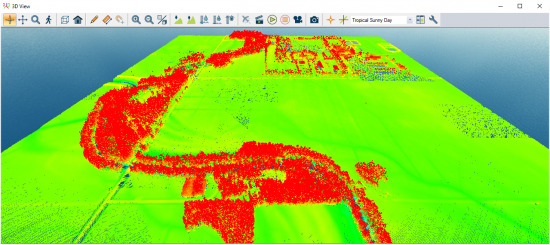
The software provides a flexible workspace for importing, editing, and analyzing almost any kind of geographic data. Whether dealing with Raster, Vector, CAD, or even point cloud data, Global Mapper Pro equips you with the necessary tools for easy handling. It also allows for advanced spatial operations like intersection, merging, reclassification, and precise coordinate system transformations.
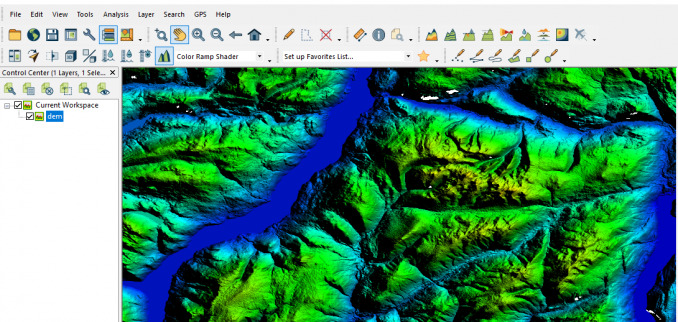
The program includes a comprehensive set of tools for analyzing elevations and topographic maps. Users can create digital surface models (DEM/DSM/DTM), calculate slope and direction, analyze water flow, and perform precise cut and fill operations. These features make it suitable for engineering surveys, urban planning, and natural resource management.
The development of Global Mapper began in the late '90s as a simple tool for viewing and converting geographic data, initially under a different name. It was later acquired by Blue Marble Geographics, a global leader in GIS solutions. Over the years, the software has undergone significant enhancements, evolving from a basic map viewer to a comprehensive platform for spatial data management and analysis.
The company has continuously updated the software to meet the needs of surveyors, engineers, and researchers. Its capabilities have been expanded to include topographic data analysis, satellite image processing, LiDAR data support, and 3D modeling. In the professional version, Global Mapper Pro, advanced tools like Pixels to Points, improved analysis algorithms, and faster processing of large datasets have been added.
Over more than two decades, the program has grown into one of the most important professional GIS solutions, balancing power and ease of use. It continues to receive annual upgrades that enhance performance and add tools to help users work with geographic data with the highest precision and efficiency.
Features of Global Mapper Pro
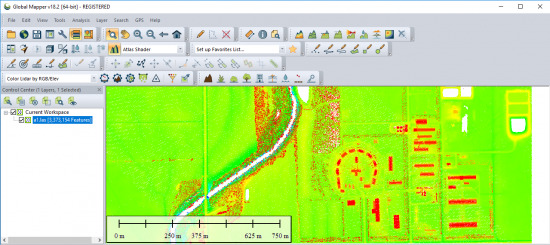
- Supports importing and exporting hundreds of different geographic data formats (Raster – Vector – LiDAR – CAD – DEM).
- Ability to create and edit shapefiles (points, lines, polygons) with precise and easy-to-use drawing tools.
- Advanced analysis tools for aerial and satellite imagery, topographic map processing, and elevation data.
- Full support for LiDAR data processing and point clouds with capabilities for classification, filtering, and feature extraction.
- Create professional 3D models like 3D Mesh, DEM, and DTM with strong and clear visual display.
- Pixels to Points tool for converting drone images into point clouds, Orthophotos, and 3D models.
- Volume calculations (Cut & Fill), slope analysis, terrain shading, water flow, and viewshed analysis.
- Spatial operations (merge, intersect, clip, difference) on data layers.
- Accurate coordinate system transformations.
- Map formatting tools for printing or exporting as high-quality images or PDF files.
- 2D and 3D viewing interface with the ability to create cross-sections and elevation analysis.
- Automation support through Global Mapper Script or Python.
- Efficient handling of very large files without heavy resource consumption.
- Excellent compatibility with Global Mapper Mobile for field data collection and direct project integration.
- Precise measurement tools for distances, areas, and elevations with advanced analysis capabilities.
System Requirements for Global Mapper Pro
Supported Operating Systems
- Windows:
- Windows 10 (64‑bit)
- Windows 11 (64‑bit)
Minimum Specifications
- CPU: Multi-core processor with 1.5 GHz or higher.
- RAM: Minimum 4 GB (8 GB or more recommended for large data processing).
- Storage: 1 GB for installation + additional space depending on geographic data size.
- GPU: OpenGL 3.3 support or newer.
- Display: Minimum resolution of 1280×1024 (higher resolution recommended for large map display).
Recommended Specifications
- Processor: Intel i5 or newer / AMD Ryzen.
- Memory: 16 GB or more for 3D map and data processing.
- Storage: SSD for faster read/write operations.
- Graphics Card: Modern NVIDIA or AMD for 3D display and geographic data analysis.
Conclusion
Global Mapper Pro stands out as a powerful and flexible solution in the GIS world, combining precise data analysis with ease of use in a comprehensive interface. With advanced tools like LiDAR data processing, 3D model creation, and converting aerial images into realistic maps, the program is an ideal choice for engineers, surveyors, and geography specialists. Its strong support for multiple data formats and task automation keeps Global Mapper Pro evolving to meet growing user needs, making it a valuable investment for any organization relying on spatial data in their daily operations.

 File Name:
 Downloads:
 Version:
 Full Version:
 Created By:
 License Type:
 Release Date:
 Languages:
 Tags:
Tags:

4 thoughts on “Download Global Mapper Pro 27.0.1.052726 for Windows - Direct Link”
السلام عليكم
دمتم بخير
je veux participer a ce forum
thaks
شكرا