

(Easy way to fix the “ERR_TOO_MANY_REDIRECTS” error) A simple method to resolve the "ERR_TOO_MANY_REDIRECTS" error: The ERR_TOO_MANY_REDIRECTS error (also known as a redirect loop) is one of the common errors we encounter regularly. This usually occurs after making a recent change to your website, misconfiguring redirects on your server, or incorrect settings with third-party services. But don’t worry, it’s quite easy to fix this error.
When you open certain websites or web pages, you may encounter the following error messages in your browser. You might also be a website owner facing this error on WordPress. In any case, there are several other reasons that can cause this error. I will discuss how to fix this error so you can browse web pages easily.
This webpage contains "ERR_TOO_MANY_REDIRECTS
This page isn’t working. domain.com has redirected you too many times. (Chrome)
The page isn’t redirecting properly. (Firefox)
Here in this article, I will share some great ways to fix this error. Just check out this article and apply the methods to resolve the issue.
What is the ERR_TOO_MANY_REDIRECTS error?
This error essentially means that there are too many redirects causing your website to get stuck in an endless loop.
The ERR_TOO_MANY_REDIRECTS error occurs as a result of misconfigured redirects on your server or incorrect settings with third-party services.
Something is causing too many redirects, sending your website into an infinite redirect loop. Essentially, the site is stuck (like URL 1 pointing to URL 2 and URL 2 pointing back to URL 1, or the domain has redirected you multiple times). Unlike some other errors, these errors rarely resolve themselves, and you may need to take steps to fix it.
Causes of the "ERR_TOO_MANY_REDIRECTS" error
There are many reasons that might cause this error in Chrome, Firefox, Opera, Internet Explorer, and other browsers. Some potential causes are listed below:
- Websites redirecting too frequently to other pages.
- Expired or corrupted cookies stored.
- Malware or spyware running.
- Incorrectly configured HTTPs settings.
- Corrupted WordPress plugins, etc.
Easy way to fix the "ERR_TOO_MANY_REDIRECTS" error
If you are the administrator, you will need to try a few things. Typically, the error results from a misconfiguration in WordPress. As mentioned earlier, sometimes the issue can be resolved by something simple like clearing cookies. This way, you can eliminate that message, ensuring your visitors are not let down.
If you are not the site administrator, you just need to clear your browser’s cache/cookies and refresh the page. If that doesn’t work, you will need to contact the administrator and wait for them to fix the issue.
Method 1: Fix using Advanced System Repair Tool
As I mentioned above, the ERR_TOO_MANY_REDIRECTS error occurs due to corrupted cookies, spyware, or malware, and incorrectly configured system settings; the Advanced System Repair Tool is one solution for this error. This tool scans your computer for all issues and fixes them with just one click.
Windows consists of a large number of dll files, exe files, sys files, various types of services, databases, and so on, so it’s not feasible to constantly monitor all files. A great PC optimization tool repairs damage, fixes errors, updates Windows and drivers, and silently removes various types of errors.
The Outbyte PC Repair Tool performs all the above tasks easily and provides you with a smooth and error-free Windows environment to work in so you can focus solely on your tasks.
3 steps to fix this error
Step 1. Download the Outbyte PC Repair Tool [File size: 16.4 MB].
Step 2. Scan your Windows computer.
Step 3. Click the "Repair" button to fix the error.
Method 2: Manually clear cookies
You can fix this error by clearing cookies in your browsers and on your computer. Here are the steps to clear cookies for the website on your device.
Step 1: Open Google Chrome
Step 2: Press Ctrl + H to open the history window. Select Clear browsing data from the right pane.
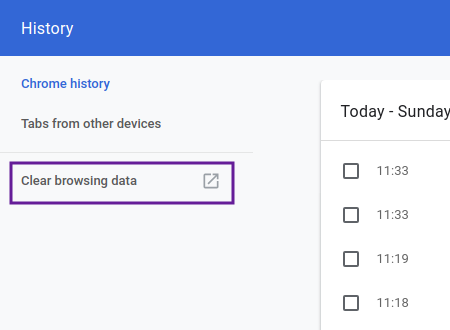
Step 3:
Select all options and click the Clear data button.
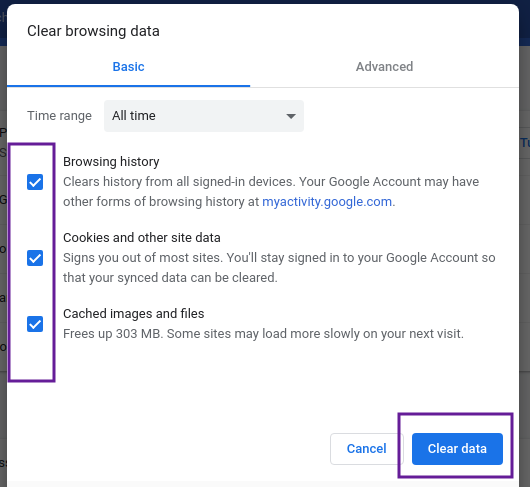
Method 3: Run antivirus software to remove spyware and malware
There is a high possibility of spyware, adware, or malware present on your computer that redirects your web requests to another harmful URL. Scanning your computer with a good and reliable antivirus can easily resolve this error.
Method 4: Site issues
Most often, this issue is not triggered by your computer but is a problem embedded in the website you are trying to access. There may be invalid configurations on its server, corrupted plugins, incorrect HTTP or HTTPS redirects, or an invalid value in the htaccess file, etc.
So, if the problem is related to a specific website and all other websites open correctly, the issue lies with that website. Therefore, to fix ERR_TOO_MANY_REDIRECTS, simply skip the problematic website and look for alternative web pages.
Conclusion:
The ERR_TOO_MANY_REDIRECTS message (also known as a redirect loop) can leave users feeling confused, but it’s just a warning from the browser indicating that the requested page is not accessible. If you encounter this message while trying to load your site, it means that the entire page or content is unavailable to you and users. This may happen due to a recent change in your WordPress site, misconfigured redirects, or some issues with third-party services.
Although it sounds very serious, it’s not the end of the world: this error is easy to fix, but you need to resolve it quickly to avoid a poor experience for visitors. Ultimately, if they see that message on the screen, they might abandon you before they even know what you have to offer, as your website may not appear secure.
In this article, we described an easy way to fix the "ERR_TOO_MANY_REDIRECTS" error. To resolve this error, you need to clear cookies and other third-party data from your computer so that the webpage can load safely and correctly.


