


(How to fix D3dx9_41.dll DirectX error) How to fix the D3dx9_41.dll DirectX error: Have you ever encountered an error message on your Windows computer indicating a file named "D3dx9_41.dll"? If so, you're not alone. This article explains what D3dx9_41.dll is, why it's important, and how to resolve any related errors.
The D3dx9_41.dll file is associated with Microsoft DirectX and is one of many files included in the DirectX package. If this file is missing, corrupted, or deleted for any reason, you will start receiving D3dx9_41.dll Not Found or D3dx9_41.dll Missing Error messages.
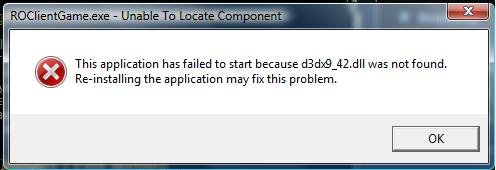
d3dx9-not found
Common D3dx9_41.dll Error Messages
1. The d3dx9_41.dll file is missing
2. D3dx9_41.DLL not found
3. The d3dx9_41.dll file could not be found
4. D3dx9_41.dll not found. Reinstalling may help resolve this issue.
5. The program cannot start because d3dx9_41.dll is missing from your computer, please reinstall the program \ application to fix this issue.
6. There was a problem starting d3dx9_41.dll, the specified module could not be found.
7. An error occurred while loading d3dx9_41.dll. The specified module could not be found.
8. Either d3dx9_41.dll is not designed to run on Windows or it contains an error.
9. Error loading D3DX9_41.dll
10. D3DX9_41.dll crashed
11. Entry point for the D3DX9_41.dll procedure.
12. Could not locate D3DX9_41.dll.
13. Access violation.
D3DX9_41.dll 14. Could not find D3DX9_41.dll.
15. Could not register D3DX9_41.dll.
If you encounter any of these error messages, don't worry, there are several solutions you can try to fix the issue and get your games or applications running again.
What is D3dx9_41.dll?
D3dx9_41.dll is a dynamic link library file that is part of the DirectX software suite developed by Microsoft. DirectX is a collection of application programming interfaces (APIs) that allow programs, especially games, to communicate with computer hardware components, such as the graphics card and sound devices.
The D3dx9_41.dll file specifically contains functions and resources related to DirectX 9, an older version of DirectX that many older games and applications still rely on, which is why the D3dx9_41.dll file remains relevant to this day.
Why is D3dx9_41.dll Important?
The D3dx9_41.dll file is essential for running games and applications that require DirectX 9, and without this file, these programs may not function correctly or may not run at all. When you encounter an error related to D3dx9_41.dll, it usually means that the file is missing, corrupted, or incompatible with your system.
It's important to note that D3dx9_41.dll is just one of many DLL files that make up the DirectX software suite. Other DLL files, such as D3dx9_43.dll and D3dx11_43.dll, are also commonly encountered in DirectX-related error messages.
Causes of D3dx9_41.dll DirectX Error
This error often appears when launching a graphics application on your computer, which could be a game, photo editor, video editor, or another program. If you receive a d3dx9_41.dll error, you will definitely be unable to use that application. There are various reasons that could cause the same issue, including an outdated Windows operating system, outdated Windows drivers, incompatible application or game installations, corrupted registry files, and infections from viruses or malware.
How to Fix D3dx9_41.dll DirectX Error
I will list some effective and tested methods to fix the d3dx9_41.dll error:
Method 1: Repair Using Advanced System Repair Tool
The most common reason for the missing d3dx9_41.dll DirectX DLL error is corrupted system files such as DLL files, EXE files, sys files, etc. There are thousands of small system files that perform specific tasks, and if one of these files is replaced, deleted, or corrupted, you may receive the d3dx9_41.dll DirectX DLL not found or missing error.
Windows consists of a large number of dll files, exe files, sys files, various types of services, databases, and so on, so it's not possible to constantly monitor all files. A great PC optimization tool repairs damage, fixes errors, updates Windows and drivers, and silently removes various types of errors.
The Outbyte PC Repair Tool performs all of the above tasks easily and provides you with a smooth and error-free Windows environment to work in so you can focus solely on your tasks.
3 Steps to Fix This Error
- Step 1. Download the Outbyte PC Repair Tool [File size: 16.4 MB].
- Step 2. Scan your Windows computer.
- Step 3. Click the "Repair" button to fix the error.
Download and install the advanced system repair tool and scan your computer; it has a large database containing 25 million files, which will find all corrupted or deleted system files and reinstall them with the new file. After optimizing with the advanced system repair tool, try running the application again.
Method 2: Update Windows and Drivers
This is one of the best solutions to fix and restore the d3dx9_41.dll error. If your driver and Windows updates are outdated, newly installed games and applications may require the latest version of DirectX. In this case, the d3dx9_41.dll file cannot be found, leading to the above error. If this file has been deleted, updating the driver also resolves the same issue.
Method 3: Run the System File Checker Tool
The System File Checker tool is a great utility for Windows users that fixes any file-related issues in the operating system. If some files are reported as missing, deleted, or corrupted, this tool can help you a lot. It is a command-line tool and works like magic. To run this tool, follow these steps:
1. Open Command Prompt as an administrator.
2. Paste the following code and press Enter
sfc /scannow
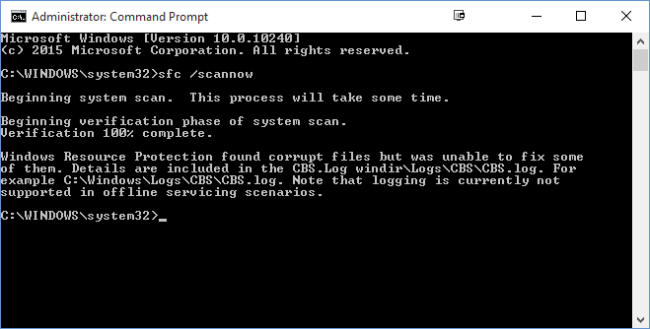
SFC is now scanning
Method 4: Reinstall DirectX
Reinstalling DirectX is also a great way to fix this issue. Download the latest version of DirectX from the Microsoft website and reinstall it on your Windows computer.
Conclusion
This article covers information on how to fix the D3dx9_41.dll DirectX error on the Windows operating system.
D3dx9_41.dll is an important file for running games and applications that rely on DirectX 9. If you encounter any errors related to this file, try reinstalling DirectX, updating your graphics drivers, scanning for viruses or malware, or manually replacing the DLL file. Always remember to download files from trusted sources and regularly update your system to prevent future errors. By following these steps, you can resolve D3dx9_41.dll errors and get back to enjoying your favorite games and applications.


