


Download and Activate SoftPerfect WiFi Guard
Download SoftPerfect WiFi Guard
Soft protect wifi guard
Download WiFi Guard to Protect Your Wi-Fi Network from Theft
SoftPerfect WiFi Guard has been updated to the latest version: SoftPerfect WiFi Guard 2.2.4
It scans the wireless network for any new connected devices that may belong to an intruder, providing you with a complete list of participants.
SoftPerfect Wifi Guard 2021 is a simple tool that makes it easy to detect intruders on your local network.
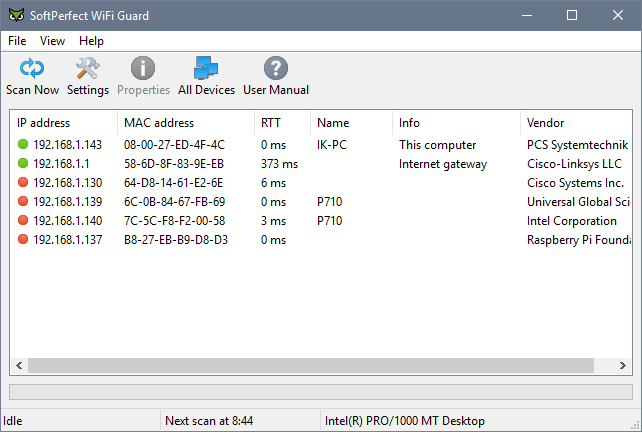
The program requires no installation (at least for Windows) - just run it, and SoftPerfect Wifi Guard will quickly scan your network and display any devices it finds. Anything that is clearly part of your infrastructure, like the computer you are working on or your router, will be highlighted in green, while everything else will be marked in red: a potential intruder.
If you recognize a device as legitimate - such as a network storage device or another system on your network - right-click on it, select properties, and choose "I know this computer or device," and it will be removed from the risk list. Initially, this list may shrink to nothing at all.
The SoftPerfect Wifi Guard will check your system every half hour; however, if any new and unknown devices connect in the meantime, you will be notified through a suitable pop-up alert.
Clearly, this is not a substitute for proper wireless network security, such as using the highest levels of encryption supported by all your network devices.
SoftPerfect Wifi Guard provides an additional simple layer of protection. It is also lightweight and completely free (no worries about intrusive adware), so if you're interested, you can try the program without any hassle or penalties.
SoftPerfect WiFi Guard is an essential tool for anyone running a small Wi-Fi network and striving to keep it secure.
Modern Wi-Fi networks are generally well protected, but many vulnerabilities can put your Wi-Fi password at risk; this includes encryption weaknesses and brute-force attacks. As a result, anyone could gain unauthorized access to your internet and local network, exploit it, and remain unnoticed.
You might think: it's fine, who cares, I have an unlimited plan. But what about someone reading your personal emails, stealing private information, or committing crimes online while using your internet connection?
SoftPerfect WiFi Guard allows you to know if your network is being used without your knowledge. It is a specialized network scanner that runs across your network at set intervals and reports immediately if it finds any new connected devices that may belong to an intruder.
What's New in SoftPerfect WiFi Guard 2.1.6:
Improvement: Avoid sending duplicate alerts via email.
Enhanced: Minor adjustments for the latest Windows 10 and macOS 11.
Protecting your personal information as well as the data stored on your computer involves more than just installing an antivirus solution to take care of everything. If you use WiFi or have a router that provides internet access for multiple computers and laptops, using a network monitoring tool is a good idea.
Among the applications designed to manage wireless access on a LAN, SoftPerfect WiFi Guard offers ease of use and smart monitoring capabilities. With its sleek and simple interface, the program can be used effortlessly even by those with less experience in this area.
SoftPerfect WiFi Guard operates in a straightforward manner. At regular intervals, it will scan the network to find any unauthorized devices that may be trying to connect. If such an intrusion is detected, you will be alerted so you can take further action.
A wealth of information is available from the main window of SoftPerfect WiFi Guard. You can view the IP and MAC addresses of connected devices, the round-trip time (RTT) in milliseconds, and more.
With this program, you can even see the manufacturer of the connected partner along with its name and any associated information or description, if these details are provided.
From the "settings" area, SoftPerfect WiFi Guard allows you to configure the number of devices scanned at once and also set the interval (in minutes) for network scans. If there is more than one network adapter available, you can select which adapter to monitor.
Thanks to its ease of use and simple customization options, SoftPerfect WiFi Guard appears to be the perfect tool for users who need a program that can take on a basic task and immediately indicate the presence of intruders on their LAN.
SoftPerfect WiFi Guard Portable is an effective network monitor that has the means to detect intruders who may have accessed your unauthorized WiFi connections.
The importance of this tool cannot be overstated; it can prevent strangers from using your internet connection without your knowledge while protecting you from attackers who may steal personal information or harm your computer.
SoftPerfect WiFi Guard Portable specifically targets WiFi networks, keeping tabs on current connected addresses as well as unknown devices. When such connections are detected, you are immediately notified to take counteraction.
It is a portable application, designed as a replica of SoftPerfect WiFi Guard, the installed version. Unlike the newer version, the portable version does not require installation, making it suitable for USB use as well.
The program is packaged with a simple yet intuitive interface, and the program can be directed to start scanning immediately, resulting in a list of all connected IP addresses, along with MAC, host name, and response time.
By default, the application performs a re-scan every 30 minutes, but this parameter can be adjusted from the settings window to match your preferences (note that it cannot exceed one hour). Also from this section, you will be able to set the program to scan multiple devices at the same time.
Furthermore, you can specify a custom range of IP addresses you want to restrict the scan to and choose your notification sound for detecting unauthorized connections.
Overall, SoftPerfect WiFi Guard Portable is ideal for monitoring WiFi networks, but the main downside is that it does not use means to block IP addresses. This feature would make it complete.

 File Name:
 Downloads:
 Version:
 Full Version:
 Created By:
 License Type:
 Release Date:
 Languages: