

Download Wireless Network Watcher for PC
Download Wireless Network Watcher to prevent any intrusions into your network
Wireless Network Watcher 2025
Wireless network
Download Free Internet Network Monitoring Software
Wireless Network Watcher is a small utility that scans your wireless network and displays a list of all computers and devices currently connected to it. The following information is shown for each computer or device connected to your network: IP address, MAC address, the manufacturer of the network card, and optionally the computer name.
Wireless Network Watcher does not require any installation or additional DLL files. To start using it, simply extract the executable file (WNetWatcher.exe) from the ZIP file and run it.
If you prefer, you can also download WNetWatcher with full installation/uninstallation support (wnetwatcher_setup.exe), which will add a shortcut to automatically launch the application in the start menu. Once the application is running, it automatically detects the wireless adapter and scans your network. After a few seconds, you should start seeing a list of computers currently connected to your network.
If WNet Watcher fails to locate and scan your network for any reason, you can try manually selecting the correct network adapter by pressing F9 (Advanced Options) and choosing the right adapter.
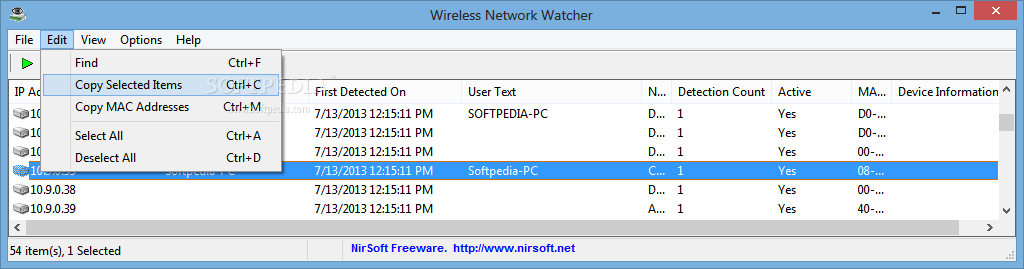 Wireless Network Watcher is a lightweight Windows program designed to display all computers connected to your wireless network, along with detailed information about each one.
Although it may seem like a task aimed at more experienced users, Wireless Network Watcher makes everything user-friendly, largely thanks to its interface.
In fact, this is also the sole purpose of the program: to show this type of information and nothing more.
The main window makes this possible, displaying the IP address, device name, MAC address, network adapter manufacturer, device information, user text, the time detected, and the detection count.
Moreover, you can configure the displayed MAC address format, perform background scanning, and place an icon in the Windows system tray for instant access and notifications whenever a new computer is detected.
Additionally, Wireless Network Watcher gives users the option to select the network adapter they wish to use, just in case there are multiple such devices on your computer, as well as the range of IP addresses to scan.
Last but not least, the application is developed to allow you to export the list of connected devices to multiple formats, including HTML, XML, CSV, or text file.
Wireless Network Watcher does not strain the CPU or RAM and runs smoothly on all versions of Windows, without slowing down your computer in any way.
Overall, this lightweight promotional tool performs its function very quickly, and although it is meant to run continuously and keep you updated on new computers in your network, it remains resource-friendly.
System Requirements and Limitations:
This utility works on Windows 2000, Windows XP, Windows Server 2003/2008, Windows Vista, and Windows 7.
This utility can only scan the wireless network you are currently connected to. It cannot scan other wireless networks.
In rare cases, Wireless Network Watcher may not detect the correct wireless network adapter, in which case you should go to the "Advanced Options" window (F9) and manually select the correct network adapter.
Although this tool is officially designed for wireless networks, you can also use it to scan a small wired network.

 File Name:
 Downloads:
 Version:
 Full Version:
 Created By:
 License Type:
 Release Date:
 Languages: